EasyManua.ls Logo

Escali Vera - User Manual

Escali Vera
2 pages
Print Icon
To Next Page IconTo Next Page
Loading...
LIFETIME LTD WARRANTY
This scale is guaranteed to be free of defects in materials and
workmanship. For more details visit: www.escali.com/warranties
Escali’s liability is limited to two (2) times the cost of the product.
© Escali Corp., Minneapolis, MN, USA. All rights reserved. Escali, the
Escali logo and other Escali marks are owned by Escali Corp. and may be registered.
Vera
Compact Digital Scale
Model # PR2000S
PRODUCT
MANUAL
Question and Answer IconNeed help?

Do you have a question about the Escali Vera and is the answer not in the manual?

Summary

How to Weigh

Basic Weighing Procedure

Steps to place items on the scale, select units, and remove items after weighing.

Tare Feature Operation

Using the Tare Feature

Instructions for subtracting the weight of a container to measure the net weight of an item.

Clearing the Tare Feature

Procedure to remove all tare values and reset the scale to zero.

Scale Operation Details

Back-light Display

Information on when the back-light activates and turns off automatically.

Warning Messages

Explanation of common on-screen warnings like overload and low battery.

Proper Use and Care

Usage Guidelines

Recommendations for scale placement, handling, and avoiding disturbances.

Cleaning and Maintenance

Instructions on how to clean the scale and what not to do, like submerging in liquid.

Battery Information

Guidance on battery type, installation, mixing, and disposal.

Product Specifications

Technical Details

Key specifications including model, capacity, graduation, dimensions, power, and shut-off times.

Overview

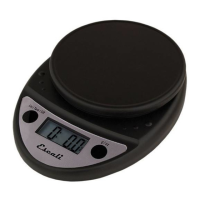
The Escali Vera Compact Digital Scale (Model # PR2000S) is a precision instrument designed for accurate weighing in a variety of units. It is intended for general household use, offering features that enhance usability and ensure reliable performance.

Function Description:

The primary function of the Escali Vera scale is to measure the weight of items. It features a "Tare" function, which allows users to subtract the weight of a container to obtain the net weight of its contents. This is particularly useful for measuring ingredients or other items that need to be weighed within a vessel. The scale also includes a back-light display for improved readability, especially in low-light conditions.
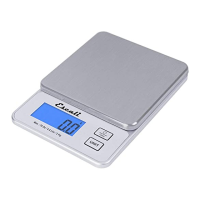
Important Technical Specifications:

  • Model: PR2000S
  • Capacity: The scale has a maximum capacity of 4 lb + 6 oz or 2000 g.
  • Graduation:
    • 0.1 g / 0.01 oz for weights under 500 g / 17.63 oz.
    • 1 g / 0.1 oz for weights over 500 g / 17.63 oz.
  • Product Dimensions: 6.75" x 4.75" x 1"
  • Platform Dimensions: 4.75" x 4.75"
  • Power Source: 2 - AAA batteries (included). For best results, alkaline batteries are recommended.
  • Automatic Shut-off: The scale automatically turns off after 5 minutes of inactivity to conserve battery life.
  • Back-light Shut-off: The back-light turns off after 10 seconds of inactivity.

Usage Features:

  • Weighing:
    1. Press the O/TARE key to turn on the scale. The display will show all segments for approximately 3 seconds before resetting to zero.
    2. Press the UNIT key to select the desired unit of measurement (g, ml, oz, lb + oz, or fl oz).
    3. Slowly place the item on the platform, and its weight will be displayed.
    4. To turn off the scale, press and hold the O/TARE key.
  • Tare Feature:
    1. Place the empty container on the platform.
    2. Press the O/TARE key. The display will reset to zero, effectively removing the container's weight.
    3. Slowly add the item to the container. The display will show only the weight of the item.
    4. This process can be repeated for multiple items by pressing the O/TARE key after each item is added to reset the display to zero.
  • Clearing Tare: To clear the tare feature, remove all items from the platform and press the O/TARE key.
  • Back-light Display: The back-light activates when the scale is turned on, a button is pressed, or an item is placed on the scale. It automatically turns off after 10 seconds of inactivity.
  • Warning Messages:
    • "0-Ld" indicates an overload warning, meaning an item exceeding the scale's capacity has been placed on it.
    • A battery icon indicates a low battery, signaling that the batteries need to be replaced.

Maintenance Features:

  • Proper Use and Storage: The scale should be used and stored at room temperature on a flat, level, and stable surface.
  • Handling: As a precision instrument, the scale should not be subjected to shaking, excessive vibration, or other rough treatment.
  • Cleaning: The scale can be cleaned with dish soap and a damp cloth. It is not waterproof and should not be submerged in liquid.
  • Battery Care:
    • Only install new batteries of the same type.
    • Ensure batteries are inserted with the correct polarity to prevent leakage and shorten battery life.
    • Do not mix old and new batteries.
    • Do not mix Alkaline, Standard (Carbon-Zinc), or Rechargeable (Nickel Cadmium or Nickel Metal Hydride) batteries.
    • Batteries should not be disposed of in fire.
    • Batteries should be recycled or disposed of according to state and local guidelines.
  • Electromagnetic Disturbances: The display may be affected by electromagnetic disturbances from sources like radios, microwaves, or cell phones. If this occurs, remove the source of the disturbance and restart the scale.
  • Warranty: Disassembling or tampering with the scale voids the warranty. The scale comes with a Lifetime Limited Warranty, guaranteeing it to be free of defects in materials and workmanship. More details are available at www.escali.com/warranties. Escali's liability is limited to two (2) times the cost of the product.

Escali Vera Specifications

General IconGeneral
BrandEscali
ModelVera
CategoryScales
LanguageEnglish

Related product manuals