3
4. TIMER HANDLING.
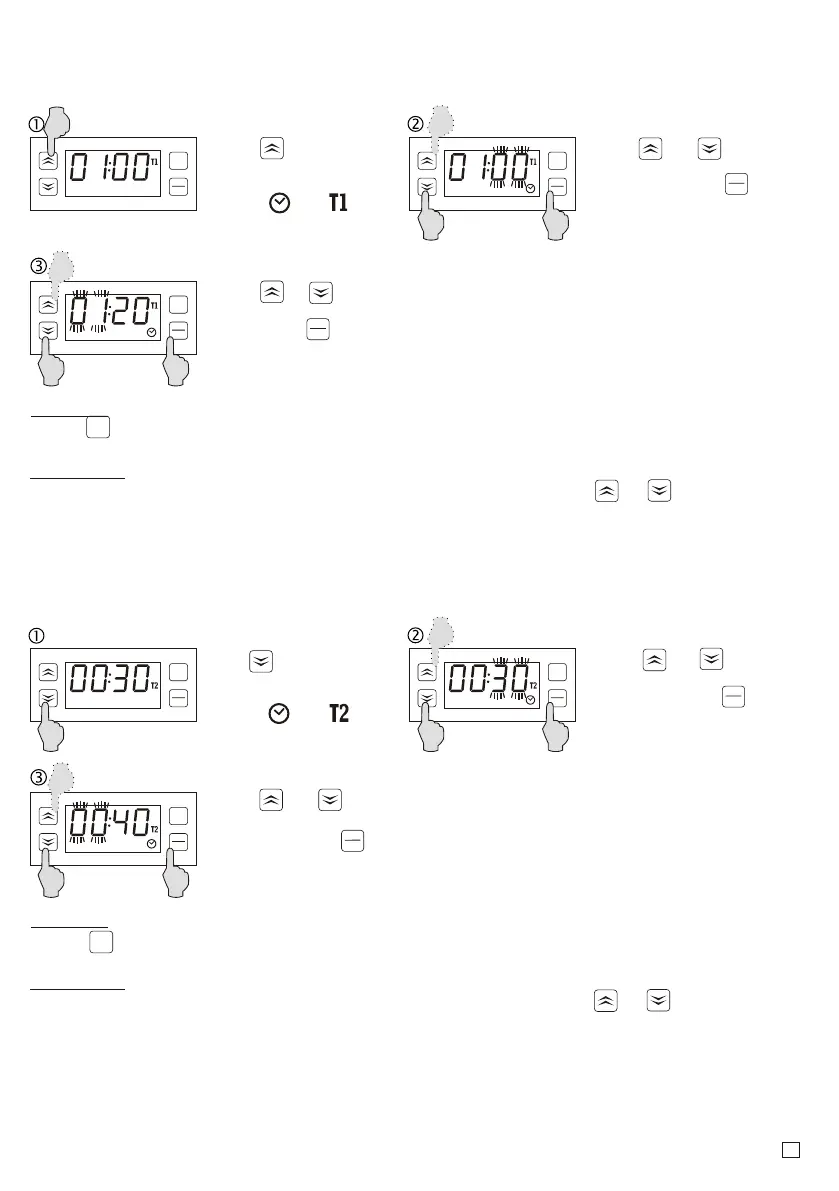
4.1. TIME SETTING T1.
Press button for
2 sec.
Diodes and lights
up and seconds rate
starts to blink.
Using or buttons
Set the seconds value
and confirm with key
Then the minutes value
starts to blink.
Information:
To improve quick increasing or decreasing the settings values hold the or button.
Remarks:
-Press button in any moment to cancel the setting. To improve quick increasing or
reset
start
stop
reset
start
start
stop
stop
reset
reset
start
stop
Using or set the
minutes value and
confirm with button.
Diodes go off.
start
stop
4.2. TIME SETTING T2 (only when the user chooses the operation mode with using
two times T1 and T2: parameter F17= 3, 4, 5, 6).
Hold button for 2
seconds.
Using or button
Set the seconds value
and confirm with key.
Then the minutes rate
starts to flash.
Information:
To improve quick increasing or decreasing the settings values hold the or button.
Remarks:
- press button to cancel the setting
reset
start
stop
reset
start
start
stop
stop
reset
reset
start
stop
Using or button
Set the minutes value
and confirm with key.
Diodes goes off.
start
stop
Diodes and lights
up and seconds rate
starts to flash.


 To Next Page