EasyManua.ls Logo

Escort Solo S3 - EZ-Programming: Signal, Alert, Tone, City, Brightness, and Band Settings; Signal Strength Meter Options; AutoMute and Audio Tone Settings; City Mode Sensitivity and Brightness Control

Escort Solo S3
21 pages
Print Icon
To Next Page IconTo Next Page
To Previous Page IconTo Previous Page
Loading...
Details
of
EZ·Programming
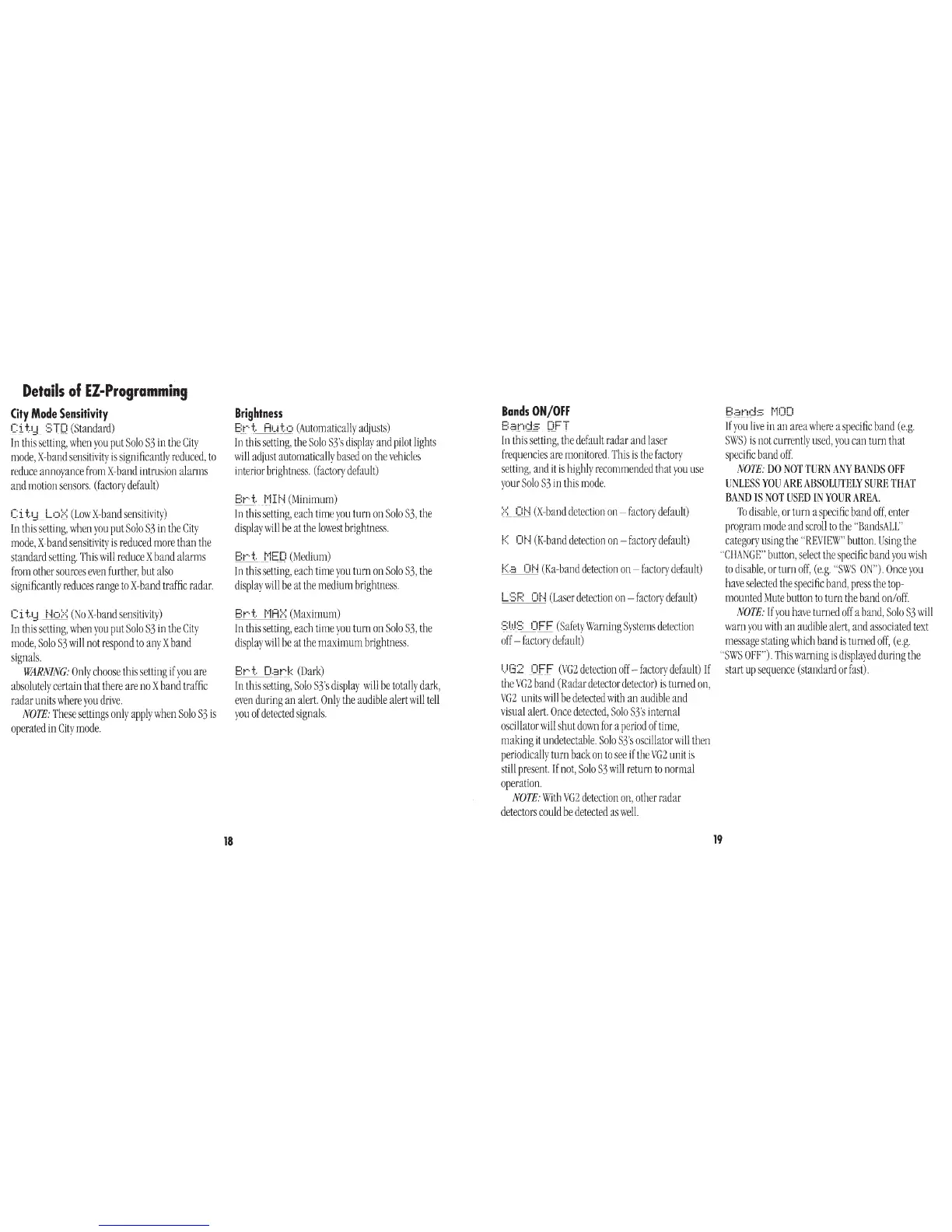
City
Mode
Sensitivity
Ci
t1d
:
:;Ti:::i
(Standard)
In
this
setting,
when
you
put
Solo
S3
in
the
City
mode,
X-band
sensitivity
is
significantly
reduced,
to
reduce
annoyance
from
X-band
intrusion
alarms
and
motion
sensors.
(factory
default)
Ci
t:::l
Lo:;.::
(LowX-bandsensitivity)
In
this
setting,
when
you
put
Solo
S3
in
the
City
mode,
X-band
sensitivity
is
reduced
more
than
the
standard
setting.
This
will
reduce
X
band
alarms
from
other
sources
even
further,
but
also
significantly
reduces
range
to
X-band
traffic
radar.
C i
t.1;
t·~o:=-=:
(No
X-band
sensitivity)
In
this
setting,
when
you
put
Solo
S3
in
the
City
mode,
Solo
S3
will
not
respond
to
any
X
band
signals.
WARNING:
Only
choose
this
setting
if
you
are
absolutely
certain
that
there
are
no
X
band
traffic
radar
units
where
you
drive.
NOTE:
These
settings
only
apply
when
Solo
S3
is
operated
in
City
mode.
18
Brightness
E:t-·
t
H!_i+,..::•
(Automatically
adjusts)
In
this
setting,
the
Solo
S3's
display
and
pilot
lights
will
adjust
automatically
based
on
the
vehicles
interior
brightness.
(factory
default)
t:;r-·t
i:'1H·i
(Minimum)
In
this
setting,
each
time
you
turn
on
Solo
S3,
the
display
will
be
at
the
lowest
brightness.
E:r--t.
_t1E!:i
(Medium)
In
this
setting,
each
time
you
turn
on
Solo
S3,
the
display
will
be
at
the
medium
brightness.
Pd.
i'1A:=<
(Maximum)
In
this
setting,
each
time
you
turn
on
Solo
S3,
the
display
will
be
at
the
maximum
brightness.
E:r--
t
_CL=:!r-·k
(Dark)
In
this
setting,
Solo
S3's
display
will
be
totally
dark,
even
during
an
alert
Only
the
audible
alert
will
tell
you
of
detected
signals.
Bands
ON/OFF
E:.~nds
DFT
-
--
--
In
this
setting,
the
default
radar
and
laser
frequencies
are
monitored.
This
is
the
factory
setting,
and
it
is
highly
recommended
that
you
use
your
Solo
S3
in
this
mode.
;:.::_
Of-i
(X-band
detection
on-
factory
default)
f<
Dr-~
(K-band
detection
on-
factory
default)
r<.::;
Of·i
(Ka-band
detection
on-
factory
default)
L:3F::
Dr·~
(Laser
detection
on-
factory
default)
9.1.!::;
QFF
(Safety
Warning
Systems
detection
off-
factory
default)
1.)(32
CifF
(VG2
detection
off-
factory
default)
If
the
VG2
band
(Radar
detector
detector)
i~
turned
on,
VG2
units
will
be
detected
with
an
audible
and
visual
alert
Once
detected,
Solo
S3's
internal
oscillator
will
shut
down
for
a
period
of
time,
making
it
undetectable.
Solo
S3's
oscillator
will
then
periodically
turn
back
on
to
see
if
the
VG
2
unit
is
still
present
If
not,
Solo
S3
will
return
to
normal
operation.
NOTE:
With
VG2
detection
on,
other
radar
detectors
could
be
detected
as
welL
If
you
live
in
an
area
where
a
specific
band
(e.g.
SWS)
is
not
currently
used,
you
can
turn
that
specific
band
off.
NOTE:
DO
NOT
TURN
ANY
BANDS
OFF
UNLESS
YOU
ARE
ABSOLUTELY
SURE
THAT
BAND
IS
NOT
USED
IN
YOUR
AREA.
To
disable,
or
turn
a
specific
band
off,
enter
program
mode
and
scroll
to
the
"BandsALL"
category
using
the
"REVIEW"
button.
Using
the
"CHANGE"
button,
select
the
specific
band
you
wish
to
disable,
or
turn
off,
(e.g.
"SWS
ON").
Once
you
have
selected
the
specific
band,
press
the
top-
mounted
Mute
button
to
turn
the
band
on/off.
NOTE:
If
you
have
turned
off
a
band,
Solo
S3
will
warn
you
with
an
audible
alert,
and
associated
text
message
stating
which
band
is
turned
off,
(e.g.
"SWS
OFF").
This
warning
is
displayed
during
the
start
up
sequence
(standard
or
fast).
19