EasyManua.ls Logo

Escort Solo S3 - Quick Reference Guide for Solo S3 Operation; Getting Started Steps

Escort Solo S3
21 pages
Print Icon
To Next Page IconTo Next Page
To Previous Page IconTo Previous Page
Loading...
Quick
Reference
Guide
'lb
begi11
using
t
he
Solo
S3,
jus
t
fol
lo
w
these
simple
st
eps:
1
Lnstall
(2)
AA
l'xtllcm.os
(includt>tl)
in
the
battery
compartment.
1
Please
note
polarity)
2 \
lount
your
Sob
S3
on
the
wi
nilih
ield
usmg
the
supplied
wincbhlcld
mount.
3
Press
the
Power
button
(
P\\
R)
localt'd
on
the
left
side
of
the
front
panel.
4
Adjust
the
volume
(\01.)
h}
pressing
the
up
and
down
buttons
located
to
the
nght
of
the
display.
Please
read
the
manual
to
full)
understand
So
lo
S3's
operation
and
feat
u
res.
6
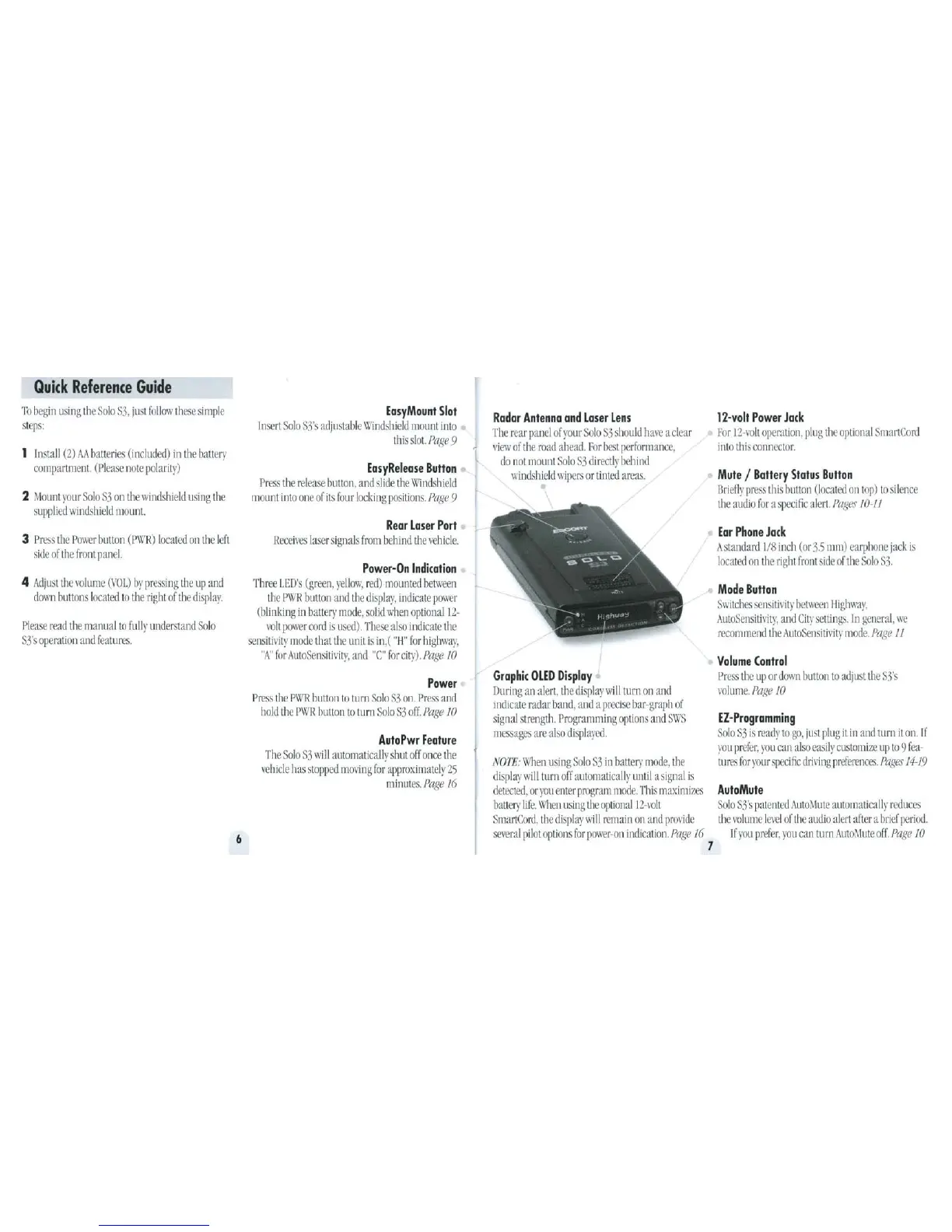
EasyMount
Slot
Insert
Solo
S3's
adjustable
Windshield
mount
into
t
his
sk>t.
Pagl!
9
EasyRelease
Button
Press
the
release
button
,
and
slide
the
\\'
i
ntbhield
mount
into
one
of
its
four
locking
positiOn~
Pap,!!
9
Rear
Laser
Port
Receives
lase
r
signab
from
behind
the
\chicle.
Power-On
Indication
Three
LED
's
(green.
yellow.
red)
mounted
between
the
PWR
button
and
t
he
display.
indicate
power
(blinking
in
battery
mode.
solid
when
~tiona!
12
-
vol
t
power
cord
is
used).
These
also
ind
i
cate
the
sensitivity
mode
that
the
unit
is
in,(
"
J-1
"
fo
r
highwa).
"A"
for
AtlloSen~ilirit~,
and
"C"
for
city).
Page
10
Power
P
ress
t
he
P\VR
button
to
tu
rn
So
lo
S3
on.
Pr
ess
and
ho
ld
the
P\VR
butt
on
to
turn
Solo
S3
off.
Pa
ge
10
AutoPwr
Feature
The
Solo
S3
will
au
t
omaticall)
sh
ut
off
once
the
vehicle
has
stopped
mo\'ing
for
approximately
25
minutes.
Pflge
16
Radar
Antenna
and
Laser
Lens
The
rea
r
panel
of
yo
ur
Solo
S3
sh
ou
ld
have
a
clea
r
view
of
the
road
ahead.
For
best
performance.
do
n
ot
mount
Solo
S.3
direct!}
behind
windshield
wipers
or ti
nted
areas.
Graphic
OLED
Display
Duri
ng
an
ale
r
t,
th
e di
splayw
illl
urn
on
and
indicate
mda
r
band.
and
a
precise
ba
r-graph
of
signal
st
r
eng
th.
Progmmming
op
ti
ons
~
tnd
SW$
messages
are
also
displayed.
NOTE:
\\11en
usi
ng
So
lo
S3
in
battery
mode.
the
displaywillturn
off
au
t
omatically
un
t
il
a
signal
is
deU..'Cted.
or
you
enter
program
mode.
This
rnaximizt'S
batte
ry
Life.\
\
11CJ1using
the
optional12-\olt
Smart
Cord,
the
di
splay
will
remain
on
and
proride
SC\eral
pilotoptionsforpower-on
indication
PaJ:e
16
7
12
-
volt
Power
Jack
For
12-volt
opera
t
ion,
plug
t
he
op
t
ional
Sma
r
tCord
into
this
connector.
Mute
I
Battery
Status
Button
Briefly
prt>s~
this
button
(located
on
top)
to
silence
the
audio
f
or
a
specific
alert.
Pages
10-11
Ear
Phone
Jack
A
st~Uldard
1/8
inch
(or
3.5
mm)
earphone
jac
k
is
locatl'<.l
on
the
right
front
side
of
the
Solo
S3.
Mode
Button
Swi
t
chc:.
:-cnsiti\it}'
between
lhghway,
AutoSensitil•ity,
and
City
settings.
in
genem
l,
we
recommend
t
he
Au
t
oScns!l
i
vity
mode.
Page
If
Volume
Control
Pres.~
t
he
up
or
down
llllllon
to
adjust
th
e
S3's
vo
l
ume
.
Page
10
EZ
-
Programming
SoloS.)
is
r
eady
to
go,
ju~t
plug
it
in
an
d
turn
it
on.
If
you
prefer,
you
can
also
easily
customize
up
to
9 f
ea-
turt'S
t
or
your
SJll'Ci
fie
dnr
i
ng
preferences.
Pages
14-19
AutoMute
Solo
S3
's
patented
Auto\lute
automatically
reduces
the
\Oiume
le\'el
of
the
audio
alert
after
a
brief
period
If
you
prefer.
you
can
turn
Auto~
lute
off.
P(/ge
10

Related product manuals