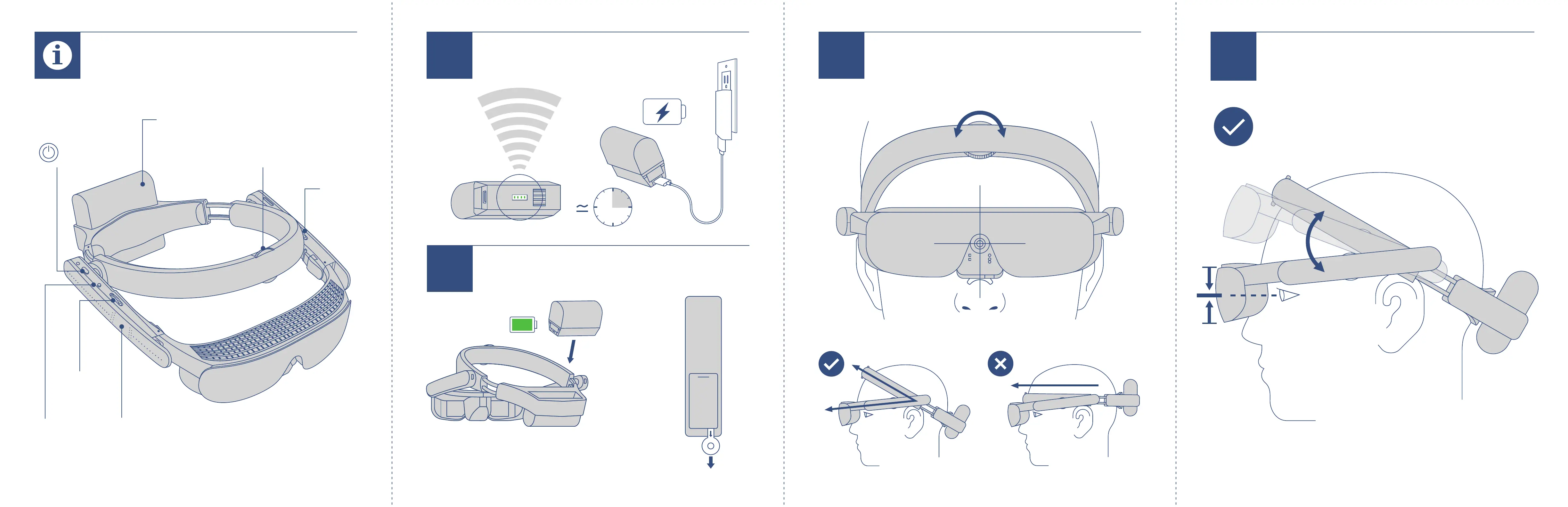
Secure eSight on your head and center
eSight on your face.
Lower the arms to adjust the height of the visor
so your eyes are vertically centered in the screens.
Right
Arm Dial
Context
Button
Left Arm
Dial
Power
Button
Touch Pad
Halo
Size Dial
Adjust the Height of the Arms
Rechargeable
Battery
Key Features Charge the Battery
100-240V AC
Push
In
Insert Battery & Remove Tab
1
Secure & Center eSight
3H
4
2
3
Pull Battery
Tab to Remove
PULL
B
E
F
O
R
E
U
S
E


 To Previous Page