
 Need help?
Do you have a question about the ESKUTE YL81F and is the answer not in the manual?
Details the various features offered by the YL81F display for different riding needs.
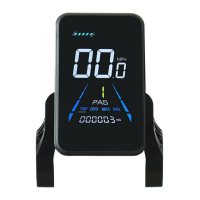
Illustrates the layout and purpose of each functional area on the display interface.
Explains the function of each of the five buttons on the operating unit.
Instructions for powering the display on/off, including automatic shutdown.
Guide on how to cycle through different display screens like speed, odometer, and trip.
Configuration for display units, allowing selection between metric and imperial.
Setting the display to match the electric bike's rated voltage (24V, 36V, 48V).
Options for setting the range and levels of the Pedal Assist System.
Adjusting the power ratio for each PAS level to customize riding assistance.
Inputting the wheel diameter for accurate speed and distance calculations.
Configuring the number of magnets on the speed sensor for correct readings.
Setting the maximum speed limit for the electric bike operation.
Adjusting the current limit for the motor controller for performance tuning.
Configuration options for the Pedal Assist System sensor.
Configuring the rotational direction for the PAS sensor.
Adjusting the sensitivity of the Pedal Assist Sensor.
Setting the count of magnets for the pedal assist sensor.
Settings related to the throttle operation.
Enabling or disabling the 6KM/H walk boost feature when using the throttle.
Setting the throttle level to influence the maximum speed achievable.
Procedure to enable and set a four-digit password for display startup.
Configuring the automatic display shutdown time to conserve battery power.
Restoring the display's parameters to their original factory default settings.
Manual procedure to reset the trip odometer reading to zero.
Details on the product's limited warranty period and general coverage terms.
Specific exclusions and conditions under which the warranty is void.
 General
| Model | YL81F |
|---|---|
| Category | Bicycle Accessories |
| Brand | ESKUTE |
| Light Source | LED |
| Waterproof Rating | IPX5 |
| Type | Bicycle Light |
| Battery Type | Lithium-ion |
| Mounting Type | Handlebar |

 To Next Page