2. Get Started on EK057
2. Get Started on EK057
2.1 What You Need
To develop applications for EK057 module you need:
• 1 x EK057 module
• 1 x Espressif RF testing board
• 1 x USB-to-Serial board
• 1 x Micro-USB cable
• 1 x PC running Linux
In this user guide, we take Linux operating system as an example. For more information about the configuration
on Windows and macOS, please refer to ESP-IDF Programming Guide.
2.2 Hardware Connection
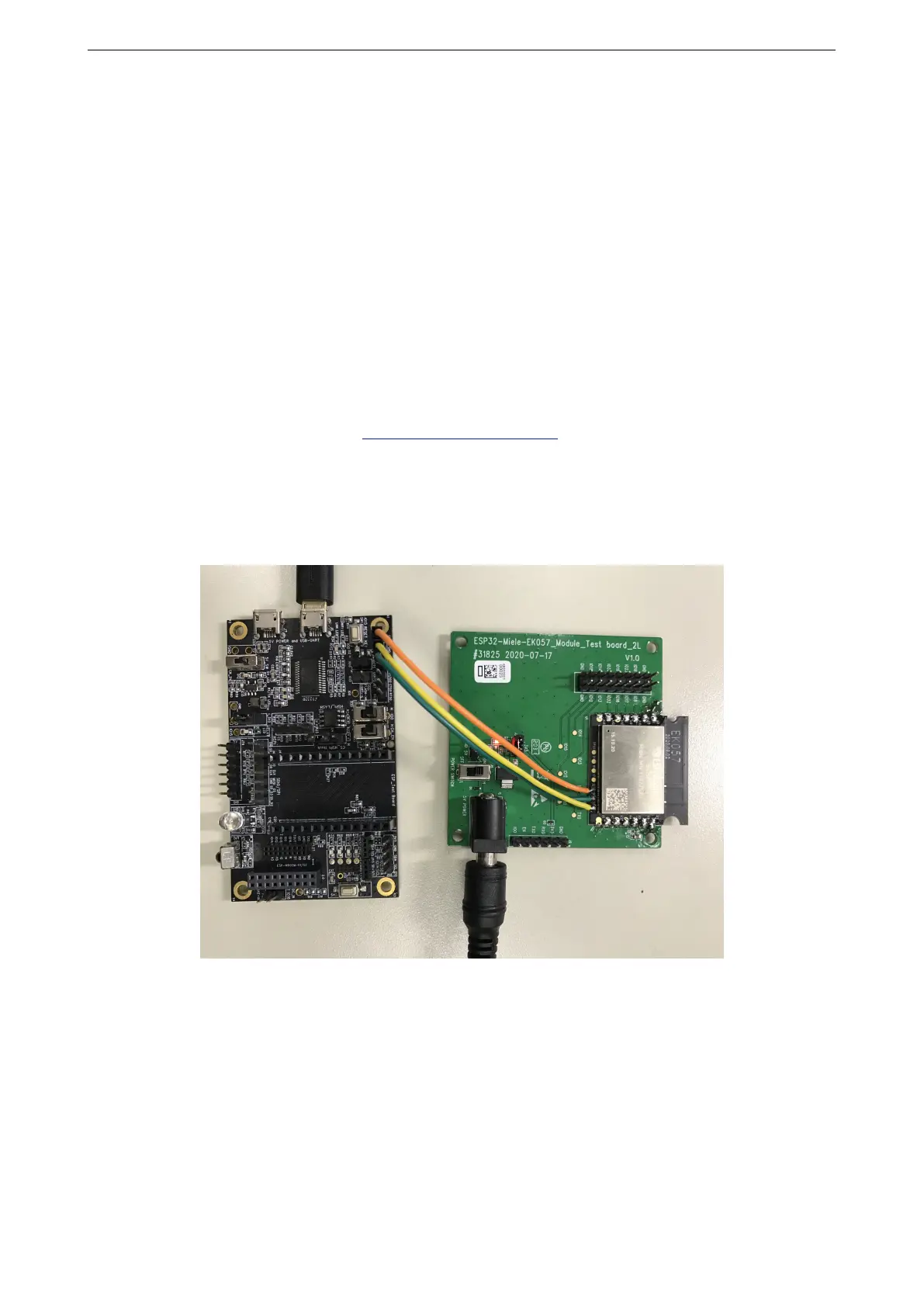
1. Solder the EK057 module to the RF testing board as shown in Figure 1.
Figure 1: Hardware Connection
2. Connect the RF testing board to the USB-to-Serial board via TXD, RXD, and GND.
3. Connect the USB-to-Serial board to the PC.
4. Connect the RF testing board to the PC or a power adapter to enable 5 V power supply, via the Micro-USB
cable.
5. During download, connect IO0 to GND via a jumper. Then, turn ”ON” the testing board.
Espressif Systems 3 EK057 User Manual V0.2



 To Next Page