13
D. Further Se ng
I. Adjus ng Co ee/Hot Water Volume
Program your desired volume of co ee for Espresso, Lungo and Ristre o, and also hot water from .50 oz. to 8.5
oz. (15ml to 250ml).
When making your co
ee (either Espresso, Lungo, Ristre o) or dispensing hot water, press the bu on, release
you
nger and when you hear the grinder start (or pump come on for hot water), press and HOLD you nger
on the same bu
on again. The appliance will con nue to make the cup of co ee or water. When it gets to the
desired level, rele
ase your
nger and you will hear the machine beep and it is now programmed for that level.
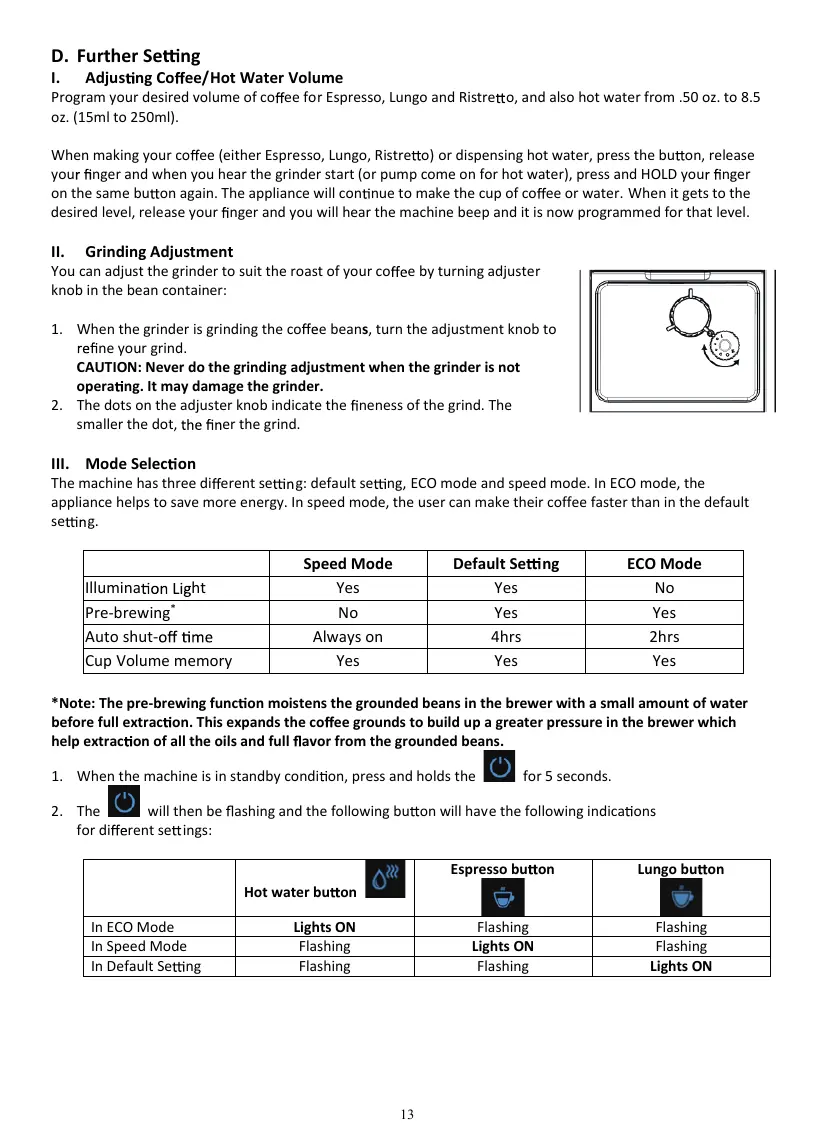
II. Grinding Adjustment
You can adjust the grinder to suit the roast of your co e by turning adjuster
knob in the bean container:
1. When the grinder is grinding the co
e beans, turn the adjustment knob to
ne your grind.
CAUTION: Never do the grinding adjustment when the grinder is not
opera
ng. It may damage the grinder.
2. The dots on the adjuster knob indicate the
neness of the grind. The
smaller the
dot,
er the grind.
III. Mode Selec on
The machine has three di erent se g: default se ng, ECO mode and speed mode. In ECO mode, the
appliance helps to save more energy. In speed mode, the user can make their coffee faster than in the default
se
g.
Speed Mode Default Se ng ECO Mode
Illumina ht Yes Yes No
Pre-brewing
*
No Yes Yes
Auto shut- Always on 4hrs 2hrs
*Note: The pre-brewing func
on moistens the grounded beans in the brewer with a small amount of water
before full extrac
on. This expands the co ee grounds to build up a greater pressure in the brewer which
help extrac
on of all the oils and full avor from the grounded beans.
1. When the machine is in standby condi
on, press and holds the
for 5 seconds.
2. The
will then be ashing and the following bu on will have the following indica ons
for di
rent se ings:
Hot water bu on


 To Next Page
 Loading...