Esscom Twintalker 9200 7
Esscom Twintalker 9200
ENGLISH
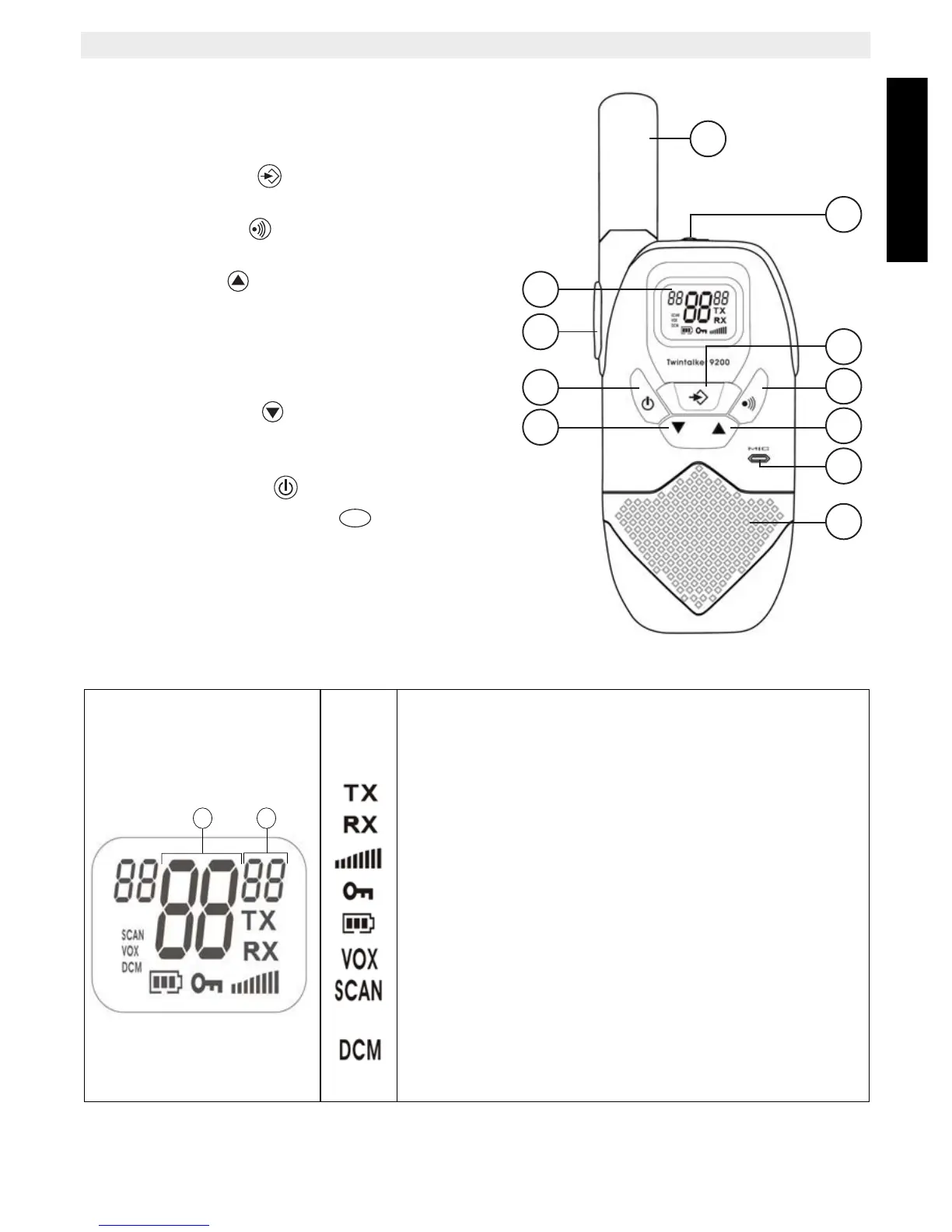
10 Buttons
1. ANTENNA
2. EARPIECE Connector
3. MENU button
– Enter menu
4. CALL button
– Transmit a call tone
5. UP button
– Increase the speaker volume
– Select the next item in the menu
6. MICROPHONE
7. SPEAKER
8. DOWN button
– Decrease the speaker volume
– Select the previous item in the menu.
9. ON/OFF button
10. PUSH TO TALK button
– Press To Talk or release to listen
– Confirm a setting in the menu
11. LCD Display
11 LCD Display information
a. Channel number
b. CTCSS code
TX icon - Displayed when transmitting a signal
RX icon - Displayed when receiving a signal
Speaker volume indicator
Lock icon - Displayed when the keypad is locked.
Battery charge level indicator
VOX icon - Displayed in Voice controlled (Vox) mode
Scan icon
- Displayed when scan mode is active
Dual Scan icon
- Displayed when dual scan mode is active



 To Next Page