EasyManua.ls Logo

Essence Care@Home C7000 - User Manual

Essence Care@Home C7000
4 pages
Print Icon
To Next Page IconTo Next Page
Loading...
Care@Home
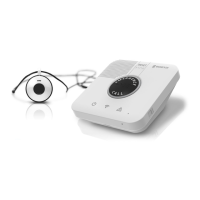
C7000 and Emergency Pendant
Advanced Kit
Getting Started
The Best Location for the C7000
Where speakerphone
can be heard throughout
premises
Convenient for
resident to access
Good cellular
reception
Near network
port
Cellular and Ethernet
Version
PERS
Question and Answer IconNeed help?

Do you have a question about the Essence Care@Home C7000 and is the answer not in the manual?

Summary

Care@Home C7000 and Emergency Pendant Advanced Kit

Getting Started

Initial steps for setting up the Care@Home C7000 and Emergency Pendant Advanced Kit.

Optimal C7000 Location Guide

Guidance on optimal placement for the C7000 device based on reception and audibility.

Setting Up the C7000

Using the C7000 Device

Emergency Call and Reset Functions

How to initiate an emergency call and cancel it using the C7000 device buttons.

Pairing Button Functionality

Instructions on using the PAIRING button on the C7000 for device management.

Status Indicator Guide

An overview of power, communication, and problem status indicators on the C7000.

Setting Up the Pendant

Pairing the Pendant

Step-by-step guide to pair the emergency pendant with the C7000 base unit.

Pendant Operation Modes

How the pendant indicates actions like panic button press or fall detection via LED lights.

Overview

The Essence Care@Home C7000 and Emergency Pendant Advanced Kit is a personal emergency response system (PERS) designed to provide safety and peace of mind. This system utilizes both cellular and Ethernet connectivity, ensuring reliable communication in various environments. The kit includes a main C7000 unit, which acts as a speakerphone and communication hub, and an emergency pendant for immediate assistance.

Function Description

The primary function of the C7000 system is to enable users to call for help in an emergency. This is achieved through the emergency pendant, which, when activated, sends an alert to the C7000 unit. The C7000 then initiates a call to a monitoring station, allowing the user to communicate their situation via the integrated speakerphone. The system also includes fall detection capabilities, automatically alerting the monitoring station if a fall is detected, even if the user is unable to press the button.

The C7000 unit serves as the central communication point. It features an emergency call button, a reset button to cancel calls, and a pairing button for connecting peripherals like the pendant. Status indicators on the C7000 provide visual feedback on power, communication, and system problems. This allows users to quickly understand the operational status of their device.

The emergency pendant is a wearable device that allows users to trigger an emergency call from anywhere within range of the C7000 unit. It is designed for ease of use, with a single button for activation. The pendant also incorporates fall detection technology, adding an extra layer of safety by automatically detecting falls and initiating an alert.

Usage Features

C7000 Unit:

  • Emergency Call Initiation: Pressing the "EMERGENCY CALL" button on the C7000 unit or activating the pendant initiates an emergency call. The button illuminates red, and the system begins the alert process.
  • Call Cancellation: The "RESET" button allows users to cancel an emergency call if it was triggered accidentally or if assistance is no longer needed.
  • Pairing Peripherals: The "PAIRING" button is used to connect new emergency pendants or other compatible peripherals to the C7000 system.
  • Speakerphone Functionality: The C7000 unit acts as a speakerphone, enabling two-way communication with the monitoring station once an emergency call is established.
  • Status Indicators:
    • Power Status: A dedicated indicator shows whether the unit is connected to AC power (on), running on battery (blinking), or off (no light).
    • Communication Status: An indicator displays the communication readiness (green if ready, blinking if sending a message), communication failure (red), or active conversation (orange).
    • Problem Status: An indicator alerts users to malfunctions in the C7000 or a peripheral (on), or supervision loss/low battery in a peripheral (blinking).
  • Optimal Placement: For best performance, the C7000 should be placed in a location with good cellular reception, near a network port if using Ethernet, convenient for the resident to access, and where the speakerphone can be heard throughout the premises.

Emergency Pendant:

  • Panic Button Activation: Pressing the button on the pendant triggers an emergency alert. The pendant blinks red when the panic button is pressed.
  • Fall Detection: The pendant automatically detects falls and sends an alert to the C7000 unit, which then contacts the monitoring station. The pendant lights green when a fall is detected.
  • Wearable Design: The pendant is designed to be worn by the user, ensuring that help is always within reach.

Maintenance Features

C7000 Unit:

  • Backup Battery: The C7000 unit includes a backup battery to ensure continued operation during power outages. This battery needs to be inserted during the initial setup.
  • SIM Card Slot: The device uses a SIM card for cellular communication, which needs to be inserted during setup.
  • Power Connection: The unit connects to a standard power source via a power cable.
  • Ethernet Connectivity: For enhanced reliability, the C7000 can be connected to a network port using an Ethernet cable.
  • Cover Access: The device has a removable cover that allows access to the SIM card slot, backup battery compartment, and power switch for setup and maintenance.
  • Power Switch: A physical power switch allows users to turn the unit on or off.

Emergency Pendant:

  • Battery Status Indication: The C7000's problem status indicator will blink to signal a low battery in a peripheral, including the emergency pendant, prompting the user to address the battery. The pendant lights green when the battery is replaced.

The system is designed for straightforward setup, involving inserting the SIM card and backup battery, connecting power and optional Ethernet, and then pairing the emergency pendant. Regular monitoring of the status indicators on the C7000 unit helps ensure the system is functioning correctly and alerts the user to any issues requiring attention, such as low battery in the pendant or communication failures.

Essence Care@Home C7000 Specifications

General IconGeneral
Device TypeSecurity System
Power SourceAC adapter with battery backup
Remote MonitoringYes
Sensors IncludedMotion
AlertsSMS, Email
InstallationProfessional
ModelCare@Home C7000

Related product manuals