CHAPTER 6
ANTENNA SETUPS
Revised: 28 Apr 11 6-11 EST P/N AA104
Programming The ESTeem Model 192 For SWR Measurements
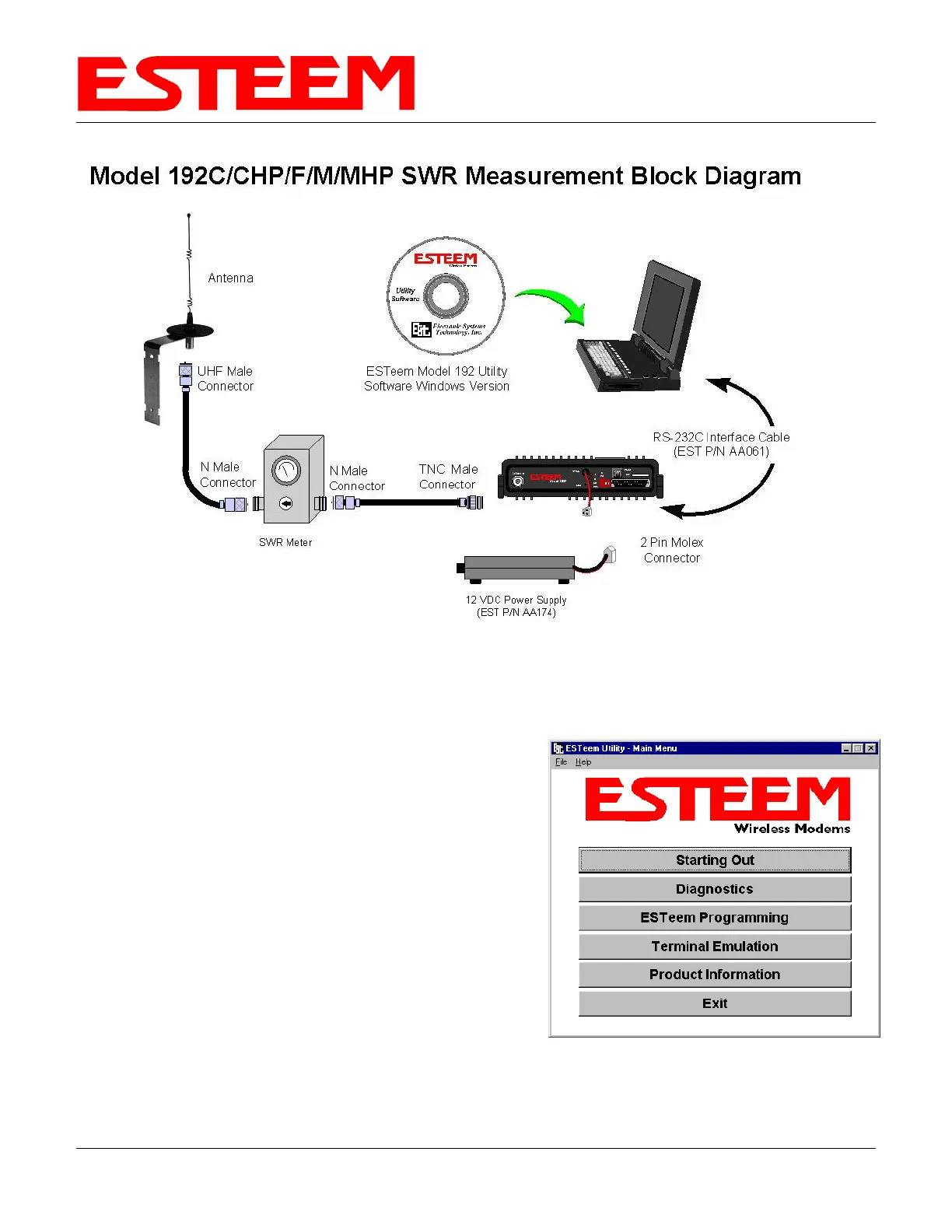
1. Configure the hardware as per the above diagram.
2. Turn Switch 2 on the RS-232 Setup Switch (located on the rear of the ESTeem) to the OFF position.
3. Reset the ESTeem (front panel push button).
4. Install the ESTeem Utility on the PC hard drive as per instructions
with the software.
5. From Utility Main Menu (Figure 1) select the Terminal Emulation
Mode.
6. In the Terminal Emulation Mode type the following commands
followed by a RETURN.
FA Return This returns the unit to factory default
parameters.
RAD ON Return Enable the RADIO ON command. The
transmitter will alternate ON for 10 seconds (5
seconds for 192CHP) and OFF for 3 seconds .
7. When the testing is completed, type the following:
RAD OFF Return This disables the RADIO ON command
Figure 1: ESTeem Utility Main Menu


 To Next Page