EasyManua.ls Logo

ETAP 28s - Page 37

Default Icon
71 pages
Print Icon
To Next Page IconTo Next Page
To Previous Page IconTo Previous Page
Loading...
!
!
:
!
J
I
!
4
,
!
I
2
I
a
I
!
!
1
I
I
T
tn\?
A
A'IE'IE}I
aq3
3S3l
The
various
batteries
can
be
charged
in
the
following
ways:
o
via
the
optional
battery
charger
;
o
via
the
alternator
of the
main
engine.
Handle
batteries
with
care
as they
contain
acid
!
12
VDG
svstem
9rihh
mnd
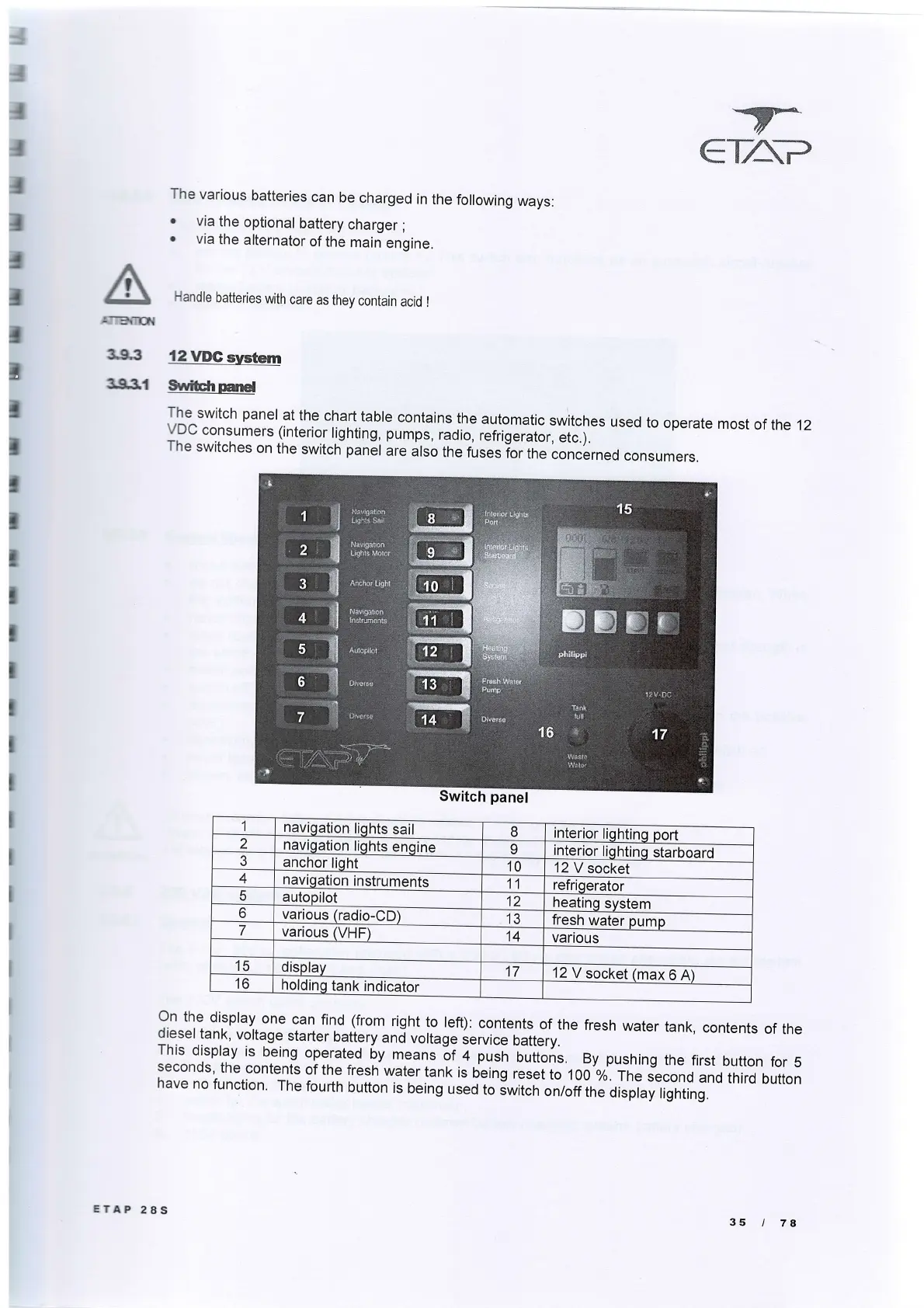
The
switch panel
at
the
cha(
table
contains
the
automatic
switches
used
to
operate
most
of
the
VDC
consumers
(interior
lighting,
pumps,
radio,
refrigerator,
etc.;.--
-
The
switches
on
the switctr
panel
are
ilso
the
fuses
for
the
concerned
consumers.
1
navigation
lights
sail
8
interior
lighting
port
2
navigation
lights
enqine
I
interior
lighting
starboard
3
anchor
light
10
12
V
socket
4
navigation
instruments
11
refrigerator
5
autopilot
12
heating
system
o
various (radio-CD)
13
fresh
water
pump
7
various
(VHF)
14
various
15
display
17
12 V
socket
(max
6
Ay
16
holding
tank
indicator
9n
tl9
display
one
can
find
(from
right
to left):
contents
of
the
fresh
water
tank,
contents
of
the
diesel
tank,
voltage
starter
battery
anJ
voltage
service
battery-
This
displ.ay
is
being
operated
by
means
6t +
pustr
uuitois.
By
pushing
the
first
button
for
5
seconds,
the
contents
of
the
fresh
water
tank
is
being
reset
to
1oo'o/o.
The
second
and
third
button
have
no
function.
The
fourth
button
is
being
used
to
Iwitch
onlonine
disptay
lighting.
12
ETAP
28S
35
I 7A
"##*
W
ffi
FTEffi
{,6
'i.
r.'
::1'
a:
17

Related product manuals