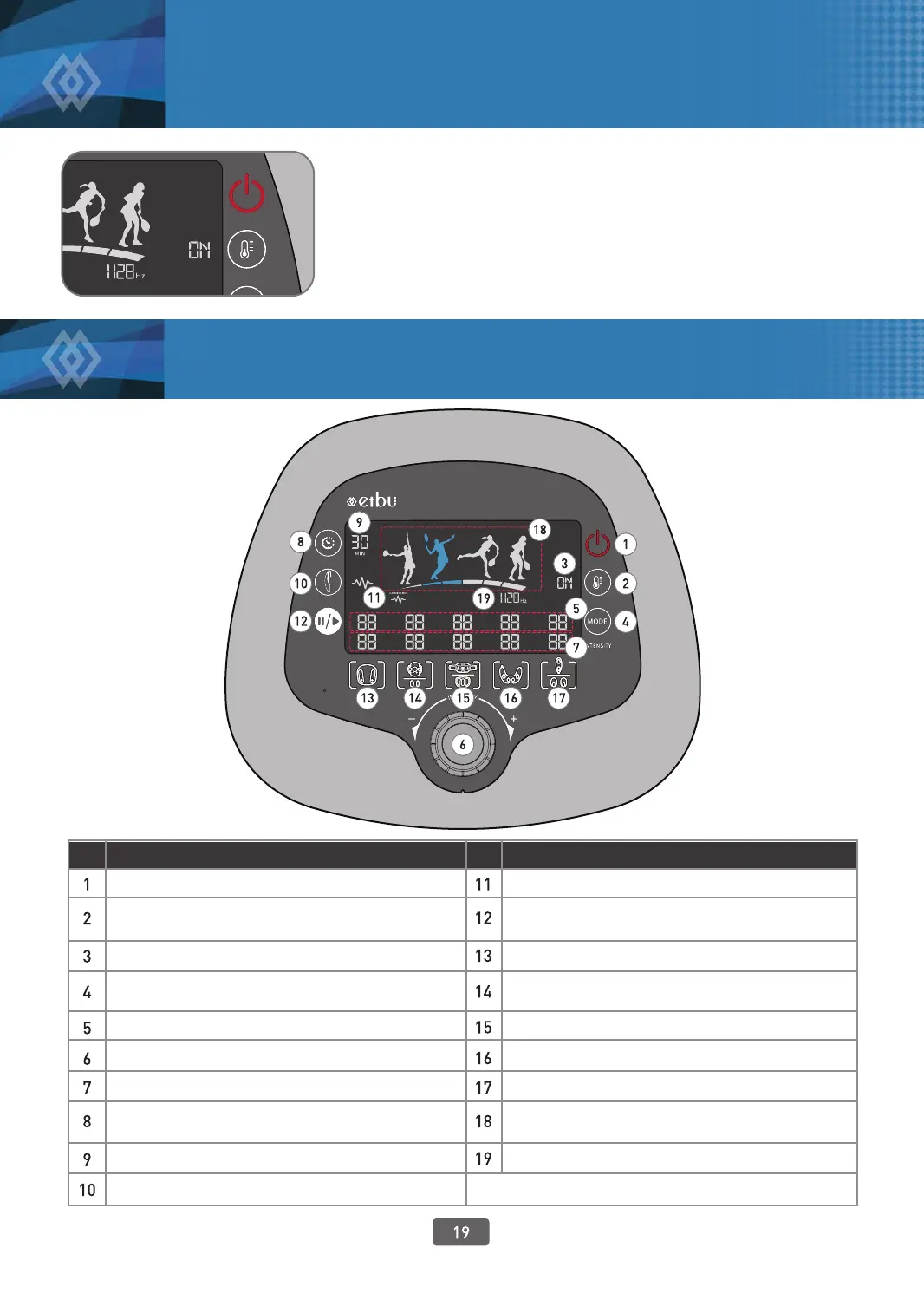
Power On/O Button
Display of Ultrasound Probe Operation
Temporary Pause / Restart Button
Foot Pad Selection Button
Knee Pad / Thigh Pad Selection Button
Abdomen Pad / Kegel Pad Selection Button
Shoulder Pad Selection Button
Vertical Muscle Pad / Multipurpose Pad Selection Button
Display of Product Status
Display of Frequency Status
Thermal Function O / On Button
(the product is set as “On” all the time)
Display of Thermal Function Status
Mode Selection Button (number changes
whenever Mode button is pressed)
Display of Selected Mode by Pad
Intensity Adjustment Dial
Display of Intensity by Pad
Use Time Adjustment Button
(time is changed by 5 minute units)
Display of Time Remaining
Ultrasound Probe On/O Button
1. Put the product on a at, stable place.
2. Check if the power matches the daily power used and then plug the
power cord into the outlet.
No.
Description of Function
No.
Description of Function
5. How to Use
5. How to Use
Preparation before Use
Display Part Diagram



 To Next Page