
 Need help?
Do you have a question about the ETEK AD 1823 and is the answer not in the manual?
Explains warning symbols like lightning flash and exclamation mark.
Details warnings against rain, moisture, and other hazards.
Guidance on preventing and correcting radio/TV interference issues.
Information for US users regarding interference resolution.
Advice on connecting the mixer to power and other equipment safely.
Instructions on how to clean and care for the mixer's exterior.
Additional warnings and advice for operating the mixer.
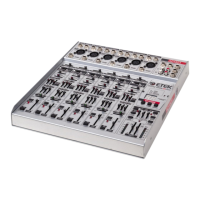
Overview of the mixer and its manual's purpose.
Explains terminology used within the manual.
How controls are identified and referenced in the manual.
Details the mixer's internal structure and input/output types.
Explains the function of the LED bar meters and clip indicators.
Describes the external power supply and its specifications.
Explains the grounding principle used to eliminate hum.
Instructions on how to safely power the mixer on and off.
How to set the input gain for mono channels using the slider.
Explains the High Pass Filter and its frequency control.
Details the Bass, Middle, and High frequency equalization controls.
Describes the Aux Send busses and their Pre/Post Fader settings.
Adjusts the channel output position within the stereo spectrum.
Controls the final feed to the Main Bus via the LEVEL slider.
Silences the entire channel output at the touch of a button.
How to set the input level for stereo channels.
Explains the function of insert points in mixer circuitry.
Details the insert points provided on the AD 1823 channels.
Lists the various input and output facilities in the Master Section.
Details the connection for the external power supply unit.
Describes the main XLR outputs for connecting to systems.
Explains the three auxiliary output busses and their routing.
Details the headphone output and monitoring controls.
Describes the input for stereo effects return.
RCA sockets for connecting tape recorders.
Button to switch the mixer power on and off.
Enables phantom power supply for microphone inputs.
Selects pre or post fader mode for Aux 2 send.
Selects pre or post fader mode for Aux 3 send.
Routes effects return to the Aux 2 bus.
Routes effects return to the Aux 3 bus.
Details wiring for various jack and XLR connectors.
Wiring for using insert as a direct output.
Wiring for processors without single jack connections.
Guide on selecting Mic or Line inputs for channels.
Step-by-step process for setting channel gain controls.
Adjusting levels using PFL and LED bargraph meters.
Default settings for all mixer controls before sessions.
Setting up multitrack recorders for recording.
Guidance on achieving optimal recording levels for digital/analog.
Matching channel sensitivity to multitrack recorder levels.
Tips for consistently setting up channels for recording/mixing.
How to use equalizers for sound correction and enhancement.
Using PFL for setting mixer levels and driving effects processors.
Explains balanced vs. unbalanced line connections and their benefits.
Details the optional effects module and its installation.
Information on the optional power amplifier designed for the mixer.
 General
| Brand | ETEK |
|---|---|
| Model | AD 1823 |
| Category | Music Mixer |
| Language | English |

 To Next Page