

EasyManua.ls Logo

ETEKCITY ESW15-USA - User Manual

ETEKCITY ESW15-USA
46 pages
Print Icon
To Next Page IconTo Next Page
Loading...
1
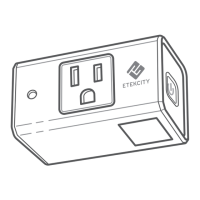
Voltson Smart WiFi Outlet
Model No.: ESW15-USA
Questions or Concerns?
Mon-Fri 9:00 AM - 5:00 PM PT
support@etekcity.com • (855) 686-3835

Other manuals for ETEKCITY ESW15-USA

Question and Answer IconNeed help?

Do you have a question about the ETEKCITY ESW15-USA and is the answer not in the manual?

Summary

Safety Information

Product Requirements

VeSync App Setup

Configuration

Smart Configuration Mode

Guides the user through connecting the smart outlet using the VeSync app's primary setup method.

APN Configuration Mode

Functions

Turning Devices On;Off

Basic operation to control the power state of connected devices via the smart outlet.

Turning Night Light On;Off

Controls the ambient night light feature of the smart outlet, responding to darkness.

Create Schedule

Set Timer

Away Mode

Smart Outlet Settings

Device Settings Overview

Configure outlet name, night light name, picture, notifications, and firmware.

Upgrade Firmware

Update the smart outlet's internal software for improvements and fixes.

Energy Saving Mode

Abnormal Power Protection

Share Your Smart Outlet

Delete a Smart Outlet

More Features

Connecting with Amazon Alexa

Instructions for linking the smart outlet with Amazon Alexa for voice control.

Connecting with Google Home

Instructions for linking the smart outlet with Google Home for voice control.

Log Out

Maintaining Your Smart Outlet

Firmware Updates

Guidance on keeping the smart outlet's firmware up-to-date for optimal performance.

Factory Reset

Procedure to restore the smart outlet to its original factory default settings.
Troubleshooting

Warranty Information

Customer Support

ETEKCITY ESW15-USA Specifications

General IconGeneral
BrandETEKCITY
ModelESW15-USA
CategoryRepeater
LanguageEnglish