EasyManua.ls Logo

ETEKCITY ETU-134 - User Manual

ETEKCITY ETU-134
2 pages
Print Icon
To Next Page IconTo Next Page
Loading...
QUICK START GUIDE
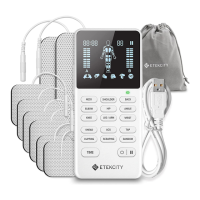
TENS Unit ETU-134
A
F
C
D
I
J
K
L
M
E N
O
H
G
B
A. Display
B. A Channel Intensity
Increase/Decrease
C. Therapy Modes [15]
D. Time Button
E. Lead Wires
F. Battery Indicator
G. B Channel Intensity
Increase/Decrease
H. Power/Pause Button
I. A1 Output
J. A2 Output
K. Micro USB Port
L. B1 Output
M. B2 Output
N. Electrode Pad
O. Micro USB Cable
Electrode Placement Guide Warranty
Customer Support
Neck Ankle/Foot Ankle/Foot
Shoulder Elbow Upper Arm
Upper Back Lower Back/
Lumbar
Hip
Wrist/Hand Knee/Joint Calf
Etekcity warrants all products to be of the highest
quality in material, craftsmanship, and service,
effective from the date of purchase to the end of
the warranty period. Warranty lengths may vary
between product categories.
If you encounter any issues or have any questions
about your new product, please contact our
helpful Customer Support Team. Your satisfaction
is our goal!
Distributed by Etekcity Corporation
1202 N. Miller St., Suite A
Anaheim, CA 92806
Email: support@etekcity.com
Toll-Free: (855) 686-3835
Support Hours
Mon–Fri, 9:00 am–5:00 pm PST/PDT
*Please have your order invoice and order ID
ready before contacting Customer Support.
Note:
Do not place electrodes on both legs or feet at the same time.
Only treat 1 at a time.
Only place electrodes according to Electrode Placement Guide.
Question and Answer IconNeed help?

Do you have a question about the ETEKCITY ETU-134 and is the answer not in the manual?

Summary

Electrode Placement Guide

Electrode Placement Areas

Visual guide to recommended electrode positions on the body for TENS therapy.

Warranty Information

Customer Support

Contact and Support Details

Information for reaching Etekcity customer support via mail, email, phone, and hours of operation.

TENS Unit Quick Start Guide

Device Component Identification

Identification and brief description of key buttons, ports, and indicators on the TENS unit.

Using the TENS Unit

Device Operation and Safety Precautions

Step-by-step guide for operating the TENS unit, including connection, mode selection, intensity adjustment, and safety warnings.

ETEKCITY ETU-134 Specifications

General IconGeneral
Product NameETEKCITY ETU-134
Auto Shut OffYes
WaterproofNo
Product TypeBody Weight Scale
Measurement Range5-180 kg
Accuracy0.1 kg
DisplayLCD
Battery TypeAAA
Weight Capacity400 lb / 180 kg
Graduation0.2 lbs / 0.1 kg
Unitslb / kg / st