Need help?
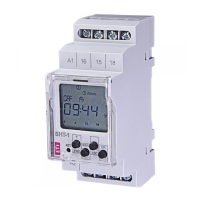
Do you have a question about the ETI SHT-1 and is the answer not in the manual?
Operations for setting, modifying, and removing programmed schedules.
Procedure for configuring the device's current date and time.
Selecting between programmed operation and random switching modes.
Configuring the duration and intervals for pulse and cyclic operations.
Setting up a period where the device bypasses standard programs.
Procedure for returning to the main operating menu.
Direct control of output relays, overriding other modes.
Initiates the process to add a new program to the device.
Option to select the channel for programming on SHT-1/2 and SHT-3/2.
Allows selection between daily and night modes for SHT-3 and SHT-3/2.
Configuration of the output switching mode (Normal, Cyclic, Pulse, OFF).
Setting the year, month, and day for yearly programming.
Setting the start and end hour/minute for a program.
Defining program activity for specific days of the week in daily mode.
Accesses and modifies existing saved programs.
Choosing and entering a specific program for modification.
Selecting and adjusting channels for SHT-1/2 and SHT-3/2.
Selecting and adjusting the operating mode for SHT-3 and SHT-3/2.
Selecting and configuring the output switching mode.
Adjusting the year, month, and day for yearly programs.
Modifying the hour and minute values for program times.
Adjusting the program's activity schedule for specific days.
Configuring the current year.
Setting the current month.
Setting the current day of the month.
Choosing between 24-hour and 12-hour time display formats.
Setting the current hour.
Setting the current minutes.
Enabling automatic changeover between summer and winter time.
Selecting the channel for mode setting on SHT-1/2 and SHT-3/2.
Enabling programmed switching according to saved programs.
Enabling random switching within a 10-120 minute interval.
Selecting the channel for pulse/cyclic mode settings on SHT-1/2 and SHT-3/2.
Configuring the duration of the pulse or cycle.
Setting the delay or cycle duration (not applicable for pulse mode).
Initiates the configuration of the holiday mode.
Setting the start year, month, and day for the holiday period.
Setting the end year, month, and day for the holiday period.

 To Next Page

 General