You may also manually program your own schedule,
designated U1. These can be accessed through the
Program button.
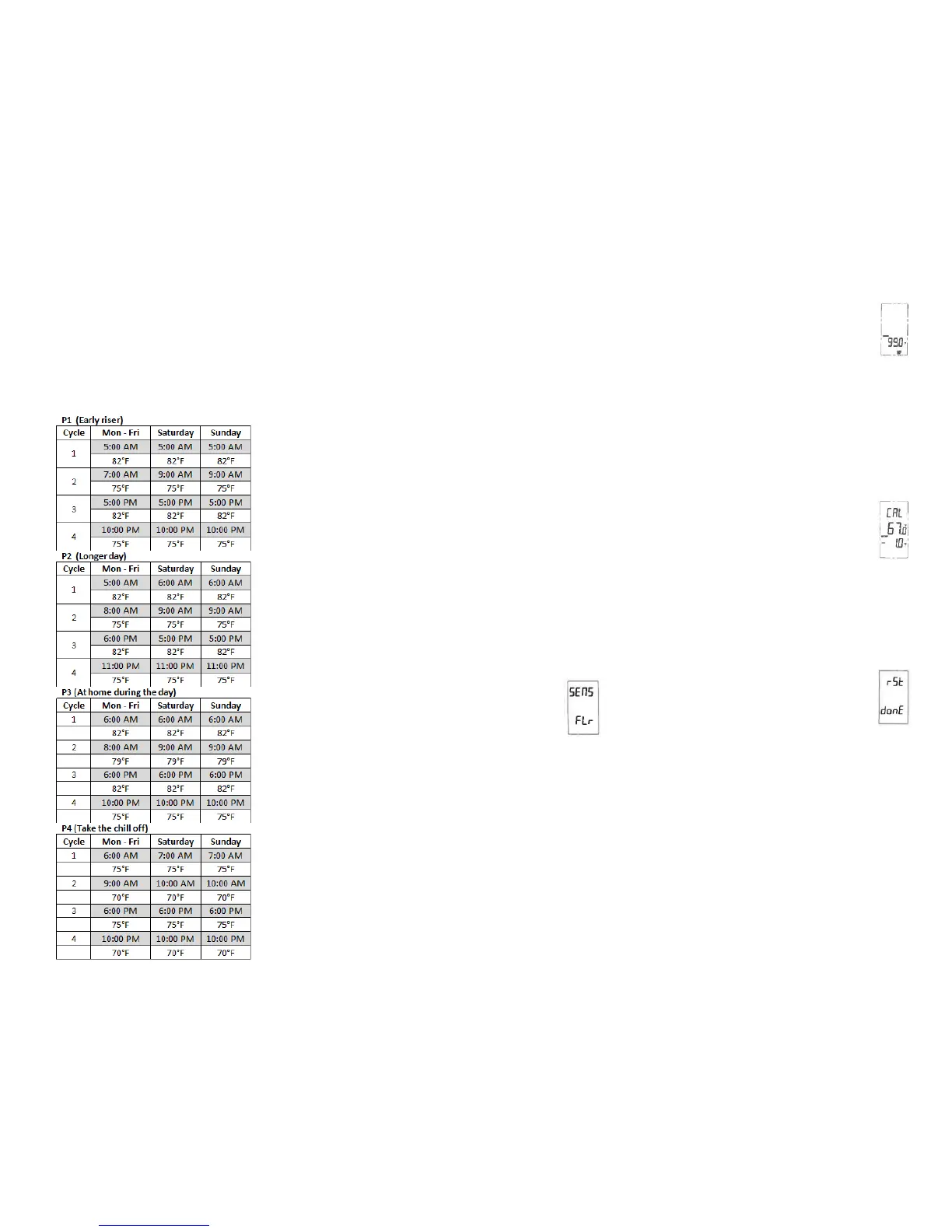
o Press and hold the Program button. PRO P1, P2, P3,
P4 or U1 will be flashing.
o Press ▼ or ▲ to toggle between the options.
If a pre-set program is desired, select P1-P4 and
once highlighted, press the Hold/Return button to
accept. These schedules cannot be permanently
modified and are as follows:
Note: Your pre-set program selection will be indicated in
the bottom left corner of the display screen.
If a manual program is desired, select U1 and once
highlighted, press the Program button once.
o The hour will begin flashing for the first of four
cycles for your Monday-Friday setting. Use ▼
or ▲ to adjust the hour. Press the Program
button once to store.
o The minutes will begin flashing for the first of
four cycles for your Monday-Friday setting. Use
▼ or ▲ to adjust the minutes. Press the
Program button once to store.
o The set temperature will begin flashing for the
first of four cycles for your Monday-Friday
setting. Use ▼ or ▲ to adjust the temperature.
Press the Program button once to store.
o Now, your hour will begin flashing again for the
second of four cycles for your Monday-Friday
setting. Repeat these steps for the remaining
cycles for Monday-Friday. Following these
cycles, you will also be programming 4 cycles
each for Saturday and Sunday as well.
o When finished, or at any time during the setting
of your manual program, you can press the
Hold/Return button to store the changes you
have made.
Note: The U1 program will not show any
indication in the bottom left corner of the
display screen.
Sensor Control and Time Control Mode
The thermostat can realize simultaneous
detection of the room temperature and
floor temperature. There are two sensor
options: Flr for floor temperature mode
and Air for room temperature mode. The
time control mode is indicated by Regu On.
o Press and hold the Options button.
o Press the Options button once more to show the
sensor options.
o Use ▼ and ▲ to toggle between Sens Flr, Sens Air and
Regu On.
o Press Hold/Return to select and store option.
Floor Temperature Mode: current temperature
displayed is pulled from the installed floor sensor.
Heating occurs when current temperature is no
more than 10° from the set temperature.
Air Temperature Mode: current temperature
displayed is pulled from the air sensor in the
thermostat. Heating occurs when current
temperature is no more than 10° from the set
temperature.
Floor Limit
If the thermostat is set to operate in Air
Sense Mode, the display will show the air
temperature but the thermostat still
monitors the floor sensor if it connected.
You may set a floor limit temperature so
the system will turn off if the floor sensor temperature
exceeds this limit. This will avoid possibly overheating
your floor.
o Press and hold the Options button.
o Use the ▼ or ▲ arrows to highlight the Sens Air
option. Press the Options button once to select.
o Your Floor Limit should show up next. Use ▼ or ▲ to
select a floor limit temperature.
o Press the Hold/Return button to store this setting.
Calibration
This feature allows the ability to slightly
adjust the display temperature. Normally
this is not recommended and certainly not
required, however it may be necessary in
special circumstances.
o Press and hold the Options button.
o Press the Options button until CAL shows on the
display with the current temperature and offset value.
The offset value is factory set to 0.
o Use ▼ or ▲ to adjust the offset value, allowing a range
of ±10°F.
o Press the Hold/Return button to store this setting.
Resetting Factory Defaults
You have the option to reset all
programming, settings and usage time to
the factory defaults. To do this, press and
hold the Restore button until Rst Done
shows on the display. The thermostat will
go through a startup mode and return to the normal
operation mode. You will need to reset the day and time
following any reset.
Note: When resetting to the factory defaults, some
malfunction situations may occur. This is caused by
information being previously stored incorrectly in the
thermostat. Cut the power supply and restart it to solve
the problem.
V. Operation
This thermostat has several ways to control your floor
heating system. It is factory set to operate in the program
schedule selected but this can be overridden to meet your
needs. Heating will show on the display when the system
calls for the heating element to turn on.
Manual Mode



 To Next Page
 Loading...