This mode can allow the user to quickly raise the
temperature as required. You can temporarily adjust the
set temperature as follows. (This set temperature will
hold until the next cycle change.)
o Press and hold ▼ or ▲ to adjust the set temperature.
o Press the Hold/Return button to store this setting.
Hold Mode
You can hold the current set temperature
indefinitely. This can be especially useful
when you are on vacation.
o Press and hold the Hold/Return button
on the main display. Hold will be
indicated on the display.
o To cancel this hold, press and hold the Hold/Return
button again and the indication will disappear from the
display.
Setback Mode
You can use the setback to override the
current set temperature. This is especially
useful if you have an alternative
temperature you repeatedly select when
you are away.
o Press and hold the Setback button. You will be
prompted to enter your setback temperature.
o Press Hold/Return and Setback will be indicated on the
display and also a set-point temperature. This set-point
will hold until the next scheduled program time.
o To cancel the setback, press ▼ or ▲.
o If a more permanent setback temperature is desired,
press and hold the Hold/Return button and Hold will
be indicated on the screen as well. To cancel this, you
will need to press and hold the Hold/Return button to
cancel the hold and then press ▼ or ▲ to cancel the
setback.
Remote Control Override Mode
If your thermostat was installed with Remote Control
input from a home automation system, this will override
the thermostat when the remote control closes its output
switch or relay. Setback and Hold will show on the display
and will operate in the setback temperature indefinitely.
To cancel this, the Remote Control switch or relay must
be opened.
Time Control Mode
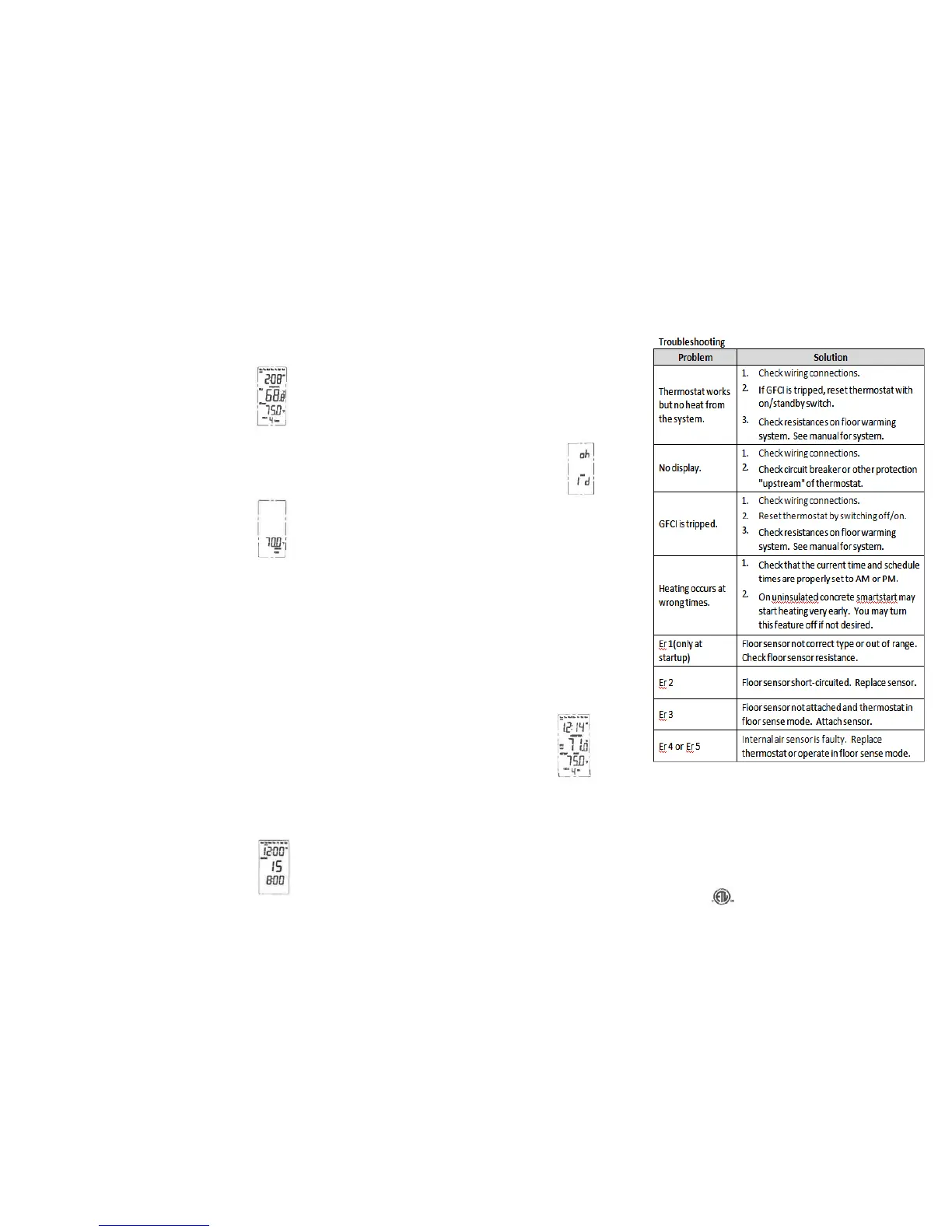
This mode functions like a timer. The
heating equipment will start and stop
every 15 minutes. You will program a
value between 0 and 15 which indicates
the length of time in minutes the system
will heat out of a possible 15 minutes.
Example: A value of 6 will cause it to heat for 6 minutes of
the 15 minute cycle and not heat for the remaining 9
minutes. 0 would indicate no heating and 15 would
indicate continuous heating.
o Press and hold the Options button.
o Press Options until the Sens options screen displays.
o Press ▼ or ▲ to locate Regu On.
o Press the Hold/Return button to select.
o The screen will now show the heating time (value
between 0 and 15) and current cycle time (repeats
from 0:00 to 14:59 measured in min:sec). Press and
hold ▼ or ▲ to select the heating time.
o Press the Hold/Return button to select.
Power Consumption Usage
This thermostat stores the number of
hours it is heating in its memory. This
information may be useful in calculating
the energy used by the floor heating
system.
o Press and hold the Options button.
o Press Options until Usage and 1d show on the display.
o The time shown on the display is the number of hours
it was heating today.
o Press and hold ▼ and ▲ to toggle between the
previous 7-day and 30-day usage.
o Press the Hold/Return button to return to normal
operation mode.
Lockout Feature
You have the ability to lock out adjustments by other
users. This may be useful in public locations.
o Press and hold both ▼ and ▲ at the same time. Lock
will indicate on the display and all keys are invalid.
o To cancel the lockout, press and hold both ▼ and ▲ at
the same time again. The Lock indication should
disappear.
GFCI Test
There is a GFCI (Ground Fault Circuit
Interrupter) inside this thermostat. It is
designed to help protect from possible
electrical shock if the floor warming
system has been damaged. To make
sure the GFCI is operating properly, test it after the
thermostat has been installed and once each month.
Note: For this function to work properly, the floor system
must be heating. Heating will be indicated on the display.
You may need to increase the set temperature
temporarily.
o Press the GFCI Test button on the side of the
thermostat. GFCI Trip should be displayed on the
screen and a right light will show next to the GFCI Test.
You should also hear a click, indicating power has been
removed from the floor warming system. If any of
these indicators fail, turn off the thermostat and
replace it. Do not continue to use.
o To reset the GFCI, slide the On/Standby switch to
Standby and then back to On. If the GFCI does not
reset, turn the thermostat off. Check the wiring
connections, reset by the On/Standby switch, and
check resistances on the floor warming system.
VI. Specifications
Power Supply AC120/240V, 50/60Hz
Maximum Load 15A, resistive
Maximum Power 1800W at 120VAC/3600W at 240VAC
GFCI Class A (5 milliamp trip)
Display Range 32°F -99°F (0°C -37°C)
Setting Range 41°F -99°F (5°C -37°C)
Accuracy 1°F (0.5°C)
Storage Temp. 32°F -120°F (0°C –49°C)
ETL Listing Control No. 4001076
Programming retained indefinitely.
Current time and day will need to be re-set if power is lost
for more than 10 minutes.
14AWG wire leads attached to the thermostat.



 To Previous Page
 Loading...