EN 18
OPERATING THE APPLIANCE
Setting the temperature
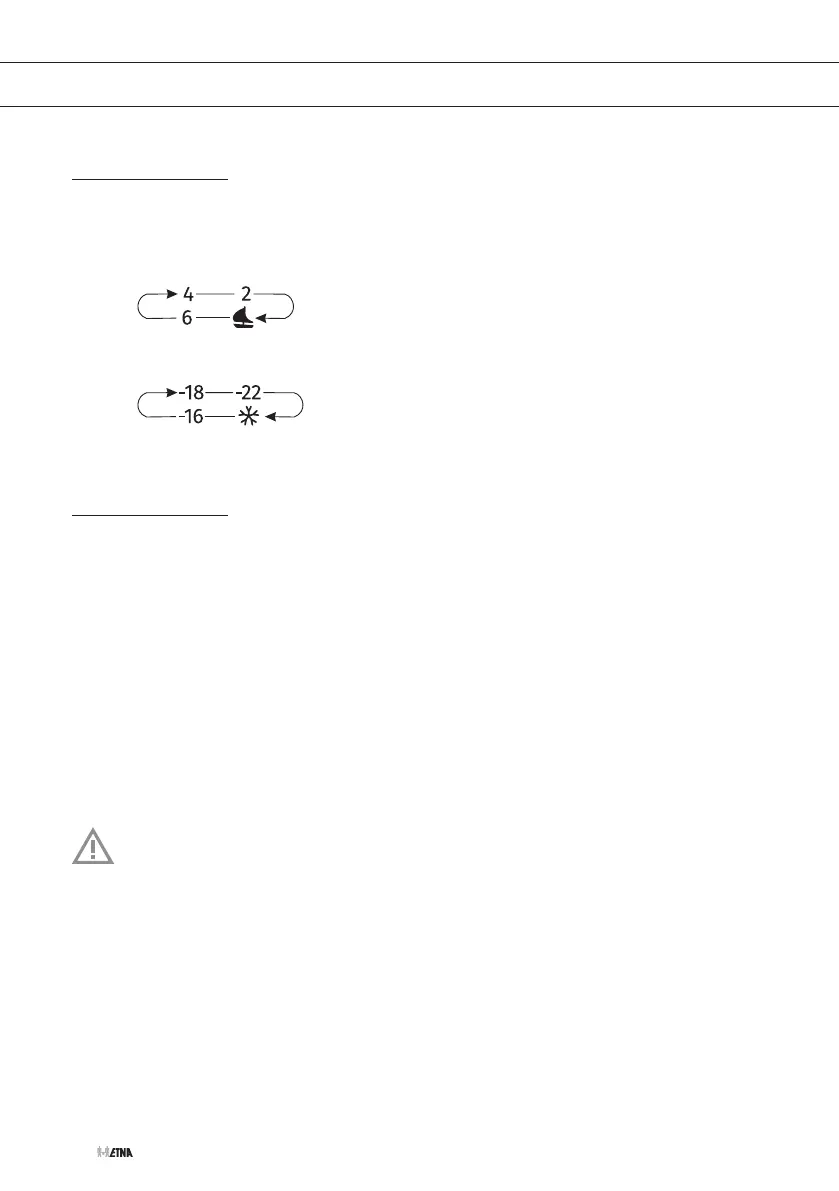
1. Touch (several times) the temperature adjustment key (refrigerator compartment or freezer
compartment) to set the temperature.
▷ The temperature of the refrigerator will be set in the following order:
▷ The temperature of the freezer will be set in the following order:
Intensive freezing
This appliance has an intensive freezing function. This function decreases the temperature in
the freezer compartment as quickly as possible. Activate this function 24 hours before you put a
large quantity of fresh food in the appliance.
Activating/disabling the intensive freezing function
1. Touch (several times) the temperature adjustment key (freezer compartment) until the
indicator light is illuminated.
▷ The function is activated.
2. Touch (several times) the temperature adjustment key (freezer compartment) until the
indicator light is not illuminated any more.
▷ The function is disabled.
When the intensive freezing function is not switched off manually, the function will be
switched off automatically (after about 2 days).


 To Next Page