18
IMPORTANT!
To get the best performance fromyour dishwasher, read all operating instructions.
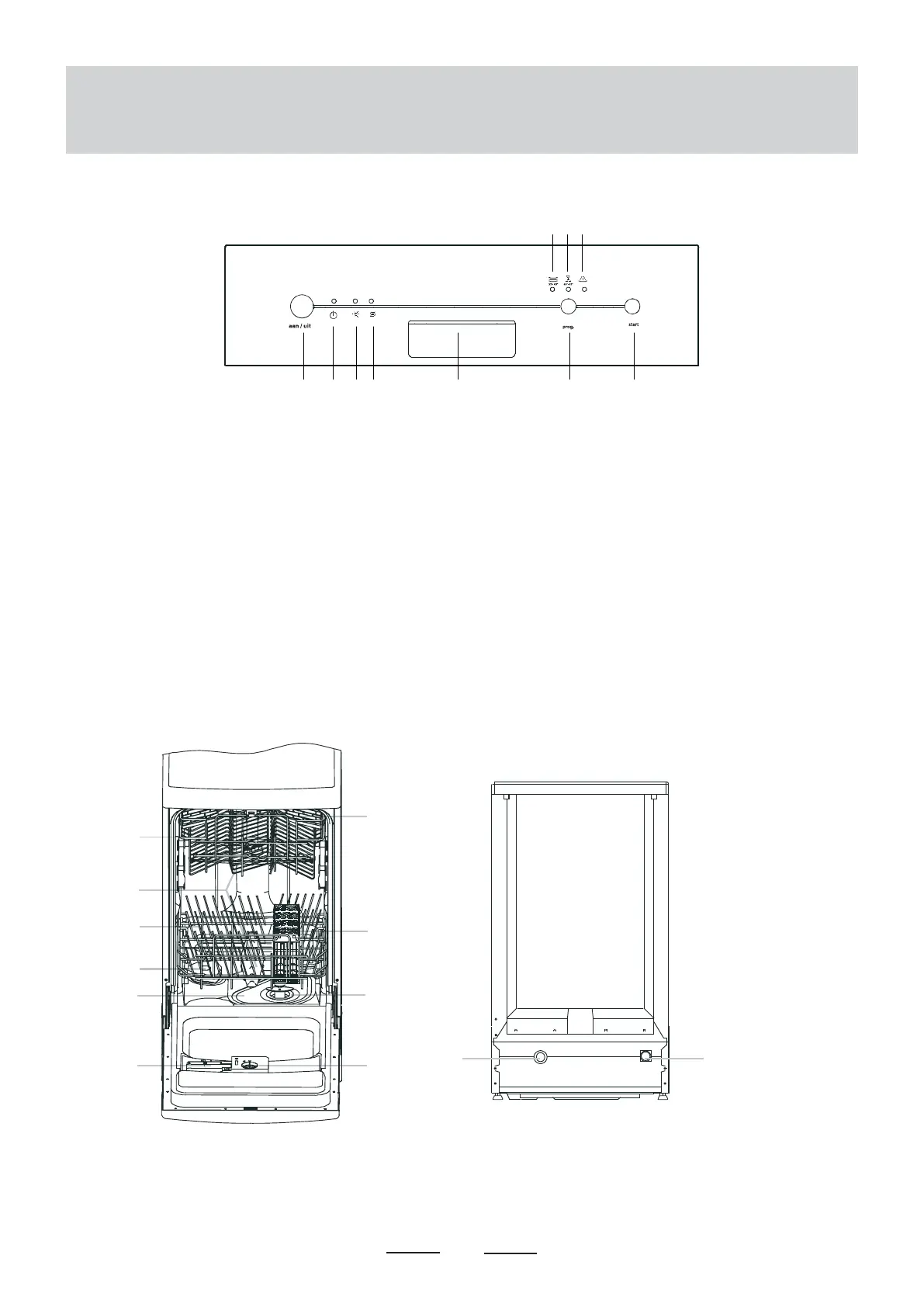
Control panel
1 Power button: To turn on/off the power supply.
2 Power light : To be on when the Power button is
pressed down.
3 Water softener warning light: To be on when the
softener needs to be refilled.
4 Rinse aid warning light: To be on when the dispenser
needs to be refilled.
5 Door handle: Pull it to open the door.
6 Washing program selector. Press the button repeatedly
to select the desired washing program.
7 Start/reset button. Press this button to start or change
the washing program.
8 Normal program indicator light. The light comes on
when the normal program is started.
9 Rapid program indicator light. The light comes on when
the rapid program is started.
10 Rinse program indicator light. The light comes on when
the rinse program is started.
8 9 10
reset
1 upper basket
2 spray arms
3 lower basket
4 water softener
5 main filter (flat filter)
6 detergent dispenser
7 cup shelf
8 silverware basket
9 coarse filter
10 rinse aid dispenser
11 drain pipe connector
12 inlet pipe connector
1
7
8
9
10
11
Dishwasher features


 To Next Page