EN 17
OPERATION
1. Press the automatic menu key to select the automatic cooking
programmes (P) or defrosting programmes (D).
▷ Temperature, weight and P01 or d01 are shown on the display,
depending on the selected programme.
2. Press the automatic menu key several times to select an automatic
cooking programme.
3. Press the weight key to set the weight.
▷ The weight flashes in the display.
4. Use the slider or the ‘- / +’ keys to set the desired weight.
▷ The weight you can set depends on the selected programme.
5. Press the start/pause key to start the selected automatic cooking
programme.
▷ A signal sounds when the cooking programme is finished.
▷ The fan continues to run for a while and then stops automatically.
▷
The combi microwave oven goes to standby automatically after
5 minutes if you do not touch the start/pause key.
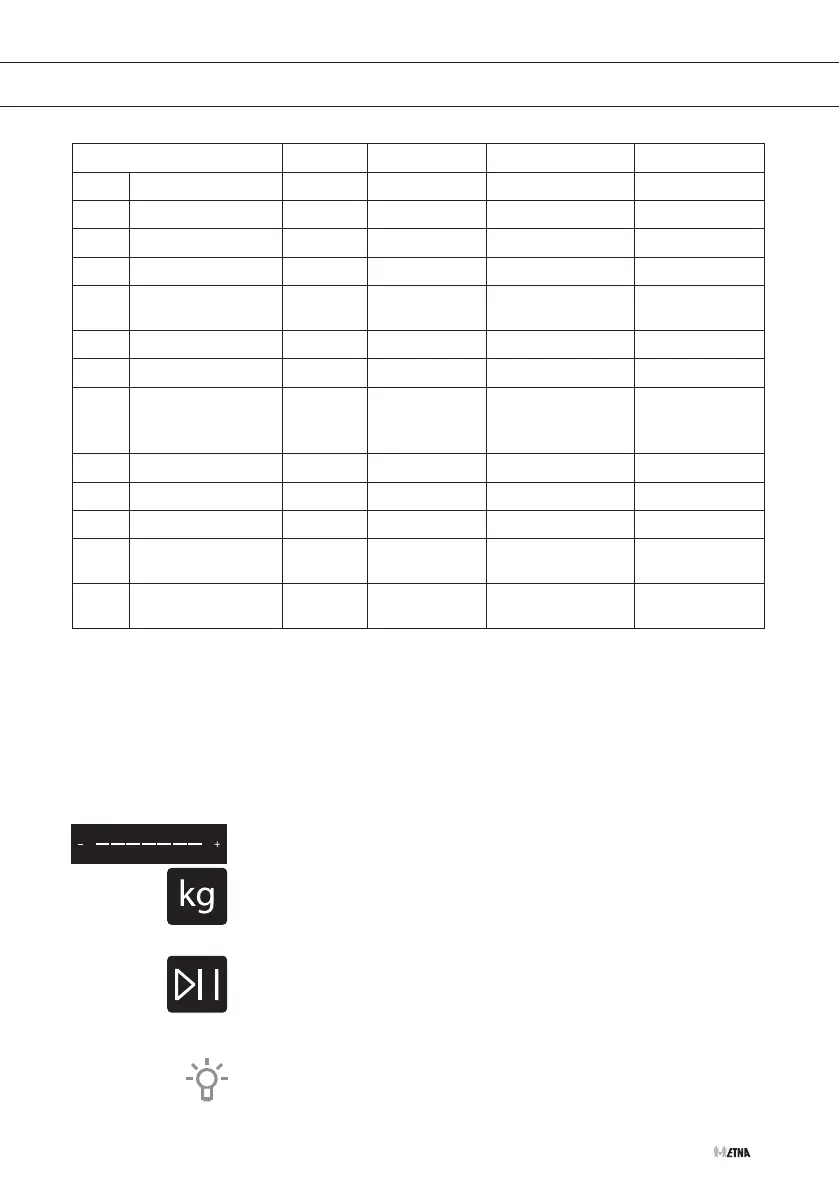
Recipe Preheat Default time Default weight Weight range
d01** Meat No 08:00 min. 200 g 100 - 1500 g
d02** Poultry No 04:48 min. 200 g 100 - 1500 g
d03** Fish No 04:00 min. 200 g 100 - 1000 g
A01** Popcorn No 03:05 min. 100 g -
A02**
Potato cheese
gratin
No 00:35 hr 500 g -
A03 Cheese cake No 01:16 hr - -
A04* Quiche Lorraine 10 min. 00:40 hr - -
A05 Meatloaf No
01:15 hour
(standard) /
00:30 hour
1000 g 500 g / 1000 g
A06 Marmor cake No 01:20 hr - -
A07* Flat bread 8 min. 00:35 hr - -
A08* Apple pie 7 min. 01:00 hr - -
A09*
Fresh pizza on a
tray
8 min. 00:35 hr - -
A10
Apple cake with
crumbles
No 01:00 hr - -
** The programme only uses the microwave function. Do not use the baking tray.
* T
he programme uses preheating.



 To Next Page