EN 16
OPERATION
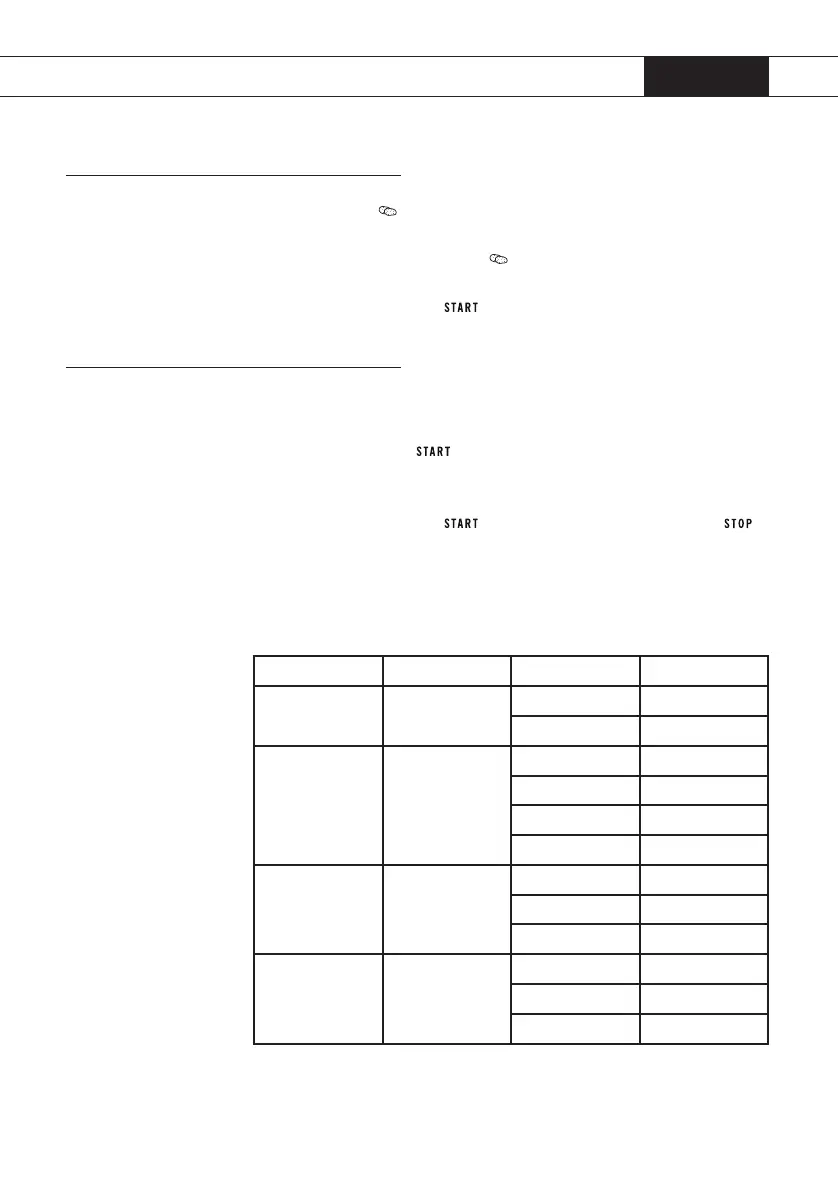
Potatoes
1. Press button .
e display will show ‘200’.
2. Press (several times) button
or turn the control knob to set the
weight (200, 400 or 600 gram).
3. Press the start button
to start cooking.
Auto menu
1. Turn the control knob to choose an automatic programme (A - 1
until A - 8, see table below).
2. Press start button
to conrm the setting.
3. Turn the control knob to set the weight.
e display shows the weight in grammes and a ‘g’.
4. Press the start button
to start cooking or press button
to cancel the setting.
In the table below, you can see which cooking programmes you can
use and for which foods the programmes are suitable.
Programme Function Weight Display
A - 1 Pizza 200g 200g
400g 400g
A - 2 Chicken pieces 200g 200g
400g 400g
600g 600g
800g 800g
A - 3 Meat 250g 250g
350g 350g
450g 450g
A - 4 Vegetables 200g 200g
300g 300g
400g 400g
Cooking


 To Next Page