EN 6
USING YOUR DISHWASHER
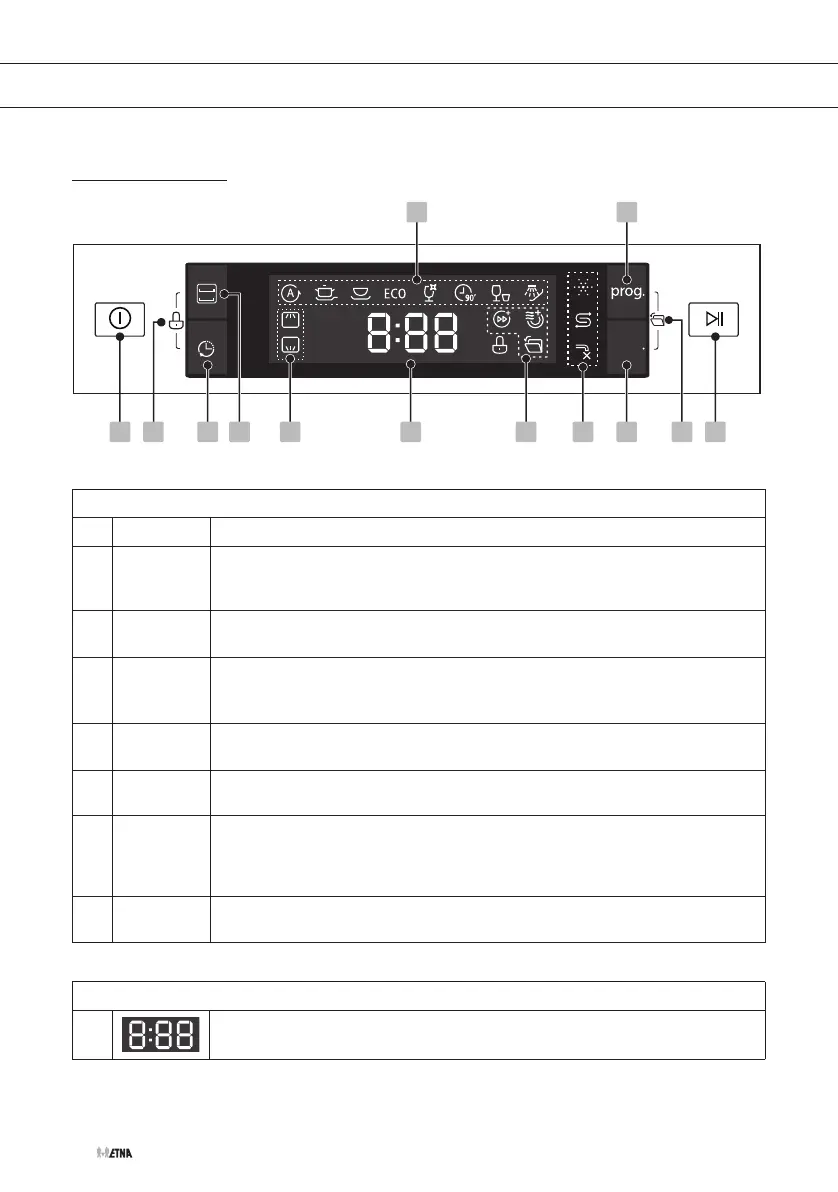
Control panel
func
1 3 6 84 2 79 121113
10 5
Operation (push buttons)
1 On/Off
Press this button to turn on your dishwasher, the screen lights up.
2 Alt
Press this button for specifically cleaning the load in the selected basket.
You do not have to wait until the whole dishwasher is loaded completely.
The corresponding indicator will be lit.
3 Delayed
start
Press this button to set a delayed start (up to 24 hours). One press on this
button delays the start by one hour.
4 Child lock
Press and hold the Alt button + Delayed start button simultaneously for
3 seconds to lock (or unlock) the control panel. The corresponding
indicator will be lit. Now children cannot accidently start the dishwasher.
5 Program
Select the appropriate washing program. The corresponding indicator will
be lit.
6 Function
Press this button to select a function. The corresponding indicator will be
lit.
7 Auto open
The dishwasher door opens automatically at the end of the program,
which improves the drying results. Press the Program button and Function
button to activate or cancel this function. The corresponding indicator will
be lit.
8 Start/
Pause
Press this button to start a selected program or to pause a program. Press
and hold this button for 3 seconds to cancel a selected program.
Display
9
1 3 6 74 2 5
prog.
11 109
func.
8
To show the remaining time, delayed start time, error codes etc.


 To Next Page