EGO 4000 PLUS OPERATION MANUAL
7
2 MAJOR FEATURES OF THE MODEL S350
6
3 INTRODUCTION
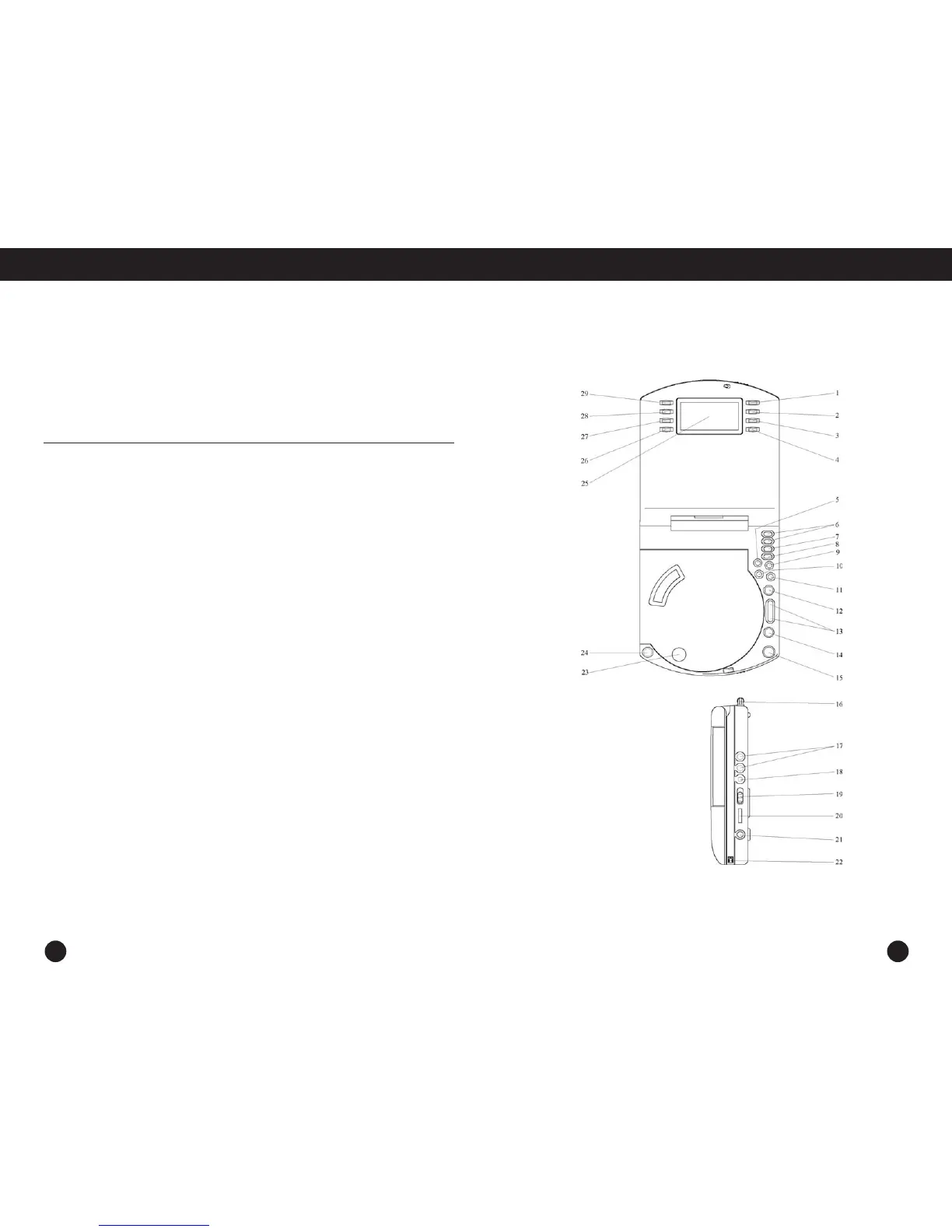
LOCATION OF CONTROLS
World/Local – to see the preset local time or world time
Set – to set world/local time, or alarm
Up/Down – to select desired time, date,
or alarm mode while setting time or alarm
SAS/+10 – while playing CD, press to turn
ESP on/off; while playing MP3, press this
button to skip 10+ tracks
Preset+/- – to select radio station presets
for listening
St/Mono – to select the FM stereo or the mono channel
Album – to search the directory of a MP3; in tuner
mode, to change the radio area (press 3 seconds)
EQ/Prog – while playing CD/MP3, press to select
desired EQ setting (DBB, POP, JAZZ, CLASSIC, DISCO,
NORMAL); when CD/MP3 not playing, press to program
CD/MP3 playing sequence; in tuner mode, press to set
radio stations in memory
Tuner/Band – to switch tuner between AM /FM.
Mode – while playing CD, press to set repeat mode
for one track or all tracks; while playing MP3, press
to set repeat mode for one track, one directory, or all
tracks; when CD/MP3 not playing, press to set Intro
or Shuff/Random play
Play/Pause – press to play or pause CD/MP3
Scan Up/Down – press to skip and search CD/MP3
tracks or directory; in tuner mode, press to search
desired radio stations or automatically scan stations
Stop – press to stop CD/MP3; in tuner mode, press to
power off
Snooze – when alarm is activated, press to snooze
for 5 minutes; when alarm is inactive, press to turn
on LCD backlighting momentarily
Telescopic FM Antenna – extend and adjust the
antenna for optimal FM reception
Speaker Jacks – to connect speaker wires from
the detachable speakers boxes
DC Jack – to connect with AC/DC adaptor
Bass Selector– to select TruBass, Stereo, or SRS 3D
bass settings
Volume – to adjust listening volume
Headphone Jack – to connect stereo headphone
Open Player – to open player, slide the button
towards the arrow
Close Lid – to close lid after inserting CD/MP3 disc
Open Lid – to open lid to insert CD/MP3 disc
LCD display – to view player status and clock
Alarm On/Off – to turn on/off one or all alarms
Alarm 1/ Alarm 2 – to set alarm 1/alarm 2, or to
view preset alarm 1/alarm 2
Alarm Mode – to activate alarm
Sleep – to set sleep time as 15, 30, 45, 60, or 90 minutes
1
2
3-4
5
6
7
8
9
10
11
12
13
14
15
16
17
18
19
20
21
22
23
24
25
26
27
28
29



 To Next Page