Uniclean™ Station
❶
❸
❹
⓬
❻
❾
❽
❿
❼
❺
❷
⓫
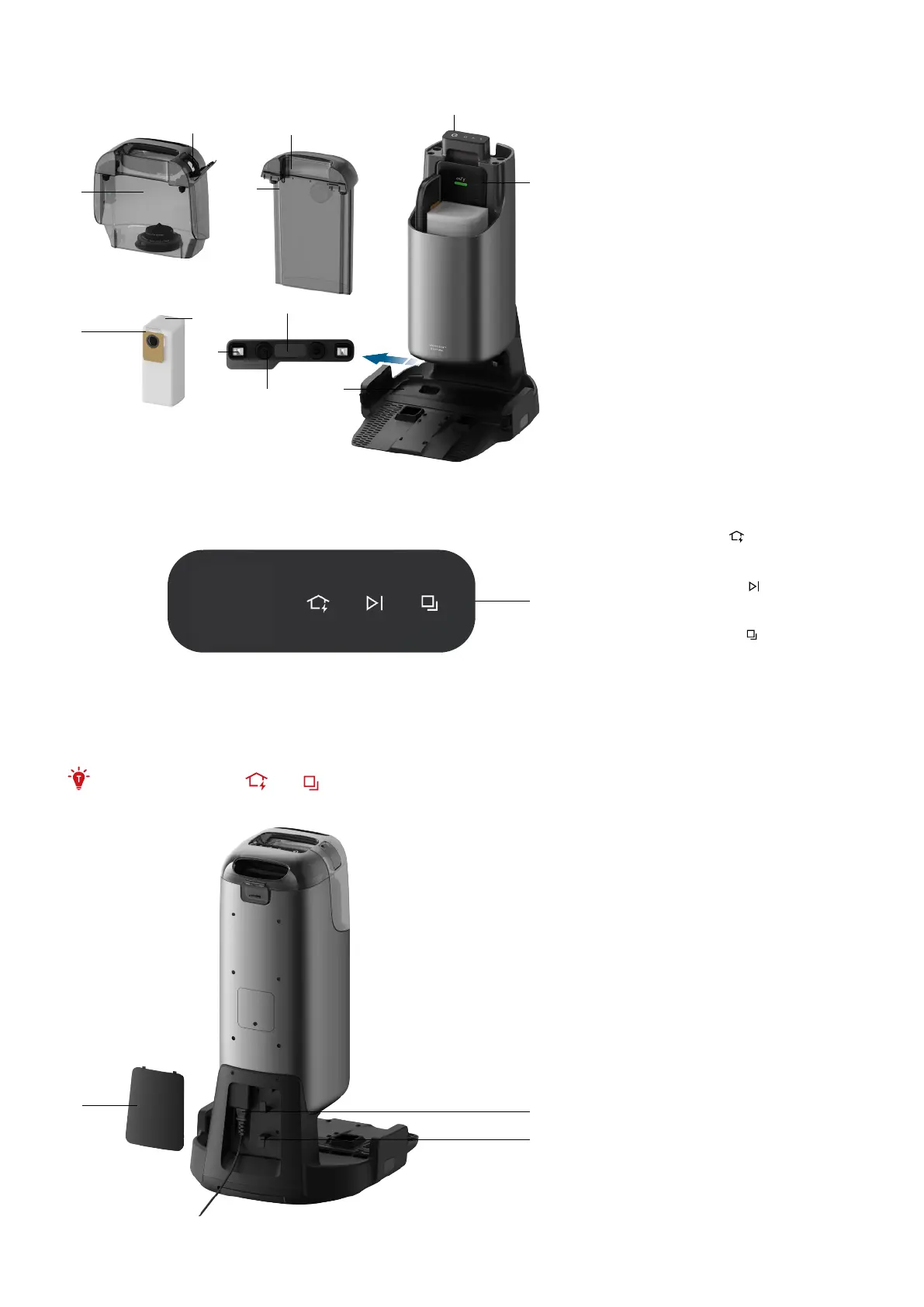
❶
Clean Water Tank
❷
Water Inlet
❸
Dirty Water Tank
❹
Dirty Water Tank Cover
❺
LCD Screen
❻
Hard Floor Cleaner
❼
Filter Tray
❽
Automatic Water Filling
Interface
❾
Charging Contact Pins (×2)
❿
Recharge Sensors (×4)
⓫
Dust Bag Handle
⓬
Dust Bag
❶
❶
Touch Buttons
• Recharge Button
»
Press to return to the Uniclean™ Station
• Start / Pause Button
»
Press to start / pause cleaning
• Mode Switch Button
»
Press to switch between Vacuum Only
mode and Mop mode
»
Press and hold for 3 seconds to
activate an additional cleaning of the
rolling mop
• Press and hold the and simultaneously for 3 seconds to enable or disable Child Safety Lock.
❷
❶
❸
❶
Cord Cover
❷
Power Socket
❸
Cord Winding Groove



 To Next Page