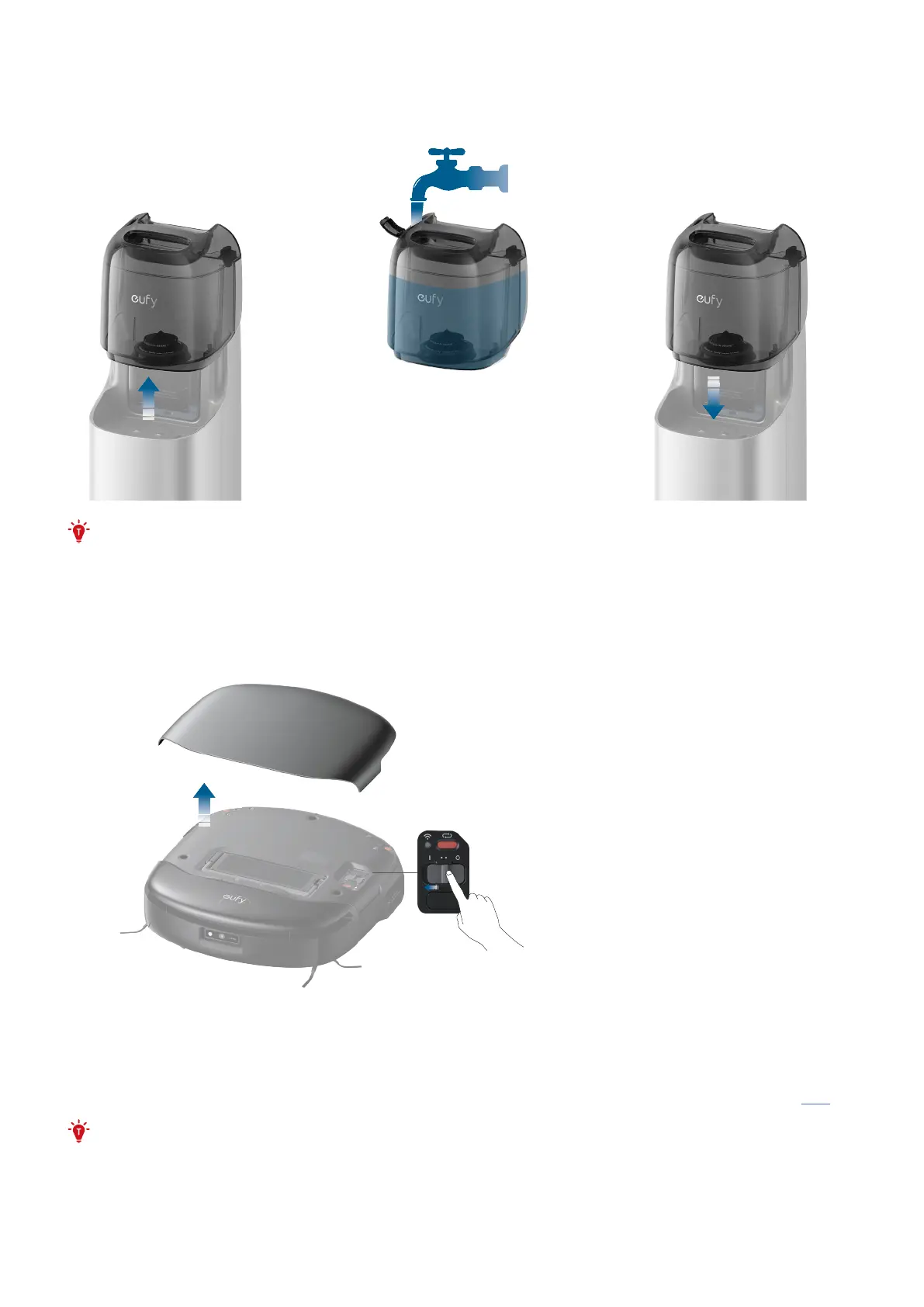
3.6 Add Clean Water
Remove the clean water tank from the station, add clean water until it reaches the MAX water line, and then
reinsert the clean water tank.
• Do not add any third-party disinfectants, cleaning agents, or hot water to the water tank, as this may
damage the device and such damage will not be covered under warranty.
3.7 Turn On the Robot
Open the magnetic cover of the robot and toggle the switch to "I" to power up the robot. Once powered on, the
robot will play a voice prompt.
3.8 Download the App
To enjoy all the available features, it is recommended to control your robot via the app. You can try the following
methods:
1. Download the app from the App Store (iOS devices) or Google Play (Android devices), or by clicking this link.
• Make sure your smartphone is running iOS 13.0 (or above) or Android 7.0 (or above).
2. After opening the magnetic cover of the robot, scan the QR code on the main unit.
Once you've downloaded and finished installing the app, please register and log into your own eufy account.


 To Next Page