12 Eureka Customer Service HELPLINE 1-800-282-2886
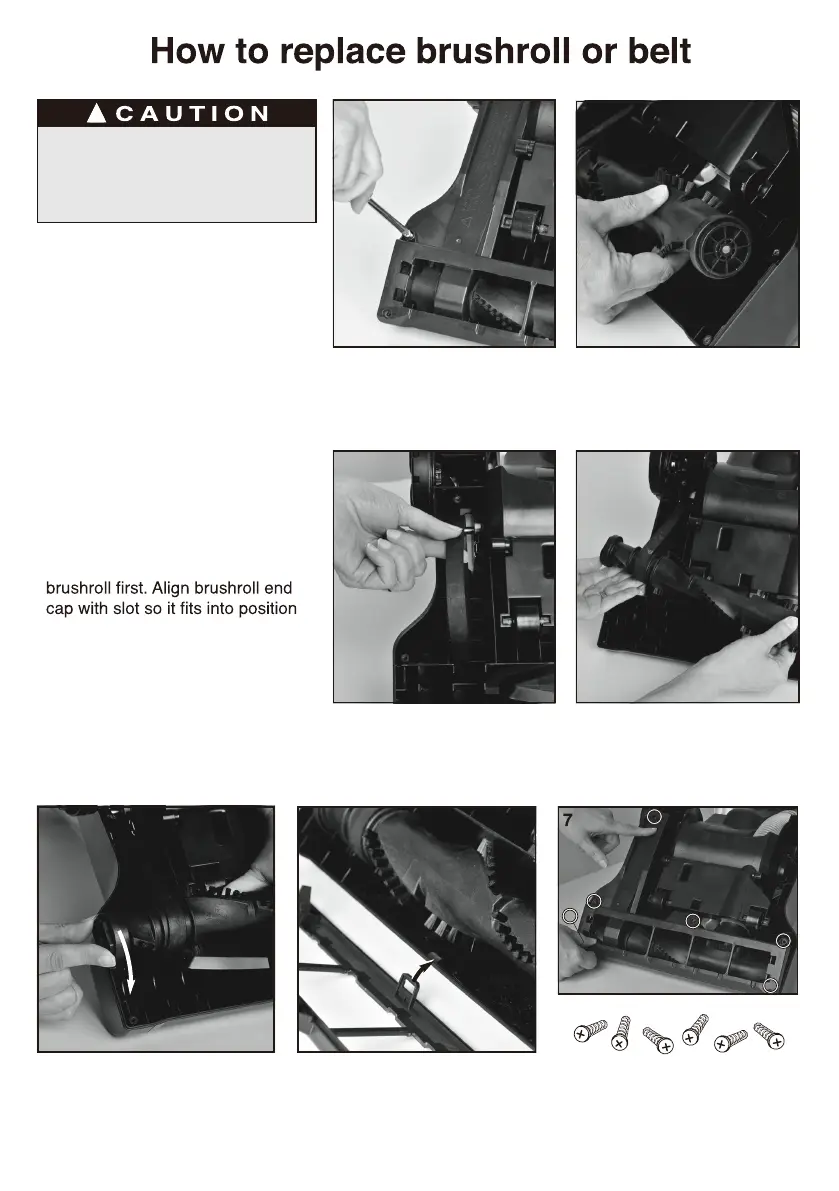
• Step on handle release and lay
vacuum cleaner face down.
• Use Phillips screwdriver to remove
6 screws from brushroll cover
(Fig. 1). Lift off cover. Refer to
Fig. 7 for location of screws.
• Rotate right end of brushroll and lift
out (Fig. 2).
• Lift out left end of brushroll.
• To replace belt, position new belt
around motor shaft (Fig. 3).
• Loop new belt around brushroll shaft
at left end of brushroll (Fig. 4).
• To reposition brushroll into base,
pull belt down and insert left end of
(Fig. 5). Press right end of brushroll
into position.
• To replace brushroll cover, align
slot on cover with tab (Fig. 6) and
snap cover into place. Replace 6
screws (Fig. 7).
1
3
2
4
5 6
3
2
1
4
6
5
Make sure vacuum is
turned off and power cord
is unplugged.



 To Next Page