6
GET TO KNOW YOUR VACUUM
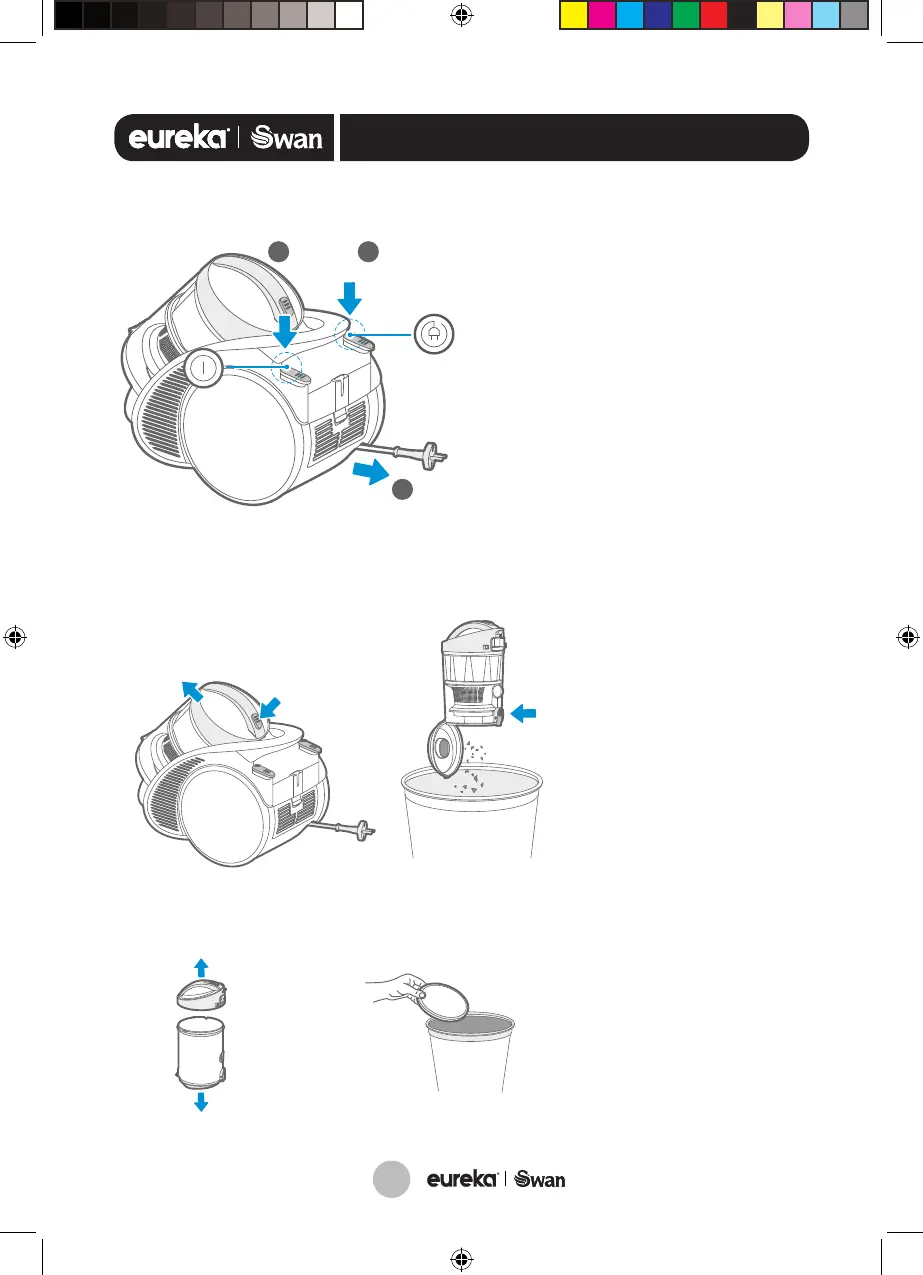
Remove the
dust tank
Push
Push
1
Dust tank maintenance
Open the dust tank: Gently lift the
dust tank open button, and then lift
up to open the dust tank cover.
Remove the filter cotton for
cleaning: Open the dust tank, remove
the filter cotton and clean it.
Clean the filter cottonSeparate
Filter disassembly and cleaning: Raise the filter and remove the filter cover,
put the filter and its bottom cover under the tap for washing.
Take out the filter
Separate
1. The filter parts can be put back for use only after being cleaned and dried thoroughly.
2. All parts must be properly installed, otherwise it will cause product failure.
3. Water is not allowed to penetrate into the vacuum cleaner electrical components, or otherwise
may cause product failure.
Illustration of the main unit
Pull out the power cord to connect the power
supply:When you see the red mark on the power
cord, do not pull the power cord outward.
Press the ON/OFF button:Control the start
and stop of the vacuum cleaner.
Press the take up button: The power cord
is automatically rolled back into the machine.
1
2
3
Push
2
1
Push
3
Pull
Remove the
dust tank
Push
Push
1
Dust tank maintenance
Open the dust tank: Gently lift the
dust tank open button, and then lift
up to open the dust tank cover.
Remove the filter cotton for
cleaning: Open the dust tank, remove
the filter cotton and clean it.
Clean the filter cottonSeparate
Filter disassembly and cleaning: Raise the filter and remove the filter cover,
put the filter and its bottom cover under the tap for washing.
Take out the filter
Separate
1. The filter parts can be put back for use only after being cleaned and dried thoroughly.
2. All parts must be properly installed, otherwise it will cause product failure.
3. Water is not allowed to penetrate into the vacuum cleaner electrical components, or otherwise
may cause product failure.
Illustration of the main unit
Pull out the power cord to connect the power
supply:When you see the red mark on the power
cord, do not pull the power cord outward.
Press the ON/OFF button:Control the start
and stop of the vacuum cleaner.
Press the take up button: The power cord
is automatically rolled back into the machine.
1
2
3
Push
2
1
Push
3
Pull
How to remove and empty
the dust tank
1. Gently lift the handle
of the dust tank
2. Push the release
button and carefully
empty the tank over
the bin. Keep it close
to the bin to prevent
overspill.
3. Clean the filter
cotton periodically
to maintain best
performance.
4. Open the dust tank at
the top. Remove and
wash the filter cotton.
5. Ensure it is
COMPLETELY dry
before refitting.
SC15814_16_IM.indd 6 19/10/2018 09:56




 To Next Page