• No petrol injection – controller detect no petrol injection in one or in a few petrol injector.
In the warnings window may appears following warnings:
• LPG injectors full open !!, - Check lambda sensor in full engine load – LPG injection loop
i.e. during LPG injection occurs next injection. If during warning’s appearance the
lambda probe is “rich” then the warning can be ignored, otherwise replace injector
nozzles with greater ones, what causes decrease of the multiplier.
In the bottom of the Errors window there is the button “Delete errors” designed for deletion of
recorded errors.
2.8. Map
The windows Map contains maps of the LPG controller:
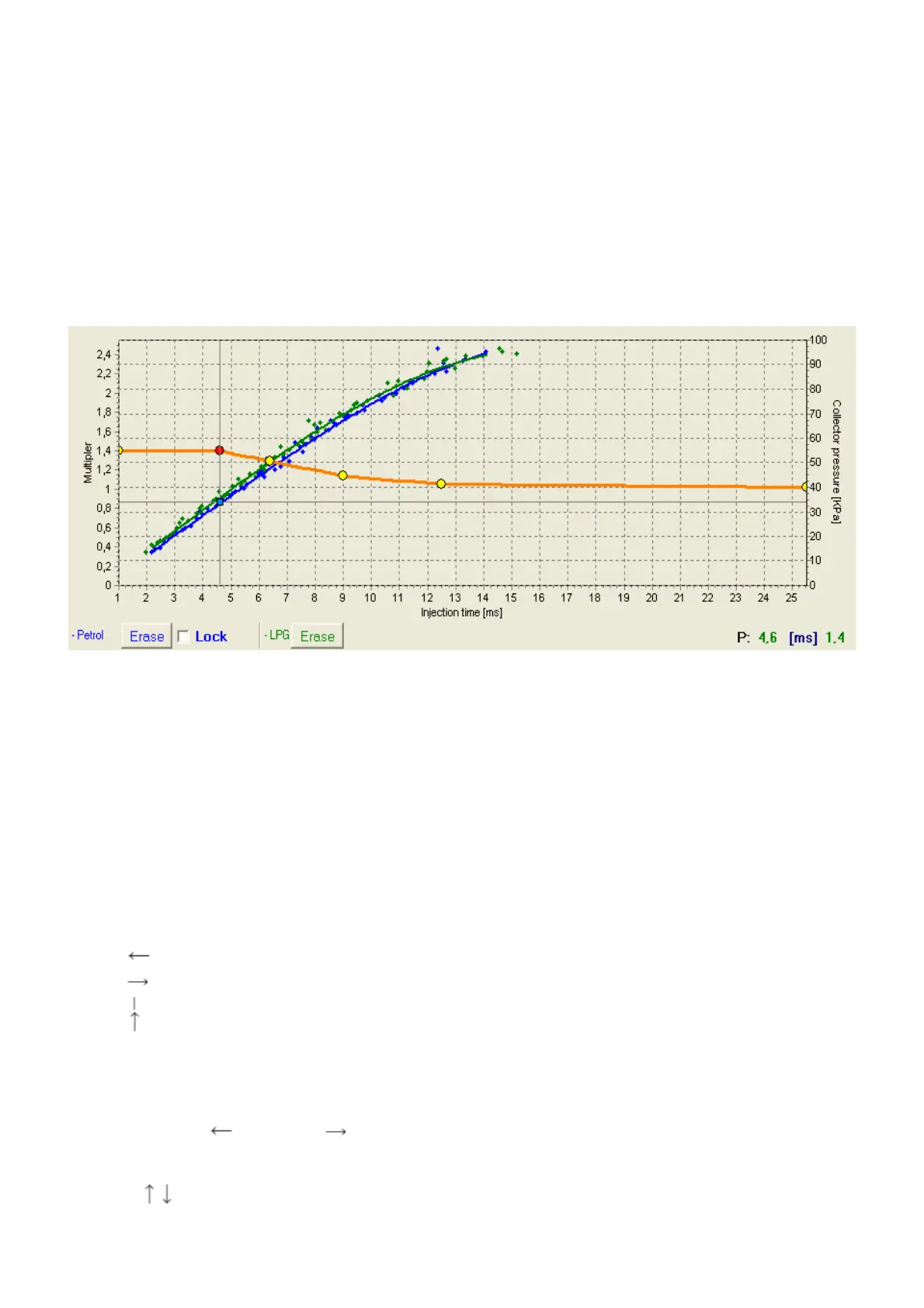
Fig. 9 Controller map
The Fig. 9 shows 3 maps:
• Multiplier map – orange
• Gasoline injection time map (with gasoline) – blue
• Gasoline injection time map (with LPG) - green
The multiplier map is coloured orange. The left axis of co-ordinates (i.e. Multiplier) and the
lower axis of co-ordinates (i.e. Injection time in [ms]) is subordinated to this map. The multiplier
map is designed for setting of the multiplier for given gasoline injection time. Points situated at the
map (yellow) are used for setting of the multiplier. After autocalibration at the map appear 2
extreme points and additionally 4 points in the centre of the map. To shift a point, first mark it by a
click. The value of marked point is displayed in the lower right corner of the map. Points can be
shifted on the map with following keys:
• arrow left – shifts the point left (change of injection time for given point)
• arrow right 0 shifts the point right (change of injection time for given point)
• arrow down – decrease of the multiplier for given injection times
• arrow up - increase of the multiplier for given injection times
• „Insert” (when a point is active) or left mouse click – adds new point
• „Delete” – deletes a point from the map
• „Page Up” – shifts the map upwards
• „Page Down” – shifts the map downwards
• „Ctrl” + , or „Ctrl” + change of the active point
With „Shift” pressed the shift is multiplied by 10 (quicker shift). If no point of the map is active,
arrows shift the entire map.
Besides of the multiplier map, the window contains two other maps. The blue map is
the map of gasoline injection times (with gasoline). The right (Collector pressure [MPa]) and the


 To Next Page
 Loading...