
 Need help?
Do you have a question about the Euroscan X3 and is the answer not in the manual?
Manual's scope, disclaimers, and intended audience.
Applicable regulations and document conventions used.
Key terms definition and recorder's intended operational conditions.
Safety guidelines, WEEE, and customer support contacts.
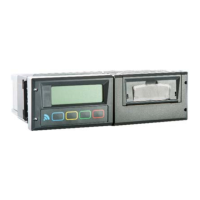
Details RX3/TX3 package contents and device differences.
Lists power, location, and tool requirements for installation.
Explains pinouts for power, serial ports, digital inputs, and temperature sensors.
Guides on recorder mounting and antenna positioning for optimal reception.
Covers initial setup, language, time, vehicle ID, and basic functionality testing.
Describes LCD, keyboard, printer, Bluetooth, and low power mode.
Details navigation of user menus for printing, alarms, settings, and status.
Procedures for inspection, error codes, and returns (RMA).
Guides on calibrating recorder accuracy and verifying sensor readings.
Lists device specs, dimensions, and unit removal instructions.
Outlines product warranty terms and service agreements.
 General
| Brand | Euroscan |
|---|---|
| Model | X3 |
| Category | Controller |
| Language | English |

 To Next Page