2
GB
Preparing the telephone for use
Recommended installation of telephone
◆ Do not expose the telephone to direct sunlight or other
sources of heat.
◆ Operate at temperatures between +5°C and +40°C.
◆ Maintain a distance of at least one metre between the
telephone and radio equipment, e.g. wireless
telephones, wireless pagers or TV sets. Otherwise,
telephone communication could be impaired.
◆ Do not install the telephone in dusty areas as this can
shorten the service life of the telephone.
◆ To clean, wipe with a moist or antistatic cloth only, never
with a dry cloth (risk of electrostatic charging and
discharge) or harsh cleaning agent.
◆ Furniture lacquer and polish can be damaged by contact
with parts of the unit (e.g. device feet).
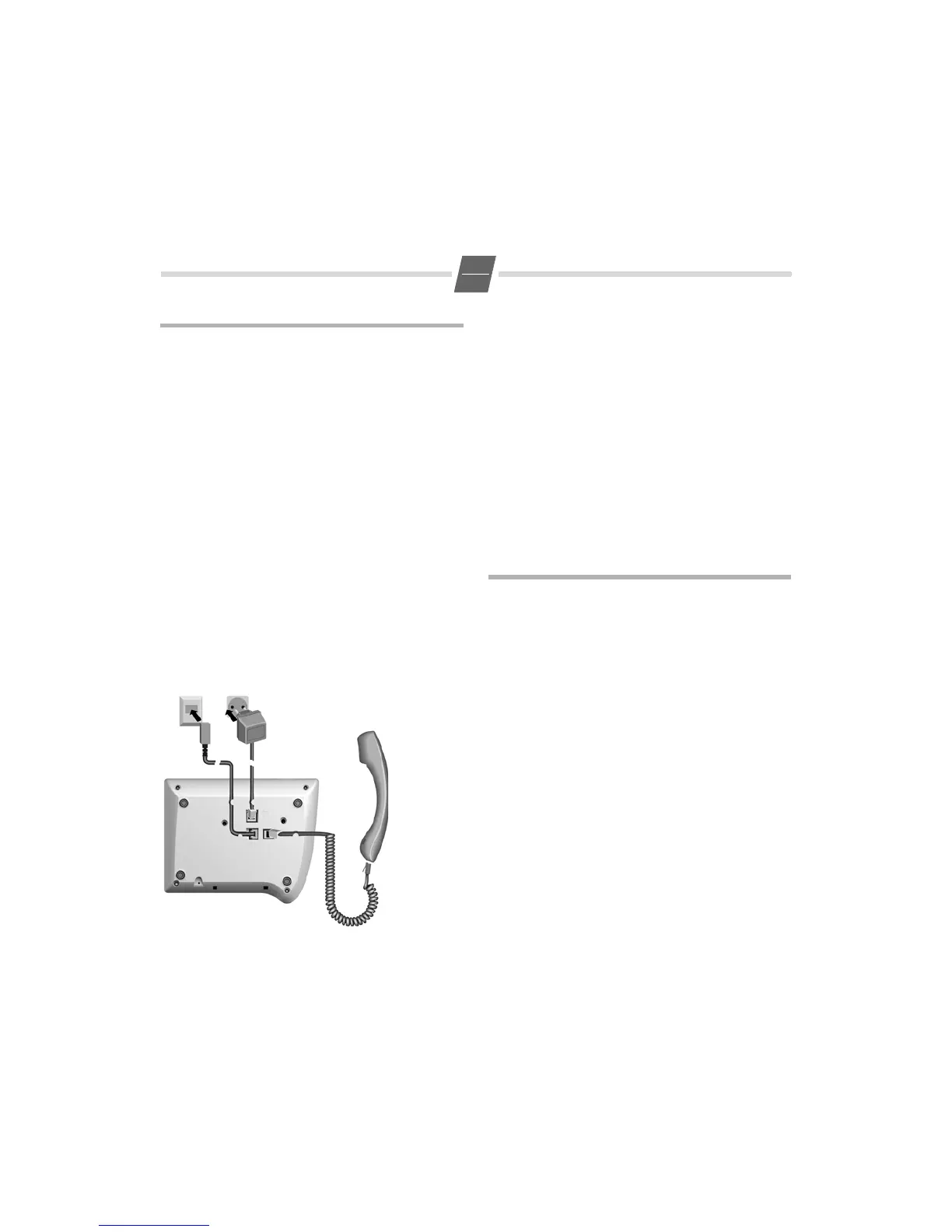
Connecting
Insert the short end of the coiled handset cord in the socket
provided in the handset and the long end in the socket
marked with an
a on the underside of the device. Plug the
phone cord into the outlet on the wall and the other end
into the socket marked with a
Y on the underside of the
device. Plug the adapter into the socket identified with "
and connect to the mains socket. Then your telephone is
ready to use.
Purpose of connecting to the mains using the adapter
If your telephone is connected to the mains using the
adapter, you can select and save all settings without lifting
the handset (or without pressing the loud-speaker button).
Without this mains supply, settings must be selected and
saved with the handset lifted (or after pressing the loud-
speaker button). Using the last number redial list and Call-
ing Line Identification and selecting the phone number are
only possible with main supply connection.
Setting the internal clock
?3 Initiate function.
The current set time is displayed in 24-hour
mode (default setting: 00:00).
o Enter the correct time in hours <hh> and
minutes <mm> (24-hour mode).
? Press the Set key.
Making calls
Dialling a number
co Lift handset, dial number.
or ...
oBc Dial number (you can delete wrongly entered
digits with
A and then enter the correct
digit) and press the OK key.
After 2 seconds the number is dialled.
Lift the handset if you want to talk via the
handset.
Any digits after the 20th digit are moved from right to left in
the display. The Last number redial key
; can be used to
insert pauses when dialling, starting from the 2nd digit.
Select phone number from the calls list (if available):
see 6.
Activating/deactivating handsfree talking
With this telephone you can also make calls (handsfree
mode) or settings without lifting the handset if the adapter
is connected. The best distance from the microhone for
speaking is about 50 cm.
◆ Activating during a call via the handset
L + a With the Loudspeaker key pressed replace the
handset.
◆ Activating before dialling the number
L Before dialling: hold down the Loudspeaker
key until you can hear the dialling tone.


 To Next Page