
 Need help?
Do you have a question about the Eurotech ReliaGATE 10-14 Series and is the answer not in the manual?
Explains hazard symbols (Danger, Warning, Caution) and their meanings.
Guidelines for safe power supply connection and usage to prevent hazards.
Precautions for antenna installation to avoid interference and ensure safety.
Warns about hot surfaces and advises to let the product cool before touching.
Steps to follow to obtain technical assistance from Eurotech.
Procedures for returning a product for repair, including packaging advice.
Explains the conventions used for signal names in the documentation.
Details the conventions used for signal types (Input, Output, Power, etc.).
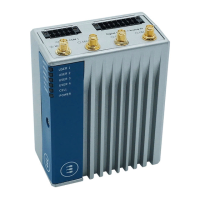
Overview of the ReliaGATE 10-14, its features, and capabilities.
Specifies the authorized and unauthorized applications for the product.
Lists the technical specifications of the ReliaGATE 10-14 across different versions.
Details the available optional accessories for the ReliaGATE 10-14.
Describes the labels found on the product and their content.
Information regarding CE marking and compliance for product versions.
Details compliance with RoHS 3 directive on hazardous substances.
Information on compliance with the Radio Equipment Directive (RED).
Regulatory notices related to FCC and ISED for radio frequency devices.
Lists antennas certified for use with the ReliaGATE 10-14.
Explains the meaning and color of the product's LED indicators.
Overview of connectors and ports located on the top side of the device.
Overview of connectors and ports located on the bottom side of the device.
Overview of connectors and ports located on the right side of the device.
Details the service panel on the left side and its included interfaces.
Step-by-step instructions for safely removing the service panel cover.
Describes the interfaces located within the service panel.
Information on how to use the MicroSD and MiniSIM card holders.
Detailed specifications and connector information for Wi-Fi and Bluetooth.
Specifications for the internal cellular modem and GNSS functionality.
Details the specifications and connectors for digital and analog I/O.
Technical details for the RS-232/422/485 serial ports.
Information on the DisplayPort connector and its pinout.
Details the specifications for the two USB 2.0 host ports.
Technical specifications and LED meanings for the Ethernet ports.
Details the expansion connector and its available interfaces.
Information on the TTL serial console and its connector specifications.
Describes the two RTC devices and their usage.
Explains the anti-tamper function and how intrusion events are recorded.
Describes the watchdog timer used for system reset when unresponsive.
Information about the Linux OS distribution and SDK provided by Eurotech.
Critical guidance on maintaining power during software installation and updates.
Information on Docker installation and management for containers.
Details on installing and using Microsoft IoT Edge.
Explains the system firewall rules and how to disable it.
Description of the device's partition layout and their purposes.
Lists the default usernames and passwords for accessing the console.
Step-by-step guide for accessing the console using a serial connection.
Instructions for logging into the console using SSH.
Procedure for changing the default root password for security.
How to use and control General Purpose IO lines via sysfs.
Instructions on how to control the product's LED indicators using GPIO.
How to use the opto-isolated digital inputs and outputs.
Details on how to read values from the analog input converters.
Information on configuring and using the serial ports (RS-232, RS-422, RS-485).
Guide to using the internal cellular modem, including SIM selection.
How to set the Wi-Fi regulatory domain for optimal performance.
How to read the status of the user-programmable pushbutton.
Explains the ignition key functionality and its interface.
Details on tamper detection events and timestamp registers.
How to read accelerometer and gyroscope values from the device.
Instructions for reading internal temperature sensor data.
How the user-programmable pushbutton performs factory restore.
Provides the physical dimensions of the ReliaGATE 10-14 enclosure.
Instructions for mounting the product on a DIN rail.
Details the electrical specifications for the product's power input.
Explains the pinout and specifications of the Power IN connector.
Step-by-step guide on how to connect power and turn on the device.
Instructions for safely shutting down and turning off the product.
How to perform a hardware reset using the reset pushbutton.
Critical steps for safely disconnecting the power supply to avoid hazards.
Steps to check the product is correctly and securely installed.
Guidelines for cleaning the product safely and effectively.
 General
| Power Supply | 9-36 VDC |
|---|---|
| USB Ports | 2 x USB 2.0 |
| Connectivity | Wi-Fi, Cellular, Bluetooth |
| Operating System | Linux |
| I/O Ports | Digital I/O |
| Certifications | CE, FCC |
| Ethernet | Dual Gigabit Ethernet |

 To Next Page