SCOOTER
OPERATION
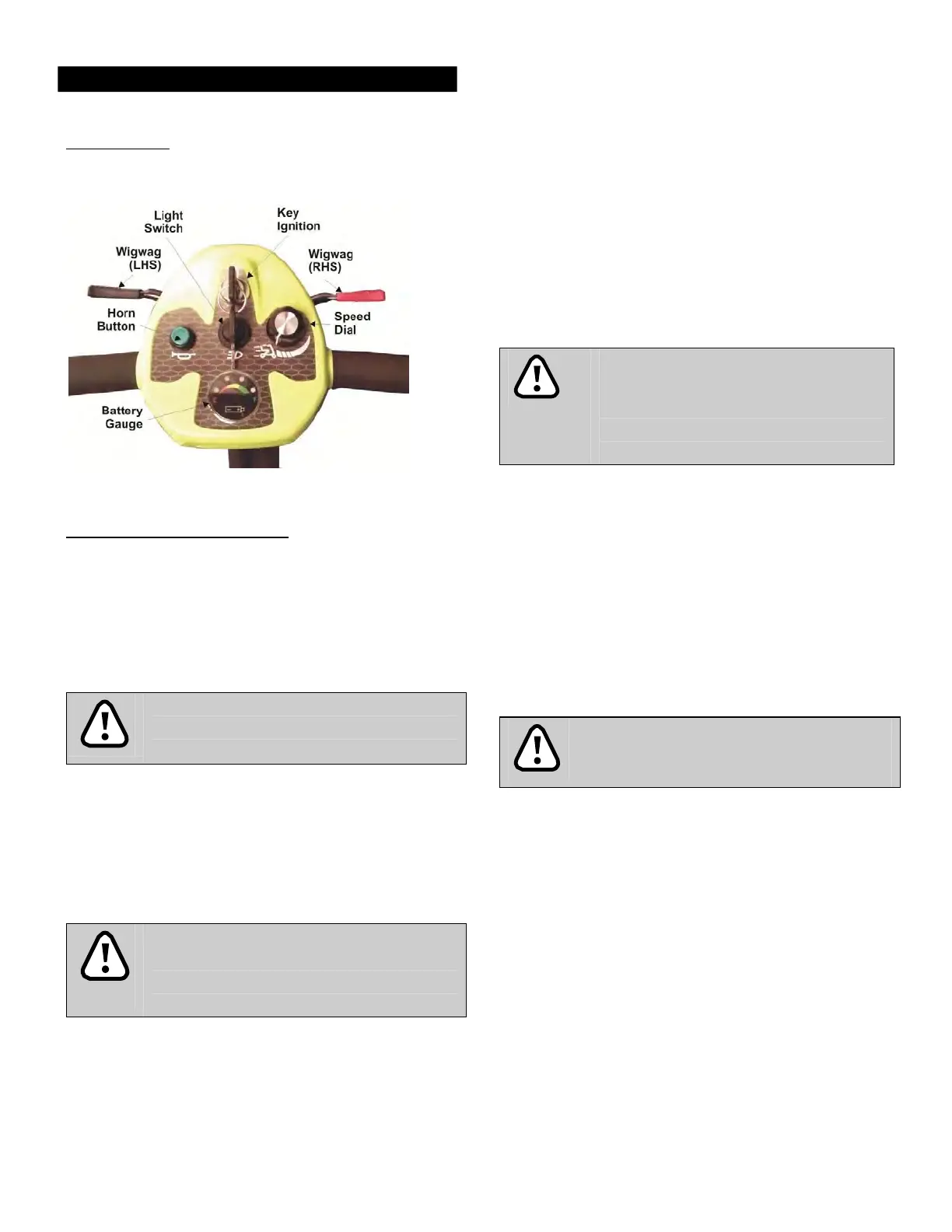
Control Panel
handle
ba
rs
.
Squeeze
the left hand
side
of the
wigwag paddle (BLACK) towards you
and the
scooter
will
move
ba
ck
ward
s
,
emitting an audible
reverse
a
la
r
m
.
To
b
ra
ke
,
release
the wigwag
paddle which
will return to neutral and activate
the
electromagnetic brake automatically
and
bring the
scooter
to a prompt
s
to
p
.
The
wigwag
paddle allows you
to control the
speed
of the
scooter
up to a
maximum speed determined
by
the
Speed Dial. The
further the
wigwag paddle
is
d
e
fle
cted
,
the
faster
the
scooter
will go
(up
t
o
3
.
5
m
p
h
)
.
Warning
Do not operate both left and right hand
sides
of the
wigwag
s
i
mu
lt
a
neou
s
ly
.
You
will not be able to control the
s
coote
r.
How To
Operate Your Scooter
•
Key
Ign
i
t
i
on
.
The key
ignition acts
as
the power
switch
for the
scooter. To switch
the
power
on
,
turn the
key clockwise
and battery
gauge
should
i
llu
m
i
n
a
te
.
To switch
the
power
off, turn the key
counter-
clockwise
,
after
which
the battery gauge
should switch
off and the
key can
be
r
em
o
ve
d
.
Do not turn the ignition off
wh
i
le
riding
as
t
h
i
s
will lead to an
emergency stop
and
possible risk
of
damage
or
in
j
u
ry
.
•
Speed Dial. Turn
the
speed
dial to
determine
the
maximum speed
of the
scooter. Turn
the dial
clockwise
to
increase
the
speed setting
and turn
the dial
counter-clockwise
to
decrease
the
s
p
ee
d
s
e
ttin
g.
Do not
adjust
the
speed
dial
while riding
as
t
h
i
s
could result
in
loss
of
control.
Do
not
s
e
t
the
highe
s
t
speed while riding
indoors.
•
Moving and
Braking.
To
move forwa
r
d
,
s
q
uee
z
e
the right
hand side (RED)
of the wigwag paddle
with
your hand towards you
while
holding
the
•
Horn
Bu
tton
.
Press
the
horn
button to
sound
the
h
orn
.
Release
the button to
stop
the
ho
rn
.
The
horn is
the
green
button located
on
the control
panel.
•
Braking
–
E
le
ctr
omagne
t
i
c
Bra
ke
.
Release
the
wigwag paddle
com
p
le
tel
y
,
and the
electromagnetic brake
will be activated
automatically
and the
scooter
will
s
top
.
When
on a
gradient, never
s
e
t
the vehicle
to
freewheel
m
ode
.
The brakes
will not be
app
li
e
d
.
•
Light. Press
the light
switch
to turn
on
the
headlight. Press
the light
switch
again to turn the
light off.
N
ote
:
the light will
only
operate if the
power i
s
switched on
at the
ign
i
ti
on
.
•
Handlebar
Height
Ad
j
u
s
t
men
t
.
Turn
the large
adjustment knob on
the front of the
t
i
lle
r
anticlockwise
to
release
the
handlebar. Slide
the
handlebar
to the
required positi
on
,
then turn the
knob clockwise
to
secure
the
handlebar
in
p
la
ce
.


 To Next Page
 Loading...