05/06
Use in RX Mode
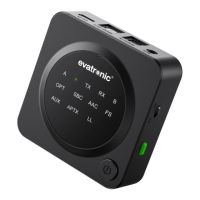
Pair with the 1st Bluetooth® Device
1. Slide the Mode switch to “RX” mode and connect the adapter to
your non-Bluetooth audio receiving device.
2. Turn on the adapter and press the Pairing Button once to enter
pairing mode, and the indicator “RX” will flash quickly.
3. Activate the Bluetooth® function on your phone/tablet, find
“ET-BA007” in the search results and tap to connect (enter the
password “0000” if needed). Once connected, the indicator
“A” will turn solid on.
Use in TX Mode
Pair with the 1st Bluetooth® Device
1. Slide the Mode switch to “TX” mode and connect the adapter to
your non-Bluetooth audio transmitting device.
2. Turn on the adapter and press the Pairing Button once to enter
pairing mode, and the indicator “TX” will flash quickly.
3. Turn on and place your Bluetooth audio receiving device, like
earphones or speakers, within a 3 feet / 1 meter range and
pairing will be completed automatically. Once successfully
paired, the indicator “A” will turn solid on, and the Codec
indicator for the current streaming codec will light up.
Pair with the 2nd Bluetooth® Device
1. After connecting with the 1st Bluetooth® device, press the Pairing
Button once, and the indicator “RX” will flash quickly.
2. Activate the Bluetooth® function on your 2nd phone/ tablet, find
“ET-BA007” in the search results and tap to connect. Once
connected, the indicator “B” will turn solid on.
Note:
· The adapter will enter pairing mode automatically when
powered on for the first time.
· The adapter can remember the devices paired previously,
and will attempt to pair with the last connected devices (up to
2 devices) automatically once it is turned on.
· Make sure your optical cable is plugged in SPDIF OUT/AUX
port in RX mode.
Note:
We recommend charging the unit for at least 2 hours before
using it for the first time.


 To Next Page
 Loading...