
 Need help?
Do you have a question about the Evenflo PreciseRead and is the answer not in the manual?
Details components of the thermometer with numerical labels for easy recognition.
Step-by-step guide to replace batteries and explanation of the low battery indicator.
How to access and review stored temperature readings on the device.
Instructions on clearing all stored temperature data from the thermometer's memory.
The Evenflo PreciseRead Touchless Forehead Thermometer is a versatile 2-in-1 device designed for home use, capable of measuring both body temperature for people of all ages and food/liquid temperatures. Its primary function is to provide quick and accurate temperature readings without direct contact, making it a convenient and hygienic option for families.
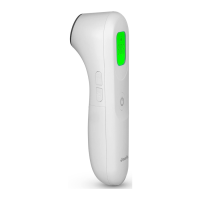
The thermometer utilizes a patented Infrared PreciseRead proximity sensor to ensure accurate measurements. It offers a one-second reading time, allowing for rapid results, which is particularly useful when measuring the temperature of infants or uncooperative individuals. The device features a 3-color LCD display that provides a visual fever alert, making it easy to interpret readings at a glance. A red backlight indicates a temperature of 100.4°F (38°C) or higher, accompanied by a frowning face graphic, signaling a fever. An amber backlight with a smiling face graphic indicates a temperature between 99.5°F and 100.3°F (37.5°C - 37.9°C), while a green backlight with a smiling face graphic signifies a temperature less than 99.5°F (37.5°C). This visual cue system helps users quickly assess the severity of a temperature reading.
For added convenience, the thermometer includes a quiet mode, referred to as "Night Mode," which mutes beeps during operation. This feature is ideal for nighttime use, allowing parents to check temperatures without disturbing a sleeping child. The device also incorporates power-saving features, including an auto power-off function that activates after 60 seconds of idling, helping to preserve battery life.
The Evenflo PreciseRead thermometer offers a °F/°C switchable function, allowing users to select their preferred temperature scale. It also boasts a multi-memory recall feature, capable of storing up to 10 temperature measurements. This memory function enables users to track temperature trends over time and share this information with healthcare professionals. A "Low Battery" symbol and "Lo"/"Hi" symbols are displayed to indicate when the battery is low or when the measurement is out of range, respectively. The ergonomic design includes a large LCD display and clearly marked buttons for ease of use.
Before taking a measurement, it is crucial to acclimate the thermometer to room temperature for 30 minutes to ensure accuracy. Users should avoid measuring temperature for 30 minutes after exercise, bathing, or returning from outdoors. If the patient's skin is covered with hair, sweat, or dirt, the area should be cleaned, and a 10-minute waiting period should be observed before taking a measurement. For body temperature readings, the thermometer should be positioned approximately 1 inch (2.5 cm) from the center of the patient's forehead, with the sensor aimed between the eyebrows. The device will beep and display the temperature with the corresponding colored backlight and graphic once the reading is complete.
When measuring food or liquid temperatures, the thermometer should be positioned approximately 1 inch (2.5 cm) from the item. In this mode, the temperature will always display with a green backlight, regardless of the reading, and the device does not provide alerts for excessively hot or cold temperatures. Users are advised to ensure that any food or liquid is at a safe temperature for their child.
The thermometer offers four measuring modes: Body Temperature, Food/Liquid Temperature, Body Temperature Night Mode, and Food/Liquid Temperature Night Mode. These modes can be toggled by pressing the Mode button. Switching to Body Temperature and Food/Liquid Temperature modes is accompanied by a beep, while Night Modes operate silently.
The memory function allows users to recall the last 10 measurements. To view stored readings, the Memory Button should be pressed briefly when the thermometer is on. Pressing it repeatedly cycles through the stored measurements. To delete all stored readings, the Memory Button should be pressed and held until a beep is heard and "- -" appears on the LCD. Alternatively, removing the batteries will also clear the memory.
Maintaining the Evenflo PreciseRead thermometer is straightforward. For home use disinfection, 75% alcohol (available in pharmacies) can be used. The measurement sensor should be cleaned with an alcohol swab before and after each use to ensure accuracy and hygiene. The body of the thermometer can be cleaned with a soft, dry cloth. It is important to avoid using abrasive cleaning agents, thinners, or benzene, as these can damage the device. Users should also refrain from scratching the surface of the probe lens or the display. The thermometer should not be exposed to extreme temperatures, high humidity, direct sunlight, or shock.
Battery replacement is simple. The device uses two 1.5V alkaline AAA (LR03) batteries. When the low battery indicator appears, the batteries should be replaced as soon as possible. If the batteries are completely depleted, "Lo" will be displayed. To replace them, the battery cover slides down, old batteries are removed and properly discarded, and new batteries are inserted in the direction indicated in the compartment before sliding the cover back into place. It is crucial to always replace the entire set of batteries at one time and never mix old and new batteries, different brand types, or incorrect battery types. Batteries should be removed when storing the product for a long time to prevent leakage and damage. The thermometer should never be immersed in water.
 General
| Measurement Type | Forehead |
|---|---|
| Display | Digital LCD |
| Battery | 2 AAA batteries |
| Age Range | All ages |
| Warranty | 1 year |
| Auto Shut-off | Yes |
| Fever Indicator | Yes |
| Accuracy | ±0.4°F (±0.2°C) |

 To Next Page