
 Need help?
Do you have a question about the Eventide Mixing Link and is the answer not in the manual?
Explores various practical applications for the device's functionality.
Provides the official website for user guide updates and FAQs.
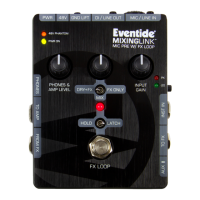
Adjusts the pre-amp gain for microphone and line inputs.
Selects between high and low gain ranges for the input.
Indicate signal peak clipping and -20dB level for the pre-amp output.
Balances the dry signal with the FX return signal.
Selects how dry and FX return signals interact.
Controls the output volume for headphones and main outputs.
Activates/deactivates the effects loop and indicates its status.
Changes the FX loop footswitch action between momentary and latching.
Controls phantom power for mics and the battery power switch.
Indicates when phantom power is active.
Shows that the unit is powered on.
Disconnects ground from the DI/Line Out XLR connector to prevent loops.
Accepts balanced mic/line signals via XLR or 1/4" TRS.
High impedance input for instruments and unbalanced signals.
Outputs the pre-amp signal to external effects.
Receives the processed signal from external effects.
Connects to mobile devices for audio input/output.
Unbalanced mono output for connecting to amps or pedals.
Stereo output for headphones, driven by the PHONES & AMP LEVEL knob.
Balanced output for PA systems or interfaces, switchable DI/Line level.
Connects the AC adapter for power supply.
Instructions for installing and powering the unit with a 9V battery.
Controls whether FX loop tails (repeats) are muted when bypassed.
Details input/output levels and impedances for various connectors.
Specifies the required voltage, current, and connector type for power.
Provides physical measurements of the unit in English and metric units.
States the weight of the device in pounds and kilograms.
Outlines covered defects, exclusions, and limitations of the manufacturer's warranty.
Defines eligibility for warranty service based on original purchaser status.
Specifies the start date of the one-year warranty period.
Identifies Eventide Inc. as the sole authorized service provider.
Details shipping responsibilities for warranty service within the US.
Provides instructions for returning the unit for service from outside the US.
 General
| Phantom Power | 48V |
|---|---|
| THD+N | <0.005% (1kHz, +4dBu) |
| EIN | -128dBu (A-weighted) |
| USB | No |
| Type | Microphone Preamplifier |
| Inputs | 1 x XLR, 1 x 1/4" |
| Outputs | XLR, 1/4" TRS |
| Input Impedance | 1 MOhms |
| Output Impedance | 100 Ohms |
| Frequency Response | 20Hz - 20kHz |
| Power | 9V DC |

 To Next Page