EasyManua.ls Logo

Everflourish EMT757 - User Manual

Everflourish EMT757
4 pages
Print Icon
To Next Page IconTo Next Page
Loading...
1/4
Instruction Manual for
Programmable Digital Timer
Item No.: EMT757
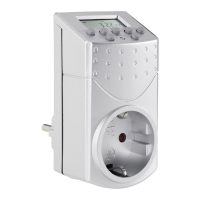
A. Functions
1. The Programmable Digital Timer (hereinafter refer as “Timer”) can preset specific on/off
time of your home electrical appliances, e.g. using in coffee machine, lamps. It is ideal for
energy saving and home security.
2. The countdown function can switch on/off your appliance on your pre-set time and
random functions allows you to switch on and off the appliance in irregular time, it is not
only ideal for home automation, also prevent burglary during your absence.
3. The LCD displays program setting status and real time.
4. With maximum 140 on/off programs per week .
B. Diagram & Descriptions
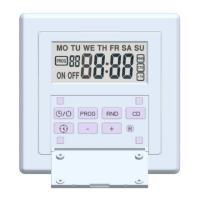
No. Description Functions
1 LCD Display Shows time and program setting.
2 CLOCK button Return to real time display when in program setting
press together with SET Button to set real time and week
press together with Button to change to Summer Time
3 CD button Press the button to start/stop countdown program when it is in
AUTO status
4 RND button Press the button to start/stop random program when it is in AUTO
status
5 On/Off button Change the setting mode to ON, ATUO or OFF. When press the
button each time, the horizontal line in the LCD moves to
ONÅÆAUTOÅÆOFF which were silk printed on the Timer
6 SET button To set time and week and to confirm setting
7
+ button
Press the button to increase the time, week or program group
8
- button
Press the button to reduce the time, week or program group
9 S - silk screen
printing
Press CLOCK Button and Button at the same time to change to
Summer Time. Time display adds one hour automatically and “S”
are shown on the LCD.
10 Reset button Press once to reset all your preset programs
11 Socket & Plug Connect your appliance to the socket and plug the timer to the wall
AC socket to get power
C. Time Display
There are two different kinds of time displays:
1. 12-hour display: the digital number is from 11:59 to 12:00 with AM or PM shown on the
LCD
2. 24-hour display: the digital number is from 00:00 to 23:59, no AM or PM is shown on the
LCD
More timers and manuals:
http://waterheatertimer.org/Woods-timers-and-manuals.html#seven
Question and Answer IconNeed help?

Do you have a question about the Everflourish EMT757 and is the answer not in the manual?

Summary

Timer Functions and Features

Programmable Timer Overview

Explains the timer's purpose for energy saving and home security.

Countdown and Random Functions

Details countdown and random functions for automation and security.

LCD Display Information

States the LCD shows program setting and real time.

Weekly Program Capacity

Mentions the timer supports up to 140 on/off programs weekly.

Timer Diagram and Component Descriptions

LCD Display

Shows time and program setting status.

Clock Button

Returns to real time display from program setting.

CD Button

Starts/stops countdown program in AUTO status.

RND Button

Starts/stops random program in AUTO status.

On;Off Button

Changes setting mode to ON, AUTO, or OFF.

SET Button

Used to set time and week, and confirm settings.

Increase;Decrease Buttons

Buttons to increase or decrease time, week, or program group.

Summer Time Button

Button combination for Summer Time change.

Reset Button

Resets all preset programs.

Socket and Plug

Connects appliance to timer and timer to wall socket.

Time Display Modes

12-Hour Display

Shows AM/PM with digital numbers from 11:59 to 12:00.

24-Hour Display

Shows digital numbers from 00:00 to 23:59 without AM/PM.

Setting Time and Week

Changing Time Display Format

Press and hold CLOCK button to switch between 12-hour and 24-hour formats.

Week Setting

Sets the current day of the week.

Time Setting

Sets the current hour and minute.

Summer Time Setting

Changes to or cancels summer time by adding or removing one hour.

Program Setting Procedures

Selecting Program Group and Status

Select program group number (1-14) and ON/OFF status.

Setting Program Week and Time

Configure specific days of the week and ON/OFF times for programs.

Countdown Setting

Entering Countdown Mode

Press button to change to countdown setting display, showing 'd ON' or 'd OFF'.

Setting Countdown Duration

Set the ON or OFF duration for the countdown function in hours, minutes, and seconds.

Activating Countdown

Connect timer to AC socket, set to AUTO, then press CD button to start.

Random Setting

Random Function Overview

Turns the appliance on and off irregularly with specified time ranges.

Setting Random Function

Activate by pressing RND button; power off 26-42 min, power on 10-26 min.

Disabling Random Function

Press RND button again to disable the random function.

Override and Resume Preset Program

Manual Override Modes

Cycles through ON (override on), AUTO (resume preset), and OFF (override off) states.

Function Activation Notes

Preset, countdown, or random functions activate only in AUTO status.

Connections and Safety

Connecting the Timer

Preset programs, switch off appliance, connect cord, then plug into socket.

Safety Precautions

Indoor use only, match voltage/frequency, battery charges in 2 hours.

Technical Specifications

Details current, max power, IP rating, working temperature, and setting interval.

Everflourish EMT757 Specifications

Power IconPower
current230V~, 50Hz, 8A
max power2000W
Operating Environment IconOperating Environment
ip ratingIP20
working temperature0 - 25°C
time setting interval1 Minute

Related product manuals