HOW TO : PRINTER CONNECTION
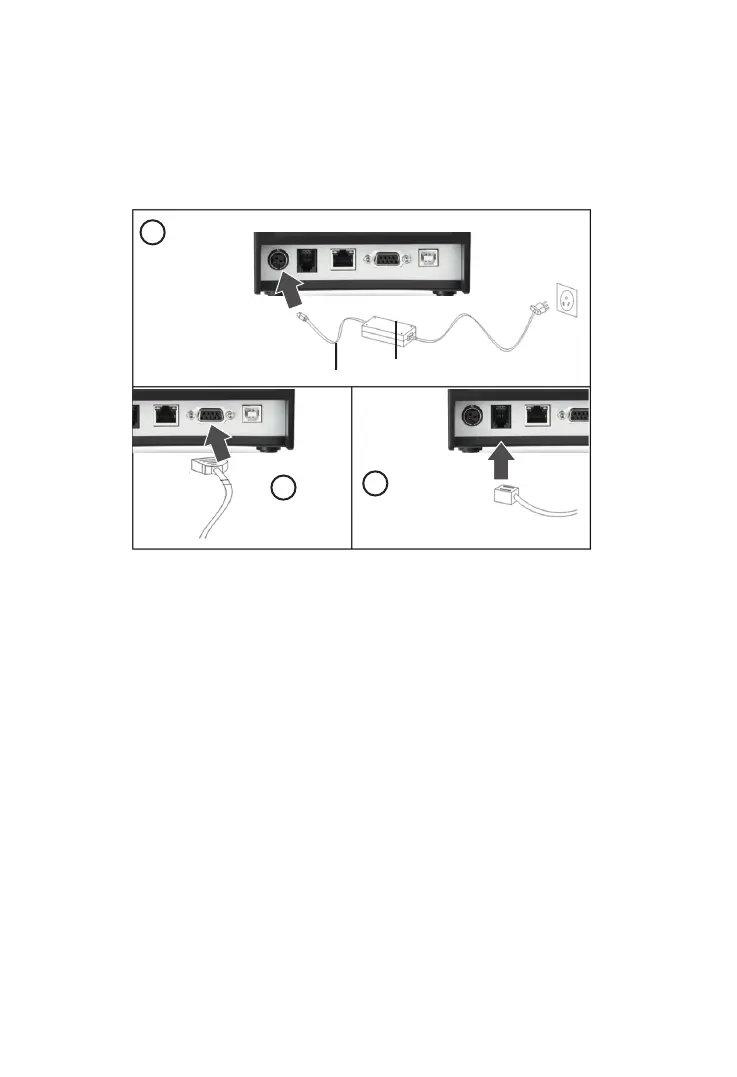
1. Connect the power adapter cable to the printer power supply interface.
2. Connect the USB data cable to the printer’s USB interface.
3. If you have cash drawer, connect its cable to printer’s RJ11 interface.
HOW TO : LOAD PAPER
1. Press the cover open button situated on the left side of the printer.
2. Put the paper roll inside the paper holder as shown in the image below.
3. Pull out paper just a little that it comes out of printer.
4. Press the cover down to close it, tear off excess printing paper.
Note : Be careful on the roll direction, if reverse direction , printer won’t be
able to print the content.
1
2
3
Power Adaptor
Power Cable


 To Next Page