HOW TO : RESTORE FACTORY DEFAULT SETTINGS
If printer is powered on, kindly power it off using the power switch on the
front panel.
Press the feed key and power on the printer at the same time using the
power switch on the front panel. ( Do not release the feed key yet )
After approximately 10 seconds release the feed key and printer settings
will be restored to factory default.
HOW TO : FIX STUCK AUTO CUTTER
Solution 1 : Restart the printer by turning it off and then turning it back on
using the power button on the panel.
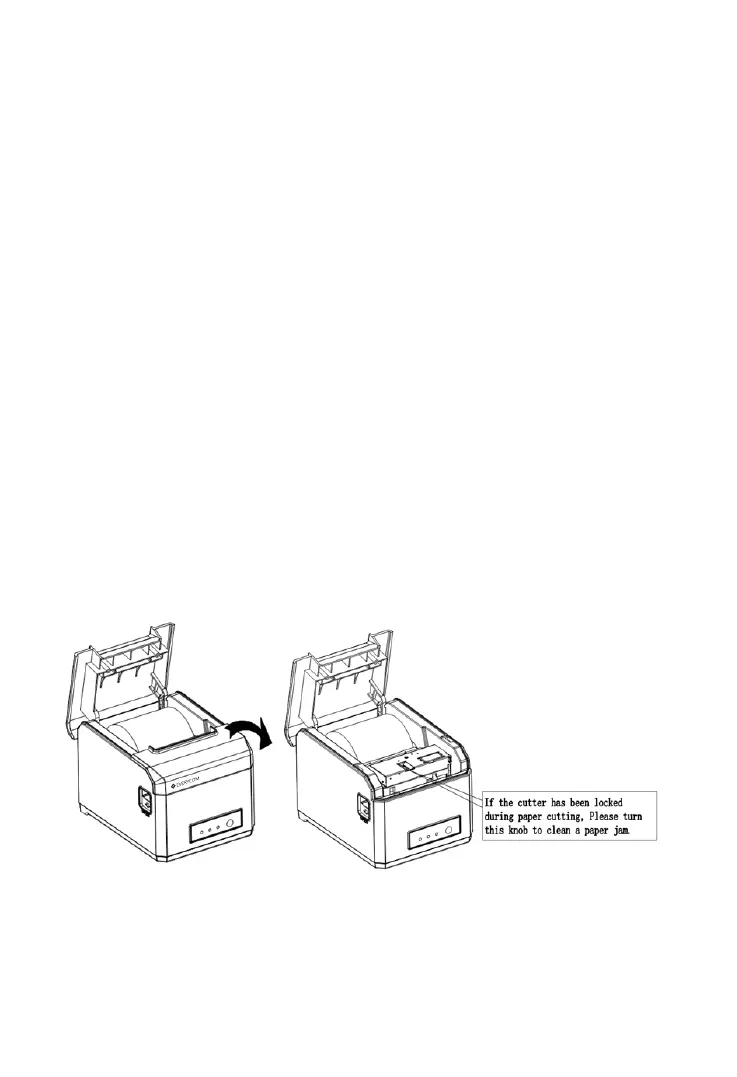
Solution 2 : Turn off the printer using the power button on the panel,
Open the front printer cover ( as shown in image below ) rotate the auto
cutter’s cutting knife gear, let the cutter return to its initial position. Once
done close the printer cover and turn on the printer using power button on
the panel. Resume printing.
front
front
front
Image for reference purpose only, Actual model of the product may differ.


 To Next Page