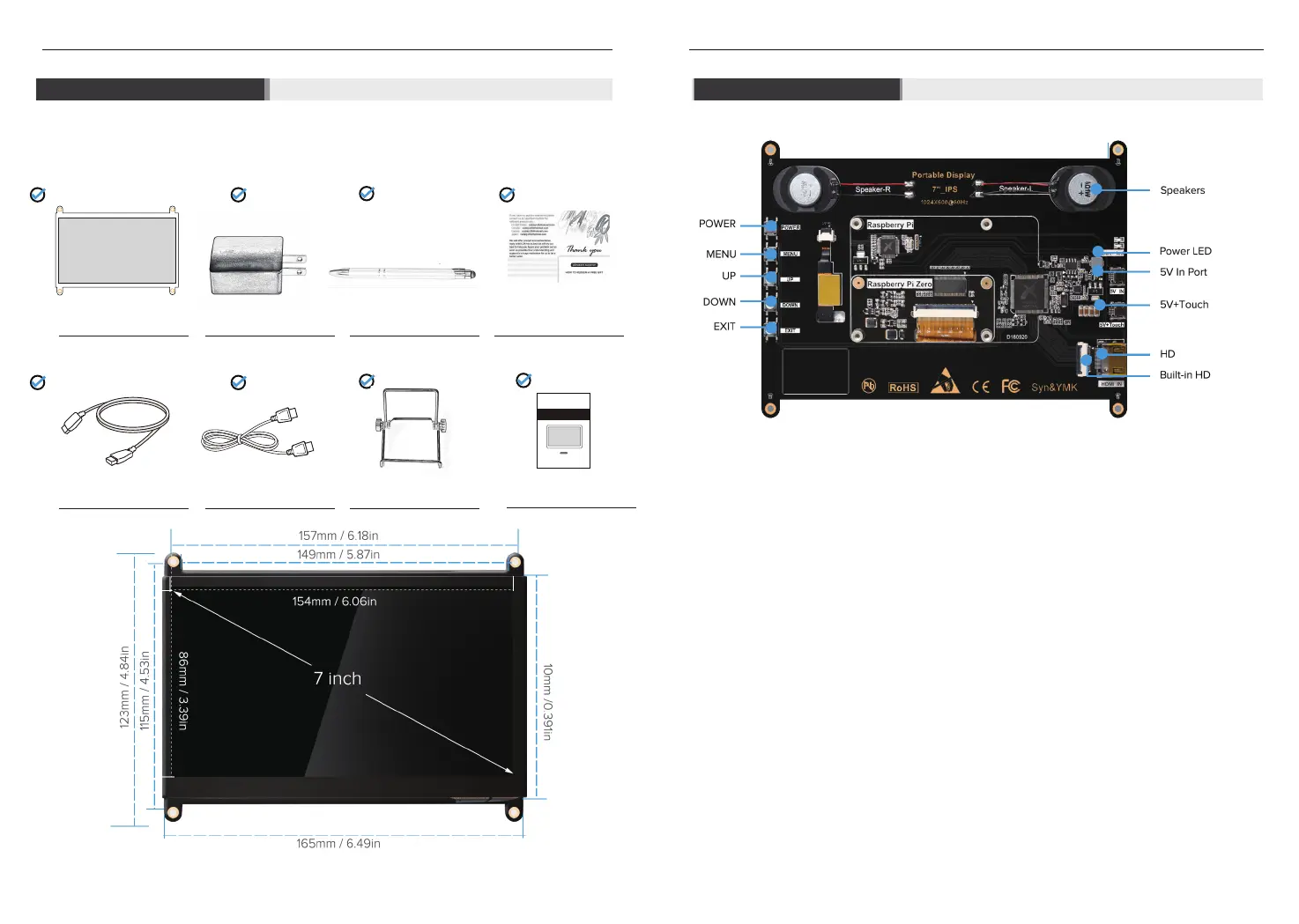
Product List Button&Port
7 Inch HDMI LCD Monitor 5V/2A Adapter
Stylus Pen
Thanks Card
micro USB Cables Standard HDMI Cable Stand
2
3
User Manual
Monitor User Manual
For 13.3 inch 1080P HDMI Portable Monitor
DS13302
Power On/Off
After entering the menu Option, Press the Menu button,then enter the lower menu or confirm command
function.
It includes menu items such as brightness contrast, image adjustment, color temperature, location, setting,
etc.
Volume Up/Former Setting
Volume Down/Next Setting
The EXIT button is the return button. When you need to return the previous setting operation, please
press the button.
Speakers
Power LED
Port for power supply.
The touch function is available when the 5V+Touch port is connected.
for HDMI cable's connection, is used to transmit signal;
for the Raspberry Pi board and the monitor's connection by a ribbon HDMI cable, is used to transmit signal
Power:
Menu:
UP Button:
DOWN Button:
EXIT button:
Speakers:
Power LED:
5V/IN Port:
HDMI Port :
Buit-in HDMI Port :
5V+TOUCH Port:



 To Next Page