Console instruction
1. MODE
Speed, time, distance, temperature, pulse, average speed, max speed, total distance and scan.
2. SET
a) RESTORATION: restoration of distance, time, average speed and max speed.
b) Data adjustment
Speed unit, wheel perimeter, time setup
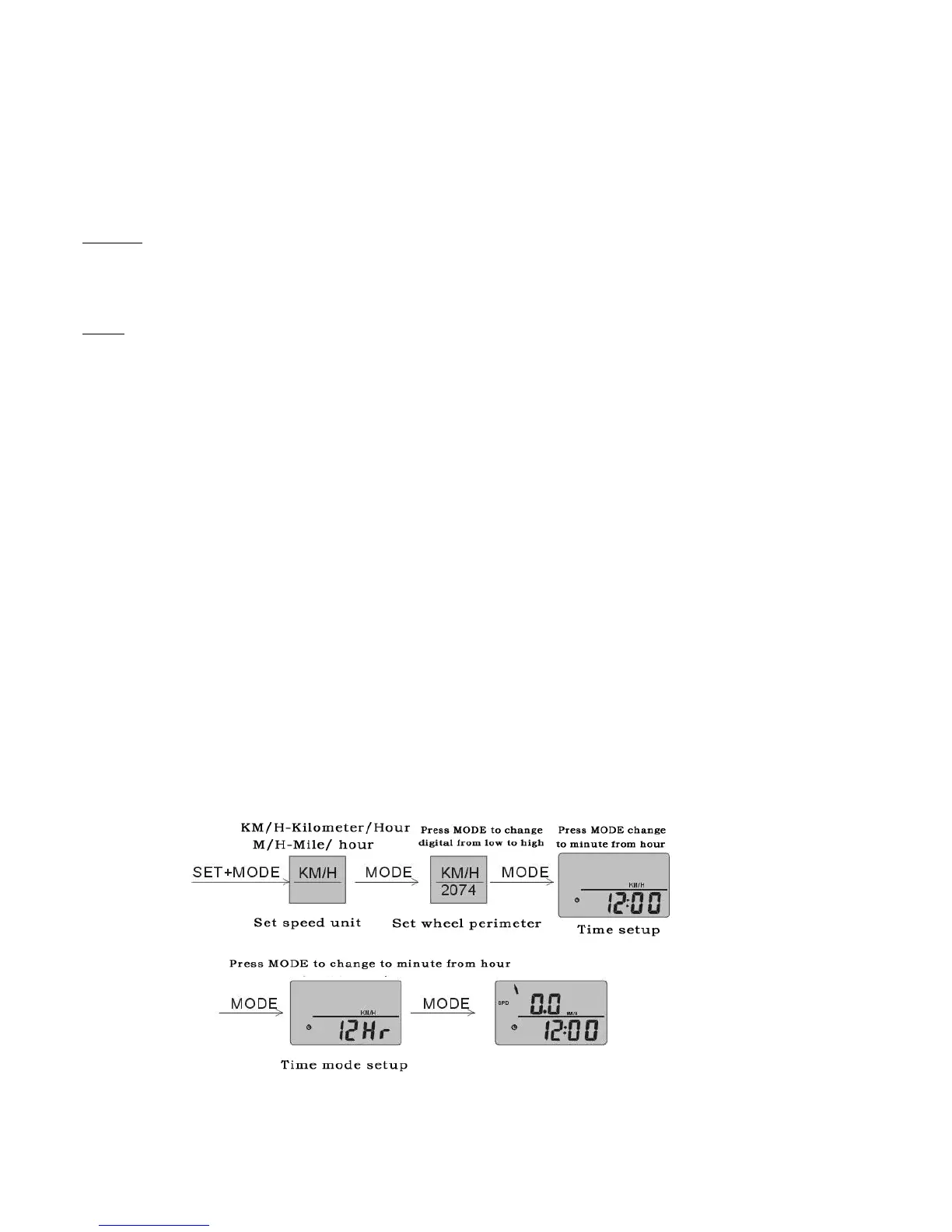
1. Clear the data, KM/H will flash, enter speed unit.
2. Press SET to switch between KM/H and M/H, Press “MODE” to confirm and exit;
3. Wheel perimeter 2074 will appear the unit figure flashes; press “SET” to choose the numerical value and press “MODE” to
confirm.
Then set the tens digit, set-up approach is the same as before, then set-up hundreds, thousands and set-up is completed; press
“ MODE” to confirm and exit.
4. Time set-up, set-up of time mode is the same as speed.
Note: ● Wheel perimeter unit of product is in millimetres.
● In the time display mode, time is in 12 hour segments, PM represents afternoon, and NO PM represents AM.
Diagram M



 To Next Page