Start the Spin Bike Computer
After installation is complete of every mode according to the instructions and all data is set-up, then you can use the spin bike
computer.
1. Before operation, clear all the previous data, this is when the degree is zero, press “SET” for two seconds, clear the data of
“DST”, “RTM”, “AVS”, “RES” and “ MAX” for zero, then enter “SCAN”.
2. Once you start to cycle the computer will immediately start. If there is no signal, the icon “
”will not flash. Check the
magnet to make sure it is installed correctly.
3. Press “MODE” to choose “DISPLAY MODE” or “SCAN (auto cycle) MODE”, the screen will display under “SCAN
MODE”; every function, every four seconds.
4. If there is no operation or signal for more than eight minutes, spin bike computer will turn off automatically and all data will
be saved. Under this mode, you can press any key to receive the signal again.
Read display data
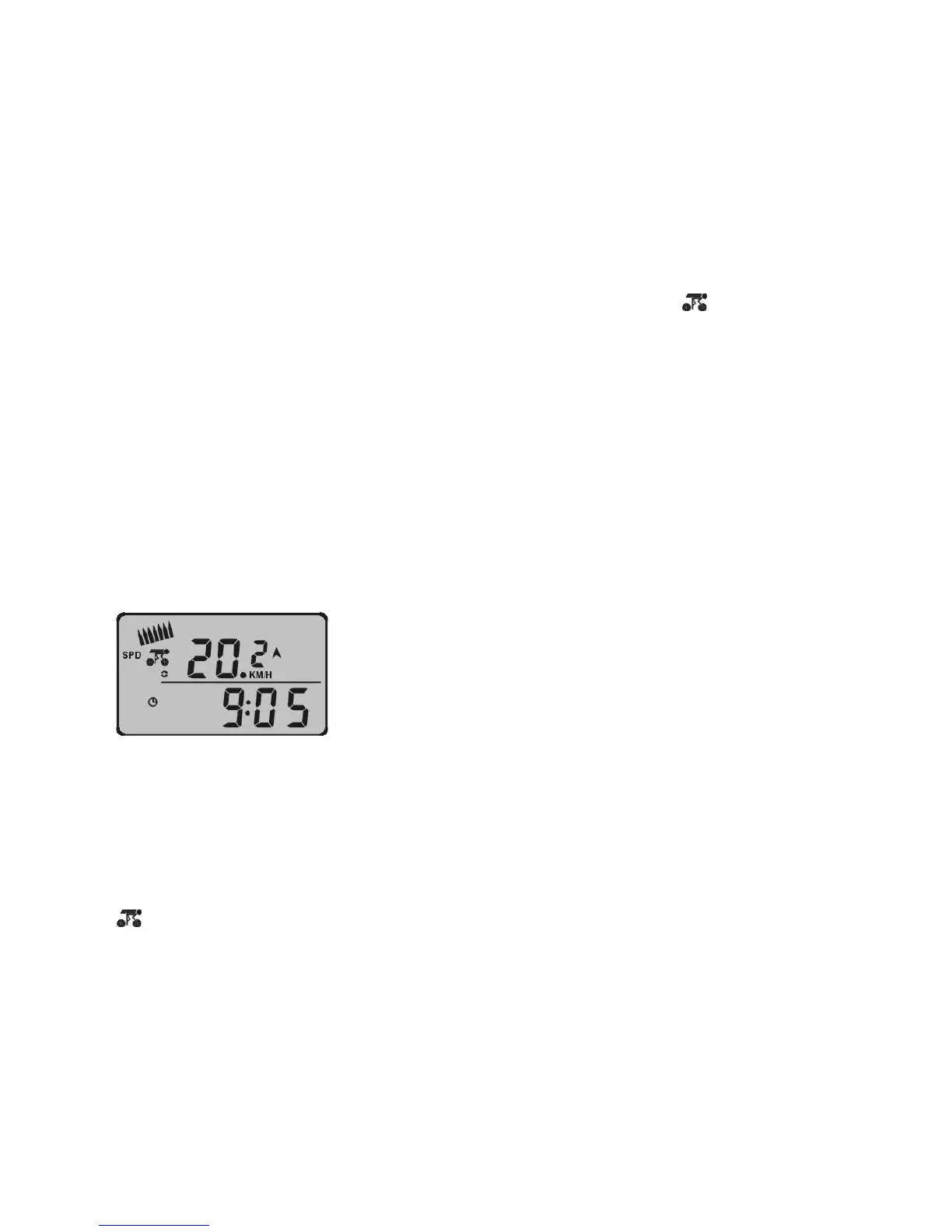
1. See Diagram P:
Diagram P
a) Top data is current riding speed: 20.2KM/H.
b) Current speed is in: KM, you can change into MPH as per speed set-up on page 11.
c) The bottom data is time.
d) Symbol ▲/▼ expresses the current speed is over or below the average speed.
e) “
” symbol expresses that the bike can receive the signal.



 To Next Page
 Loading...