P. 9
ASSEMBLY STEPS HOW TO OPERATE YOUR LITHIUM SCOOTER
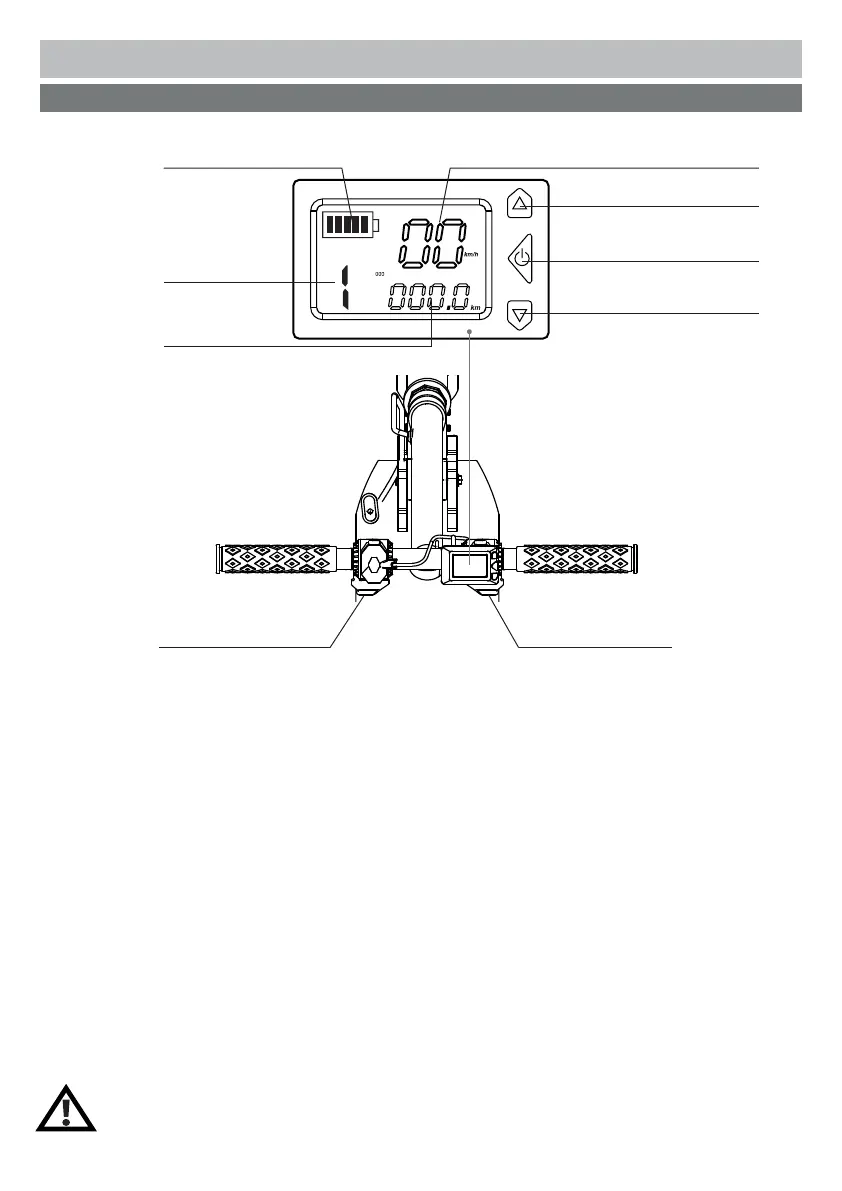
Lcd Control Panel Display
POWER ON / OFF
Press and hold the On / Off button for 2 seconds to POWER ON the scooter.
Press and hold the On / Off button for 2 seconds again to POWER OFF the scooter.
SPEED CONTROL
Press and hold the right Throttle to accelerate.
Release the Throttle to decelerate.
The deeper the Throttle is pressed down the faster the scooter will move.
GEAR SWITCH
Tap the Shift up/ Shift down button to switch gears
The gear can be set to:
Level 1 (Eco mode) at max. 6km/h
Level 2 at max. 15km/h
and Level 3 at max. 18km/h
HANDBRAKE
Press the left Electric brake lever to stop the scooter or use the foot to press the rear brake on rear fender.
HEADLIGHT ON / OFF
When the scooter is powered on, press and hold ‘’Shift up gear button” for 2 seconds to TURN ON the headlight.
When the headlight is on, press and hold ‘’shift up gear button” for 2 seconds to TURN OFF the headlight.
Speed
Shift up gear button
Shift down gear button
Mileage
Battery level
Gear
On / Off button
ThrottleElectric brake lever
Note: Kick start until the scooter is moving, then press throttle. The motor will
engage only if the scooter gains momentum.



 To Next Page