In use mobile air conditioning:
1. Connect the power supply
1. Connect the power supply for the first use and refer to step 2 "Fill the water"
2. Insert the plug into the socket and press the 【power】-button on the control panel if it is not
being used for the first time or if there is water in the water tank.
2. Fill the water
When the mobile air conditioner gives the signal to fill water (no water in the water reservoir during
the first use or water shortage during use), follow the steps below to fill the mobile air conditioner
with water:
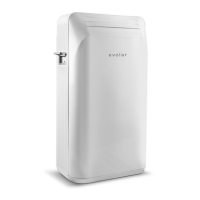
1. Use the water filler connection on the back of the air conditioner to connect the filling hose to
the tap. Press the water supply button ('water inlet') and open the filling tap, this should be
done simultaneously.
2. When the water level reaches the correct height, the water inlet valve will close automatically
to stop the water supply.
3. Remove the hose and screw the lid of the filler neck fixed.
3. Cooling For the best cooling performance, use cold storage function (point 6) before cooling.
1. Press 【mode】in order to select the cooling mode.
2. Press【+】or 【-】in order to set the desired temperature. Set the temperature in between
the first 16 ℃ and 32 ℃.
3. Press【wind speed】in order to set the desired speed. There are four positions: low, mid, high
or automatic.
4. Press【swing wind】to set the discharge blades in the correct position. The slats can move up
and down automatically in the swing position and can be locked in the desired position.
Note:
The actual air inlet temperature is displayed during cooling.


 To Next Page
 Loading...