3. Assignable Rotary controllers
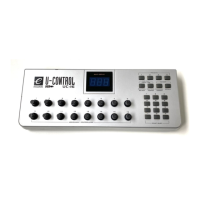
There are 16 assignable controllers selected by the CONTROL SELECT & CONTROL ASSIGN
functions.
‘
Assignable Controllers’
refers to any of the 16 assignable Knobs.
The basic operation is:-
Select the controller by moving it. Alternatively, you can press the CONTROL SELECT button
and then type in the number using the keypad or ‘+’, ‘-‘ buttons. Press the CONTROL ASSIGN
button and enter the new number using the keypad.
To change one of the assignable controllers, the UC16 uses the following method:
Press the CONTROL SELECT button and release. Alternatively simply move the rotary control.
The number of the presently selected MIDI controller will flash.
Select a controller by moving any one of the assignable controllers, the numeric keypad or the
+/- keys.
The LED display will show the new MIDI controller number assignment.
Repeat this process to see the
controller number assignment
(0-132) for any Knob (1-16),
by
moving the relevant controller or by typing a new number.
If no keys are pressed or any of the assignable controllers moved, the LED display stops
flashing after 3 seconds and returns to normal operation.
Press the CONTROL ASSIGN button & release.
The number entered at this point will be assigned to the last selected controller.
The numeric entry uses the standard data entry system. (see section on Entering Numbers)
If a complete number is entered the display stops flashing and the new assignment is stored.
If the Inc/Dec keys are used, the revised value is shown on the LED display and the flashing
time-out is reset.
Once a controller has been assigned the current knob position should be sent out.
This ensures that when the controller if first moved it does not trigger a large jump from it’s
previous setting.
During the data entry stage while the LED display is flashing, the Knobs,
do not function.


 To Next Page