4. Entering Numbers
When any number is entered it adheres to the following rules:-
Increment/Decrement Keys
Initially the LED display starts flashing.
The value displayed can be incremented/decremented using the +/- keys.
Pressing both + & - should call up the default value for that parameter.
The LED display shows the new value.
The new value is sent out except for the CONTROL ASSIGN which sends data when the display
stops flashing)
When the display stops flashing the keyboard returns to normal operation.
Numeric Keys
Initially the LED display starts flashing.
A numeric value can be typed in using the numbers 0-9.
As each key is pressed the display continues to flash, the time-out value is reset.
When a
complete number
* has been entered the display stops flashing and the value is
selected.
Alternatively, if no key is pressed and the display stops flashing the number on the display is
selected.
The update routine is triggered, so that the new value is sent out.
When the display stops flashing the keyboard returns to normal operation.
* The following table shows how many keys are required to enter a complete number:-
1 key 2 keys 3 keys
Channel 2-9 01, 10-16
Memory 0-9
Control Select 2-9 01,10-14
Control Assign 14-99 000-013, 100-132
5. Snap Shot
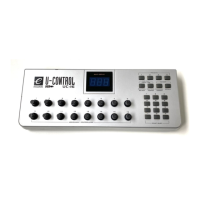
When both SNAP SHOT keys are pressed the UC-16 sends out the settings for all of the
Assignable Controllers. The settings will be sent out on whichever channel each rotary dial is
assigned to (see channel assignment later). This feature lets you record the settings of the Knobs
into your sequencer. It is handy for setting up parameters in a song. Set the UC16 to all
parameter levels you desire, engage record mode on your sequencer and press the SNAP SHOT
buttons.


 To Next Page