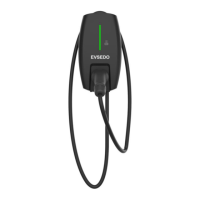
The EVSEDO-AC011K-AE-25 is an AC charging station designed for charging electric vehicles. It offers tailor-made, intelligent, and network charging solutions suitable for both company and home use. The charging station can connect to the internet via WiFi, allowing for remote control and monitoring. Charging can be initiated and stopped using an RFID card or a mobile application called "Chargeln." This charging station is intended for hardwired AC input installation, complying with applicable national regulations, and is suitable for both indoor and outdoor use.
Electrical equipment should only be installed, serviced, and maintained by qualified personnel. IPC2U assumes no responsibility for consequences arising from the use of this documentation. A qualified person is defined as someone with skills and knowledge related to electrical equipment and installations, who has undergone safety training to recognize and avoid associated hazards. This charging station should not be used by individuals with reduced physical, sensory, or mental capacity, or those lacking experience or knowledge, unless supervised or instructed by a responsible person. The EVSEDO range of charging stations is exclusively designed for charging electric vehicles and cannot be used to switch on/off site ventilation at the vehicle's request.
Hazard Categories and Special Symbols:
- DANGER: Indicates an imminently hazardous situation that will result in death or serious injury if not avoided.
- WARNING: Indicates a potentially hazardous situation that could result in death or serious injury if not avoided.
- CAUTION: Indicates a potentially hazardous situation that could result in minor or moderate injury if not avoided.
- NOTICE: Indicates practices that do not involve the risk of bodily injury.
- A lightning bolt symbol within a triangle indicates an electrical hazard that could result in death or personal injury if instructions are not followed.
- An exclamation mark within a triangle is the safety alert symbol, warning of a risk of physical injury. Strict compliance with safety instructions is required.
Technical Specifications:
The EVSEDO-AC011K-AE-25 is available in two cable lengths: 4m (EVSEDO-AC011K-AE-25/4m) and 7m (EVSEDO-AC011K-AE-25/7m).
- User Interface: LED indicator, RFID card reader.
- Housing Material: Plastic.
- Installation Way: Wall-mount (default), Floor-stand (optional).
- Card Quantity: 2 pieces.
- Charging Outlet: Type 2.
- Product Dimension (LWH): 32518187mm.
- Net Weight: 3.01KG (4m version), 3.5KG (7m version).
- Gross Weight: 3.83KG (4m version), 4.5KG (7m version).
- Input Voltage: AC400V±20%.
- Input Frequency: 50/60Hz.
- Max Power: 11kW.
- Output Voltage: AC400V±20%.
- Max Output Current: 32A.
- RCD: 6mA DC.
- Standby Power: <3W.
- Application Place: Indoor / Outdoor.
- Working Temperature: -30°C ~ +55°C.
- Working Humidity: 5% ~ 95% without condensation.
- Working Altitude: <2000m.
- Protection Grade: IP65.
- Cooling Method: Natural air cooling.
- Safety Standard: EN 61851-1: 2011, EN 61851-22: 2002.
- MTBF: 100,000 hours.
- Protections: Over voltage, under voltage, over load, current leakage, ground fault, over temperature, under temperature.
- Communication: Charger v.s. Backend communication: WiFi.
- Internet Communication Protocol: OCPP 1.6.
- Declaration of conformity CE.
- Complies with IEC 61851, Electric vehicle conductive charging system (IEC 61851-1 Edition 2.0 and IEC 61851-22 Edition 1.0).
- Complies with IEC 62196, Plugs, socket-outlets, vehicle couplers and vehicle inlets - Electric vehicle conductive charging system (IEC 62196-1 Edition 2.0 and IEC 62196-2 Edition 1.0).
Usage Features:
- Starting Charging:
- Prepare your vehicle for charging according to the manufacturer's instructions.
- Check that the charging station status indicator light is flashing green.
- Connect the vehicle to the charging station using the charging cable.
- The charging station status indicator light should flash yellow.
- Scan the RFID card near the status indicator light on the front panel to start the charging process. Charging can also be started and controlled via the "Chargeln" mobile application.
- The start of charging can be postponed at the vehicle's request.
- The indicator light blinks green as soon as charging starts (or is postponed by the vehicle).
- Charging stops automatically when the EV is fully charged.
- Stopping/Restarting Charging:
- Charging can be interrupted at any time by scanning the RFID card near the status indicator light.
- The indicator light turns yellow, and charging stops.
- To restart charging, scan the RFID card again; the indicator light will blink green.
- Unplug the charging cable.
- The indicator light turns green (standby status).
- Place the charging cable connector into the holder on the front panel and wind the cable around the charging station.
- Stopping Charging Automatically:
- Charging stops automatically once the battery is fully charged.
- Unplug the charging cable.
- Wind the cable around the charging station and place the charging cable connector into the holder on the front panel.
- Storing the Charging Cable: When not in use, the cable must be stored by placing the cable connector in the connector holder and winding the cable around the charging station.
Charging Station States (LED Status):
The indicator light on the front panel provides visual feedback on the charging station's status:
- In the standby: Flashing green, 1S on, 4S off.
- Charging status: Breathing green, 1S on, 1S off.
- Plugged gun state: Breathing yellow, 1S on, 1S off.
- Software upgrade: Green light flash.
- Ground warning: Flashing yellow, 2S on, 2S off.
- Relay adhesion (Fault): Red light normally on.
- Input polarity reverse (Fault): Flashing red, 500ms on, 500ms off, 1 time, 3S off, Cycle.
- CP fault (Fault): Flashing red, 500ms on, 500ms off, 2 times, 3S off, Cycle.
- Leakage current fault (Fault): Flashing red, 500ms on, 500ms off, 3 times, 3S off, Cycle.
- Input terminal overtemperature (Fault): Flashing red, 500ms on, 500ms off, 4 times, 3S off, Cycle.
- Relay overtemperature (Fault): Flashing red, 500ms on, 500ms off, 5 times, 3S off, Cycle.
- Under voltage fault (Fault): Flashing red, 500ms on, 500ms off, 6 times, 3S off, Cycle.
- Over voltage fault (Fault): Flashing red, 500ms on, 500ms off, 7 times, 3S off, Cycle.
- Overload fault (Fault): Flashing red, 500ms on, 500ms off, 8 times, 3S off, Cycle.
- Over frequency fault (Fault): Flashing red, 500ms on, 500ms off, 9 times, 3S off, Cycle.
- Owe frequency fault (Fault): Flashing red, 500ms on, 500ms off, 10 times, 3S off, Cycle.
- Leakage current loop abnormal (Fault): Flashing red, 500ms on, 500ms off, 11 times, 3S off, Cycle.
Maintenance Features:
- Care: Do not spray water on the charging station with a pressure washer. Do not clean the charging station while the electric vehicle is charging.
- Cleaning the Charging Station: Do not use aggressive cleaners (e.g., benzine solvents, acetone, ethanol, spirit glass cleaner) on the Wallbox or its plastic panel, as these can damage the surface. Never use abrasive pads or detergents. Permissible cleaners include mild detergent solutions (rinsing solution, neutral cleaner) and a soft, moistened cloth. It is recommended to clean the charging station with a soft dry cloth.
- Malfunctions and Intervention: This charging station contains no user-repairable or user-serviceable parts. Any work on the charging station must only be undertaken by a qualified person.
- If the indicator light blinks red, an abnormal situation is detected.
- Cut power to the charging station by setting the dedicated circuit breaker to OFF in the switchboard.
- Unplug the charging cable.
- Plug the charging cable back in, ensuring it is fully inserted.
- Power up the charging station by resetting the dedicated circuit breaker to ON.
- If the indicator light does not turn back to green, contact your electrician. When contacting an electrician, provide the full reference for your equipment (model, catalog number, serial number), which can be found on the sticker attached to the side of the equipment.
- Troubleshooting (Fault Resolution):
- OverVolt: Input over voltage (AC input voltage too high). Check input voltage from backend. If voltage is over 276Vac for a short time, wait for the power grid to recover.
- UnderVolt: Input lower voltage (AC input voltage too low). Check input voltage from backend. If voltage is under 184Vac for a short time, wait for the power grid to recover.
- OverCurr: Output overload (AC output current too large). Shut off leakage current protection switch in the power distribution cabinet. Check for low resistance connection between AC output cables of the charger.
- OverFreq: Input over frequency (AC input frequency too high). Check input voltage frequency from backend. If frequency exceeds 63Hz for a short time, wait for the power grid to recover.
- UnderFreq: Input lower frequency (AC input frequency too low). Check input voltage frequency from backend. If frequency is lower than 47Hz for a short time, wait for the power grid to recover.
- OverTemp: Over temperature (Temperature inside the charger too low). Check surrounding conditions for nearby heating devices. Ensure environmental temperature is under 60°C.
- Over DCLeak: Over leakage current to the earth (Leakage current too high). Shut off leakage current protection switch in the power distribution cabinet. Check for broken AC output cables or low resistance connection to the earth.
- PhaseError: Reverse connection of L/N input cable. Shut off leakage current protection switch in the power distribution cabinet. Check if AC input/output cables are normal and if there is an inverse connection of L/N input cables.
- CableRCError: Charging cable connection abnormal (Poor connection of charging cable with EV/Charger). Check if charging cable connection is correct and firm.
- If problems persist, contact the seller.
Protecting the Environment:
- Recycling Packaging: Packaging materials are recyclable. Please recycle them in appropriate containers.
- End-of-Life Recycling: EVSEDO products are optimized to reduce waste at the end of their useful life and for better recovery of components and materials. Components are designed for conventional processing, including decontamination (where recommended), reuse, dismantling for improved recycling, and crushing to separate materials.


 To Next Page

 General