

EasyManua.ls Logo

Ex-Or QuickSet Pro - User Manual

Ex-Or QuickSet Pro
4 pages
Print Icon
To Next Page IconTo Next Page
Loading...
QuickSet Pro
Programming Instructions
(for MS, MLS and CDH/W products only)
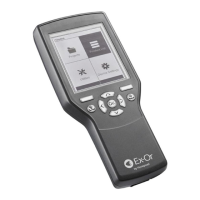
The QuickSet Pro digital programmer handset is
designed for use with Ex-Or’s range of lighting control
products. The programmable parameters of the
various products can be configured via this battery-
powered, hand-held, infrared unit. The Quickset
Pro allows programming and re-programming to
be carried out with virtually no disturbance to the
building’s occupants. Settings are chosen from the
QuickSet Pro menu and transferred instantaneously
to the product being programmed by pressing
the upload button. The commissioning engineer
receives positive feedback at all stages of the
process. Settings from one product can be copied
in seconds to another and settings can be checked
at any time using the QuickSet Pro’s download
function. Reprogramming of the parameters can
be carried out quickly using the QuickSet Pro.
The QuickSet Pro can be easily upgraded to
accommodate product revisions/additions via
USB connection to the PC software package.
(Refer to back page)
CONTENTS: 1 x QuickSet Pro, 4x AA Batteries, 1 x USB Lead
FIG. 1 FIG. 2
FIG. 3
Option
Upload
Page Down
OK
Left Key
Up Key
Right Key
Download
Down Key
Micro SD
Card
USB Port
Press any key to start
Insert Batteries
QuickSet Pro
Alkaline Cells
USB
Lead
Question and Answer IconNeed help?

Do you have a question about the Ex-Or QuickSet Pro and is the answer not in the manual?

Ex-Or QuickSet Pro Specifications

General IconGeneral
BrandEx-Or
ModelQuickSet Pro
CategoryHandsets
LanguageEnglish

Summary

Communicating with a Sensor

Download Sensor Settings

Copies sensor memory to programmer. Always download prior to commencing operations.

Upload Sensor Settings

Overwrites sensor memory with programmer contents. Use with caution.

Adjusting Time Delay Settings

Set Time Delay Parameter

Select and set desired time delay for lights to remain on after no movement is detected.

Check Current Sensor Settings

Perform download to view current sensor parameters without altering them.

Setting the Photocell

Non-Dimming Luminaires Photocell Setup

Set photocell for non-dimming lights, achieving desired light levels during dawn/dusk.

Dimming Luminaires Photocell Setup

Adjust light level using UP/DOWN keys for dimming luminaires after setup.

Photocell Setup Notes and Behavior

Explains light behavior, parameter setting, and digital values for photocell.
Installing Desktop Applications and Firmware Updates