QuickSet Pro Programming Instructions
To set the photocell correctly, the lights
will need to be on and have been on
for at least 15 minutes. If the lights are
already on, go to Step 10.
If the lights are O, you will need to
turn the lights on manually by using
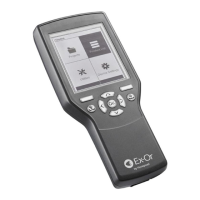
the Quickset Pro. Power up and wait
until the Home Menu appears, scroll to
Utilities and then press OK. (Fig.13)
7 Scroll to LightSpot/MLS/LCM then
press OK. (Fig 14)
8 Select ‘Set Light Level’ then Press
OK. (Fig 15)
9 Up/Down/Ok (Send) will appear
on the screen. Point the QuickSet
Pro at the sensor and press the UP
button. (Fig.16) The lights will turn on.
Now go to Step 10 for Non-Dimming
Luminaires or Step 11 for Dimming
Luminaires to set the photocell.
10 Non-Dimming Luminaires
To set the Photocell, wait until you have
the desired light conditions* then point
the QuickSet Pro at the sensor and
press OK.
* Desired light level to be a
combination of incoming daylight
and light coming from the luminaire,
this can be achieved at certain times
of the day such as dawn and dust
Note: Non-Dimming Luminaries
When the natural light exceeds the
‘upper threshold’ value, the lights do
not turn off immediately. The lights will
turn off only when the ‘upper threshold’
has been exceeded for the duration of
the Off Delay. If the Off Delay is set to
‘Disabled’, then the lights will turn OFF
after 20 minutes.
11 Dimming Luminaires “Up/Down/
Ok (Send)” will appear on the screen.
(Fig 16) Point the QuickSet Pro at the
sensor and adjust the light level using
the UP/DOWN keys. (Fig.17)
14 Once dimming level has been set
to the requirements press ok (Fig 18).
Note: The sensor takes measurements
and sets the threshold parameters
automatically. The lights will flash
(Regulating) or switch off and on
(Switching) to acknowledge correct
setup. Please note that the threshold
values are not in lux, rather non-specific
digital values.
SETTING THE PHOTOCELL
FIG.16
Download
FIG.17
Adjust Up/Down
FIG.18
Press OK
FIG.13
Press OK
Home
FIG.14
Press OK
Utilities
LightSpot HD
LightSpot/MLS/LCM
Options
FIG.15
Press OK
LightSpot/MLS/LCM
Set Light Level
En Ocean
DALI LED Fast Fade
Toggle Channel
User Remote
User Test
Options
The colourless Activity LED flashes
green only when there is activity in any
zone on the bus.
(Note: only sensors without a
programmed zone can cause this LED
to flash.) It flashes red/amber when
a bus installation fault is detected
regardless of movement or occupancy
in the building. Please note that not all
faults will be indicated by this LED.
MLS RB2000 DATA BUS POWER SUPPLY
Up / Down / OK (Send)
Press OK
To investigate other parameters, download from the relevant detector and navigate
the screen to the relevant parameter. Use the ‘help’ facility for that parameter to
remind or inform yourself of the operation and consequences of the parameter
and the options available.
Energy Conservation Solutions Pty Ltd - Exclusive Distributor - Australian and New Zealand
Locations: VIC/TAS, NSW, QLD, FNQ, ACT, SA/NT, WA, NZ. For Contact Details Visit: www.ecs.net.au


 To Next Page
 Loading...